Gradebook Calculations for Year-long Courses




Help!!!
Calculations for the current term are being calculated with the last semester grade average and they should not.
Is there a box somewhere that should be checked to start grade calculations in the second semester of a year-long class?
The current grades are being averaged with the grades from the first semester that the students have already received a grade for.
Although the course is year-long, the grades should only be calculated by the second semester and not include the first semester grades. How do I stop the first semester grades from being averaged into the second-semester grades in the grade book?
Calculations for the current term are being calculated with the last semester grade average and they should not.
Is there a box somewhere that should be checked to start grade calculations in the second semester of a year-long class?
The current grades are being averaged with the grades from the first semester that the students have already received a grade for.
Although the course is year-long, the grades should only be calculated by the second semester and not include the first semester grades. How do I stop the first semester grades from being averaged into the second-semester grades in the grade book?
0
Comments
-
Gwendolyn -
If you are talking about how a student's marking period grade for a class is being calculated, it sounds as if it is a gradebook setting. You can these by:
Academics > Grading setup > Gradebook settings
In the Marking period & grade access box, apply the appropriate filters for school and year and check the dates for each marking period.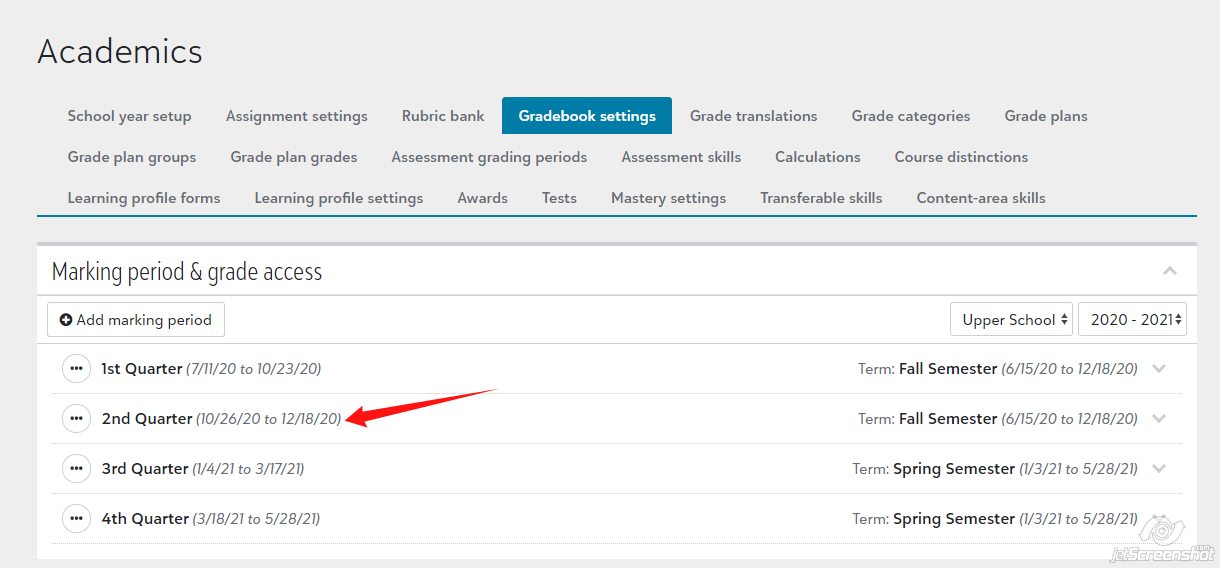
If the date needs to be edited, click on the ... icon to the left of the marking period name.
Hope that helps.
Scott
0





Categories
- All Categories
- New YourCause Community TEST
- New SKY Community TEST
- New Grantmaking TEST Community
- New Altru Test Community
- New bbcon Community - TEST
- 12 Blackbaud Agents for Good™
- New Raiser's Edge NXT Community
- 7 Blackbaud Community Help
- 218 bbcon®
- 1.4K Blackbaud Altru®
- 409 Blackbaud Award Management™ and Blackbaud Stewardship Management™
- 1.2K Blackbaud CRM™ and Blackbaud Internet Solutions™
- 16 donorCentrics®
- 361 Blackbaud eTapestry®
- 2.7K Blackbaud Financial Edge NXT®
- 680 Blackbaud Grantmaking™
- 598 Blackbaud Education Management Solutions for Higher Education
- 3.3K Blackbaud Education Management Solutions for K-12 Schools
- 952 Blackbaud Luminate Online® and Blackbaud TeamRaiser®
- 85 JustGiving® from Blackbaud®
- 7K Blackbaud Raiser's Edge NXT®
- 3.9K SKY Developer
- 257 ResearchPoint™
- 123 Blackbaud Tuition Management™
- 165 Organizational Best Practices
- 247 Member Lounge (Just for Fun)
- 40 Blackbaud Community Challenges
- 37 PowerUp Challenges
- 3 (Closed) PowerUp Challenge: Grid View Batch
- 3 (Closed) PowerUp Challenge: Chat for Blackbaud AI
- 3 (Closed) PowerUp Challenge: Data Health
- 3 (Closed) Raiser's Edge NXT PowerUp Challenge: Product Update Briefing
- 3 (Closed) Raiser's Edge NXT PowerUp Challenge: Standard Reports+
- 3 (Closed) Raiser's Edge NXT PowerUp Challenge: Email Marketing
- 3 (Closed) Raiser's Edge NXT PowerUp Challenge: Gift Management
- 4 (Closed) Raiser's Edge NXT PowerUp Challenge: Event Management
- 3 (Closed) Raiser's Edge NXT PowerUp Challenge: Home Page
- 4 (Closed) Raiser's Edge NXT PowerUp Challenge: Standard Reports
- 4 (Closed) Raiser's Edge NXT PowerUp Challenge: Query
- 822 Community News
- 3.1K Jobs Board
- 57 Blackbaud SKY® Reporting Announcements
- 47 Blackbaud CRM Higher Ed Product Advisory Group (HE PAG)
- 19 Blackbaud CRM Product Advisory Group (BBCRM PAG)