SP26 Employment Date Feature - A Word of Warning
Basically, if you change the relationship end date, it changes the job end date. And there is now a constraint that doesn't allow the relationship end date to be prior to a job start date (probably more to it than that, but you get the gist). Sounds great? Not so much. Read on...
A user can still edit the end date of a job independently of the relationship, leaving them out of sync. Also, if you have 6 years of unconstrained data in your system, like we do, you have LOTS of relationship and job end dates that don't sync (relationship is end-dated and job is not, job is end-dated and relationship is not, relationship end date is prior to a job start date, etc. I'm totally sure there will be another scenario I have missed, despite extensive QA.) I did not test batches, but since Blackbaud says "This change does not affect changes made through batches," that is an additional scenario to throw dates out of sync.
Now imagine that you have that out of sync data in your system, whether due to old data or due to the fact that the user can still fiddle with the job independently of the relationship or batch-loaded data. For a user who tries to edit the relationship, perhaps to update recognition credits or add a Comment, here's what can happen:
- If the relationship has no end date and all the jobs for that employer are end-dated, saving the relationship results in removing the end date of the last job.
- If the relationship has an end date that falls after the start date of the last job on that employer, and the last job has no end date, saving the relationship results in adding an end date to the last job.
- If the relationship has an end date that falls before the start date of the last job on that employer, attempting to save the relationship results in an ugly constraint error, which will definitely confuse the user.
Since we are self-hosted and have awesome in-house developers, including the fabulous Rick Root, here's what we have to do to account for this awesome new feature:
- Well, I had to do a crapton of QA on this feature that I'm assuming Blackbaud didn't do. (Did I say that out loud?)
- Extend both the Add and Edit forms for the job (Employment History) to update the relationship end date if appropriate. (Rick will write it, but I have to spec this out and QA it too.)
- Write a bunch of data checks to look for end dates that don't sync, until #4 can be done, and even after, in case we missed something. (Time spent by master report writer. Guess who specs and QA's these?)
- Perform a scripted cleanup on at least 7000 employment records, assuming I can identify the precise scenarios where it's safe to script it (Spec-writing and QA on me again, so Rick can script this correctly.)
- Possibly manual cleanup if we can't script everything. (That will fall to our data entry staff.)
- Communicate something to our 50+ data entry users about this prior to deploying the SP. (I have to write the communication. Thankfully, it's not going to affect all 600+ users.)
- Delay deployment of the SP in our production environment for a week, solely due to this new feature. Chances are, we won't be able to knock out 3, 4, and 5 before that, so our data entry users will have to cope until then.
I don't usually vent like this, but I have a major pet peeve when something unnecessarily creates more work for me or my coworkers. Here's hoping the time I spent on this already will save you some time!
Kelli Crispin
Business Analyst/Quality Assurance Specialist
she/her/hers
The University of North Carolina at Chapel Hill
Office of University Development
Comments
-
Thank you Kelli for reaching out to us with the feedback. We understand the frustration that this has caused you and your team and we look forward to partnering with you while developing additional enhancements.
To provide additional context, this is the first release in multiple planned employment end date workflows that we plan to address in upcoming service packs. We plan to implement additional workflows similar to the ones you mentioned in the Idea Bank comment as well as Batch workflows. Some of these scenarios get pretty complex and take additional time. In order to deliver immediate value we decided to release the initial phase with basic scenario of updating the Employment history row when you end date an Employee/Employer relationship. The other workflows are in our backlog and we will continue iterating on this to accomplish the additional workflows.
For the scenarios you highlighted, #1 and #3 currently reside in our backlog. I have the proposed plan for each of them below.
1. If the relationship has no end date and all the jobs for that employer are end-dated, saving the relationship results in removing the end date of the last job.
-The current design here is to provide an option/prompt to the user to either remove the end date of the last history or add a new one.
2. If the relationship has an end date that falls before the start date of the last job on that employer, attempting to save the relationship results in an ugly constraint error, which will definitely confuse the user.
-The constraint here is received because of the bad data. We will be making a change here to provide a more user friendly message.
Lastly, we really appreciate your feedback regarding scenario #2. While this is technically working as designed, we can absolutely understand how this is creating more work for you. The intention was to keep the jobs in sync and save a step for the user. I am working with my teams(s) to see how we can make this a better experience for users. We could add a prompt letting the user know that the last job will be end dated. In the order to alleviate some of the pain, we are going to address the 3 issues that you have highlighted in the upcoming SP28 release
3 -
So after talking it over with Kelli, our first step is going to be extending the Add Job and Edit Job forms to check the relationship and possibly update the relationship end date if required.4
-
Thank you Kelli for this word of warning!
This is an issue for us too. I've only tested scenario #1 that you mentioned. My specific issue with this is when we are processing our own (UGA) employment info and there is a gap in employment. So I would manually re-activate the employment / Relationship record that had previously been processed as terminated. I don't want to loose the previous end-date on the Job record, because like I said there may be a gap, from a few months to a year or more. So if we take this service pack and continue processing our HR data in the same fashion, then I would either have to remember the date before it gets deleted or look in another environment to find the date again, as in our Staging environment or in the history of the HR data.
But I did want to add that it looks to me like this is happening due to a trigger, not an update to the form Edit form itself. Is that correct?0 -
Hi Tanya,
I am unsure if this is a trigger or a function of the form. However, I can respond to your concern about a gap in employment. You would have to make your changes starting with adding a new job, rather than starting with the relationship. For example, the employment relationship dates and the dates of Job A match up and are 1/1/2020-12/31/2020. The person returns to the same employer on 2/15/2021. Even if they have the same job title, you still want to add Job B with a Start Date of 2/15/2021. Then you have to take a second step to remove the End Date on the relationship. You can do those steps in any order now, but once you take SP26, you have to start with the job first.1 -
Hi Poornima,
I appreciate your response, and I am glad to hear you will be more fully addressing these issues in the future. A couple of things:- It would have been nice to receive this level of communication with the service pack, rather than a one-liner in the release notes that was more about marketing and less about the reality of the feature and its true impact.
- I would have preferred to wait for you to make this a more robust feature, because it really didn't provide "immediate value" for us. You have sacrificed quality for speed on a feature we have been living without for 6 years. I would have preferred it remain in the idea bank until it covered all the bases. Yes, there are complex scenarios. Yes, you can roll it out in stages. But your stages need to to NOT cause issues for your customers' users! The items you mention as still in your backlog should have been in your first release of this feature.
Regards,
Kelli2 -
It's great to get these enhancements to improve data quality. Please remember to accommodate the case when an individual leaves an employer and then later, after some time period, returns to a job at that same employer. Thank you.1
-
Thank you for sharing this Kelly.
We have just started testing SP26 and your findings have been very useful.
Regards,
Karen (Deakin University Australia).0 -
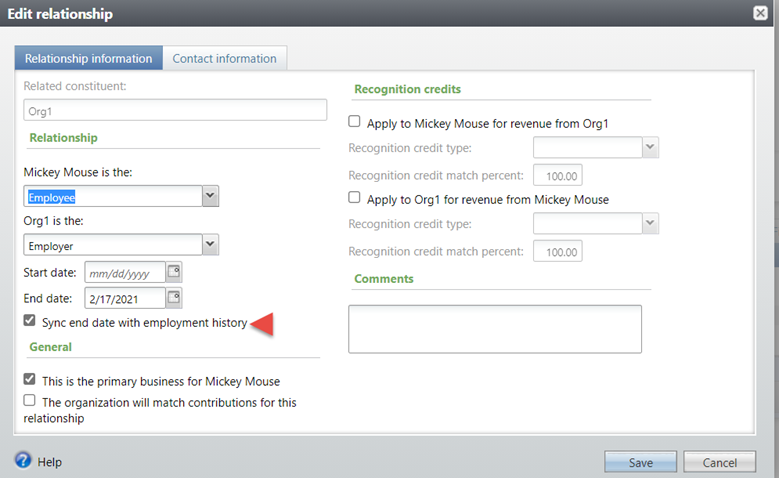
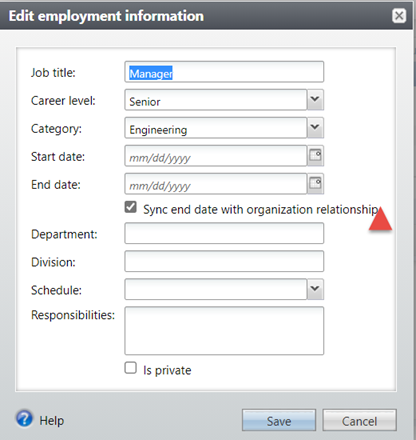
We have revised the changes made to the end dating of the relationship feature in SP28. We have added the ability to end date the employment history by end dating the relationship and vice versa. And this will not be an automatic sync. Instead it will be an option/checkbox that is controlled by the user.
-
In SP28 when the user end dates a relationship, there will be an option to sync the end dates. If this option is checked, then the end date is added to the recent employment history.
-
The same option will be available in the recent Employment history section as well. If a user end dates the employment history, and checks the option to sync the end dates, then the relationship will be end dated.

0 -
-
Will this checkbox be checked by default? Will we have the option to configure/customize it to be checked or unchecked by default?
Additionally, I have noticed there are times when the relationship is updated, and the job dates DO NOT sync, but I have yet to isolate the scenario when this happens. (Still on SP26)0 -
I just submitted Case # 018578214 regarding the changes in SP28. For the most part, everything works. However, the checkbox does not appear on older jobs on the same employer, and saving the older job's Edit form results in the relationship getting that job's end date, without the user having the option to stop it by unchecking the box (because the box isn't there).
1 -
Hi Kelli,
Have you noticed this issue when using a batch process to update employment relationships and/or historical employment data??0 -
Hi Jim. I'm sorry, I did not test batches. Since this functionality was added piecemeal across SP 26 and 28, and the release notes do not mention batch, I suspect the batch functionality hasn't changed.
1 -
Thx Kelli,
We have a few batches that update employment history and will more than likely test those batches given your findings.
You are concerned with the checkbox on the relationship and employment history edit form that says "Synch end date with employment history", correct?0
Categories
- All Categories
- 6 Blackbaud Community Help
- 211 bbcon®
- 1.4K Blackbaud Altru®
- 396 Blackbaud Award Management™ and Blackbaud Stewardship Management™
- 1.1K Blackbaud CRM™ and Blackbaud Internet Solutions™
- 15 donorCentrics®
- 360 Blackbaud eTapestry®
- 2.5K Blackbaud Financial Edge NXT®
- 649 Blackbaud Grantmaking™
- 568 Blackbaud Education Management Solutions for Higher Education
- 3.2K Blackbaud Education Management Solutions for K-12 Schools
- 937 Blackbaud Luminate Online® and Blackbaud TeamRaiser®
- 84 JustGiving® from Blackbaud®
- 6.5K Blackbaud Raiser's Edge NXT®
- 3.7K SKY Developer
- 247 ResearchPoint™
- 119 Blackbaud Tuition Management™
- 165 Organizational Best Practices
- 239 The Tap (Just for Fun)
- 34 Blackbaud Community Challenges
- 31 PowerUp Challenges
- 3 (Open) PowerUp Challenge: Data Health
- 3 (Closed) Raiser's Edge NXT PowerUp Challenge: Product Update Briefing
- 3 (Closed) Raiser's Edge NXT PowerUp Challenge: Standard Reports+
- 3 (Closed) Raiser's Edge NXT PowerUp Challenge: Email Marketing
- 3 (Closed) Raiser's Edge NXT PowerUp Challenge: Gift Management
- 4 (Closed) Raiser's Edge NXT PowerUp Challenge: Event Management
- 3 (Closed) Raiser's Edge NXT PowerUp Challenge: Home Page
- 4 (Closed) Raiser's Edge NXT PowerUp Challenge: Standard Reports
- 4 (Closed) Raiser's Edge NXT PowerUp Challenge: Query
- 785 Community News
- 2.9K Jobs Board
- 53 Blackbaud SKY® Reporting Announcements
- 47 Blackbaud CRM Higher Ed Product Advisory Group (HE PAG)
- 19 Blackbaud CRM Product Advisory Group (BBCRM PAG)