tracking instructors activity for scheduled programs



Hello all,
We are trying to find a way to effectively track activity by instructors that lead our scheduled events (classes). We are primarily an educational arts center and have many art and drama classes. Some repeat in cycles and others do not. We have a stable of teachers for the classes and for various reporting reasons it would be very useful to have who is teaching a certain program series as trackable.
I would love to learn how any of you in similar circumstances deal with this issue.
Thank you!
We are trying to find a way to effectively track activity by instructors that lead our scheduled events (classes). We are primarily an educational arts center and have many art and drama classes. Some repeat in cycles and others do not. We have a stable of teachers for the classes and for various reporting reasons it would be very useful to have who is teaching a certain program series as trackable.
I would love to learn how any of you in similar circumstances deal with this issue.
Thank you!
0
Comments
-
Hi Mieke!
You are able to assign staffing resources to your art and drama classes. I've included some screenshots below. From Tickets > Resources, you can add staffing resources. From the Scheduled Program or Preregistered Program record, you'll go to the Resources tab and you can plug in how many Instructors you'd like for that program. As you go to add scheduled program events, those instructors will get assigned to those events. From the specific event record (ex. Ceramics Class on 5/26/21 at 10AM), you can actually assign staff members to the specific events you'd like them to cover.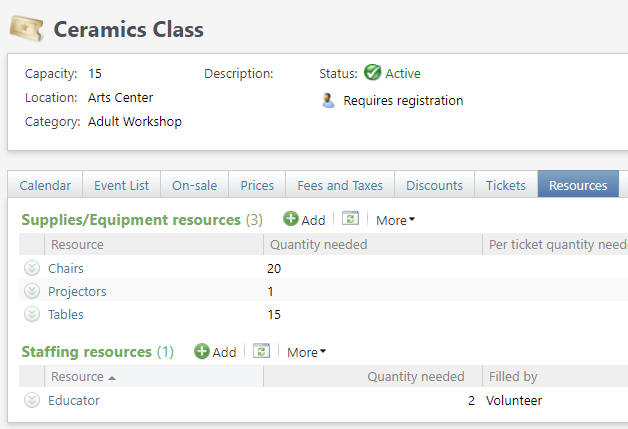

The above image shows the Educator's schedule for the events taking place for Ceramics Class.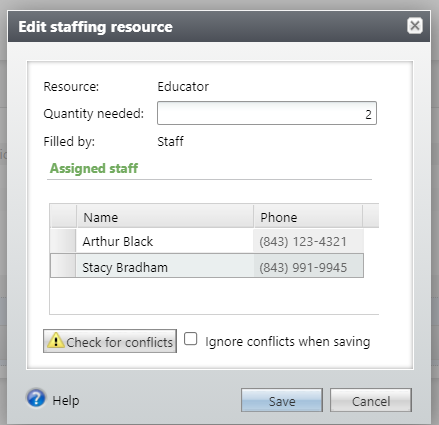
From the Event record, you can assign specific staff members to the program events.
In terms of reporting, your best bet is probably the Daily Schedule report. That shows you the total number of staff resources you need per event. What it doesn't show you though is the name of the assigned instructors. You'll need to click on the program event name to see who is actually assigned.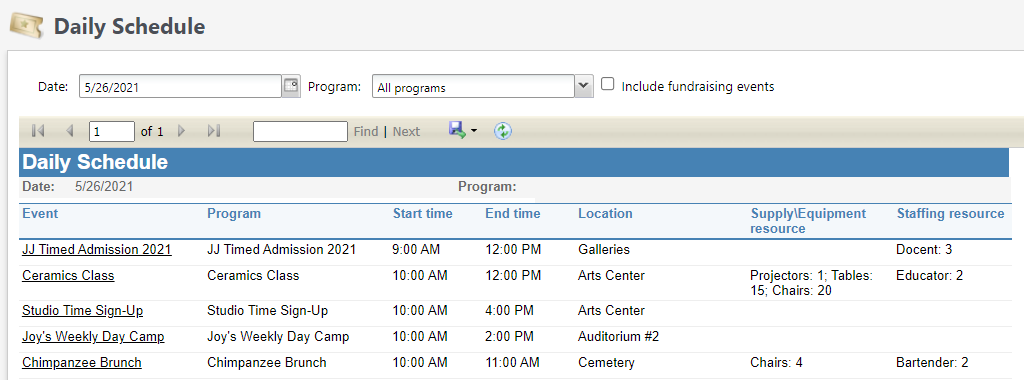
Let me know if this helps or if you have additional questions!
Megan
0




Categories
- All Categories
- New YourCause Community TEST
- New SKY Community TEST
- New Grantmaking TEST Community
- New Altru Test Community
- New bbcon Community - TEST
- 12 Blackbaud Agents for Good™
- New Raiser's Edge NXT Community
- 7 Blackbaud Community Help
- 219 bbcon®
- 1.4K Blackbaud Altru®
- 409 Blackbaud Award Management™ and Blackbaud Stewardship Management™
- 1.2K Blackbaud CRM™ and Blackbaud Internet Solutions™
- 16 donorCentrics®
- 361 Blackbaud eTapestry®
- 2.7K Blackbaud Financial Edge NXT®
- 681 Blackbaud Grantmaking™
- 599 Blackbaud Education Management Solutions for Higher Education
- 3.3K Blackbaud Education Management Solutions for K-12 Schools
- 952 Blackbaud Luminate Online® and Blackbaud TeamRaiser®
- 85 JustGiving® from Blackbaud®
- 7K Blackbaud Raiser's Edge NXT®
- 3.9K SKY Developer
- 257 ResearchPoint™
- 123 Blackbaud Tuition Management™
- 165 Organizational Best Practices
- 247 Member Lounge (Just for Fun)
- 40 Blackbaud Community Challenges
- 37 PowerUp Challenges
- 3 (Closed) PowerUp Challenge: Grid View Batch
- 3 (Closed) PowerUp Challenge: Chat for Blackbaud AI
- 3 (Closed) PowerUp Challenge: Data Health
- 3 (Closed) Raiser's Edge NXT PowerUp Challenge: Product Update Briefing
- 3 (Closed) Raiser's Edge NXT PowerUp Challenge: Standard Reports+
- 3 (Closed) Raiser's Edge NXT PowerUp Challenge: Email Marketing
- 3 (Closed) Raiser's Edge NXT PowerUp Challenge: Gift Management
- 4 (Closed) Raiser's Edge NXT PowerUp Challenge: Event Management
- 3 (Closed) Raiser's Edge NXT PowerUp Challenge: Home Page
- 4 (Closed) Raiser's Edge NXT PowerUp Challenge: Standard Reports
- 4 (Closed) Raiser's Edge NXT PowerUp Challenge: Query
- 822 Community News
- 3.1K Jobs Board
- 57 Blackbaud SKY® Reporting Announcements
- 47 Blackbaud CRM Higher Ed Product Advisory Group (HE PAG)
- 19 Blackbaud CRM Product Advisory Group (BBCRM PAG)