Hi all,
Ben from the LMS team here. I wanted to reach out to share good news around a major area that folks raised in our LMS survey: setting default filters for assignment lists.
We heard from a number of teachers that the process of changing the filters for your assignment lists (e.g. Not Published to Published; Past to Future) was taking a lot of time and clicks.
I'm happy to share there is a solution, and it's one that already exists within the product, but may not have been apparent: You can set default filters for your assignment center and section assignment lists! The process is as follows:
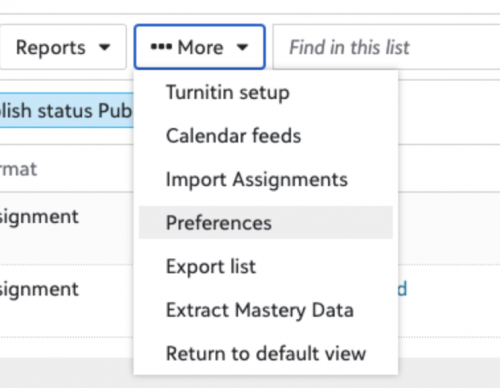
1. From your assignment center or section assignment list, click More, then select Preferences:
2. From there, go to
Assignment lists and set your default filters and sorting order. You can set defaults for both the Assignment Center and Section assignment lists.
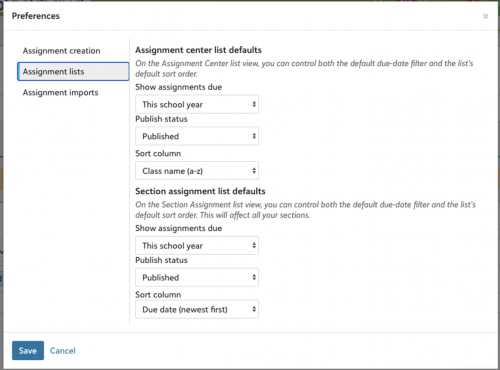
3. Hit
Save, and your preferences will be applied!

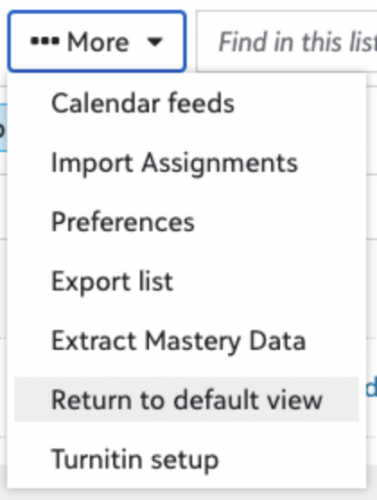
If you manually change your filters and want to back to your defaults, select Return to default view under More to re-apply your default settings right away.
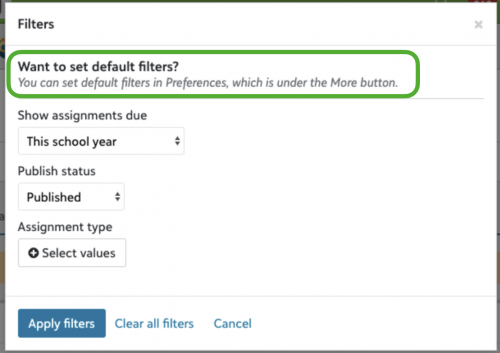
We’ve also added guidance directly in the Filters modal to remind users of this process:
Thanks for reading, and most of all, a huge thank you to folks who took the time to surface this pain point via our survey. As always, if you have feedback or questions, feel free to share, and if you have ideas for future improvements, feel free to add to the ideas forum. Thanks!
-Ben