My Community
YourCause®
Impact Edge™
All-Star Lounge
Member Lounge (Just for Fun)
Community News
Community Manager
Groups
Browse Products
Members
Community All-Stars
Monthly Challenges
Member Search
Jobs Board
Help
Using the Blackbaud Community
Blackbaud Support
Knowledgebase
Blackbaud University
Discussions
Categories
Groups
Home
Blackbaud Raiser's Edge NXT®
Raiser's Edge NXT Discussions
Query total number years giving
Kelli Hurley
Hi!
I'm building a query for our team and one question they're asking is to include not only the number of consecutive years giving but also to include the total number of years giving. I have not been able to find out how to do this. Any ideas?
Thanks!
-K
Find more posts tagged with
Query Import Export
Comments
shani traum
I have not yet found a way to do this within RE 7.
What I had to do to find total years given is to export all gifts for the constituents requested (ID and gift date only). Each column following that you label with a year. For each gift, mark the year the year was given. Then create a pivot table to count how many gifts given in each year per ID. Then use Count function in Excel to see how many years they have given. I had to do this for all donors who have been donors starting in 1990, so there were many gifts mark.
As for a quick count/query from RE?
I don't believe this can be done.
But is someone else replies to this with a way to do it - I'd be excited to hear it!
Karen Stuhlfeier
This information is on the individual record in web view as well as the consecutive years of giving. I've often wondered why this information can't appear in a list.
Joshua Bekerman
Check the RE user group on Facebook, there are plenty of threads about this. Or create a custom report in Crystal Reports (or hire someone to build one for you ?).
Karen Diener
The only way I know of is (sort of) lengthy and static by nature, so you can't easily pull it in to a query.
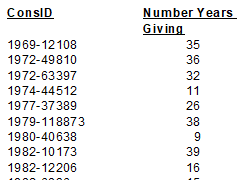
The Analytical Report | Consecutive Years Report allows you to get this information using calendar year OR your fiscal year, which is nice. The report only gets you part way though, since you can end up with a nice report in PDF but can't actually GET the numbers. So here is what I did:
Set up a specific Addressee that includes the constituent's constituent ID and use that in the report *
Ran the report with the settings I needed (which were consecutive fiscal year giving for at least 3 years)
Exported the PDF into an Excel data only format
Separated the constituent ID from the addressee using text to columns in Excel
Used VLOOKUP on the ID to pull over the years giving into the report where I needed it
* In hindsight, I maybe only needed the addressee to contain the ID. Having only the ID would have eliminated the step of separating the ID from the Addressee, but I liked seeing the names too.
I only needed to do this four times a year on average, so it wasn't that bad. But it doesn't work well for ongoing processes.
While I don't think this is terribly helpful for your specific process, I'm dropping it here in case it is helpful to someone else down the road. It's good to have this in webview, but users need to be able to extract it sometimes and the workarounds that are necessary can be frustrating. That being said, I am glad that RE has the ability to figure out workarounds, since some other databases that I work in do not!
Karen
Denise Small Kelley
this kind of thing is one reason I taught myself Crystal Reports a few years ago. The learning curve is steep at first, but then you can do nearly any kind of slice-and-dice you want. I find it so much easier now to simply write what I want to have in a report.
Quick Links
All Categories
Recent Posts
Activity
Unanswered
Groups
Help
Best Of