Donation Form Designer - Phone Types?





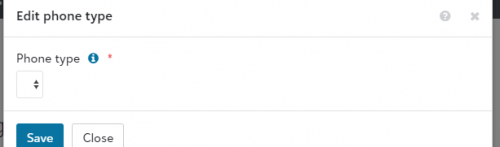
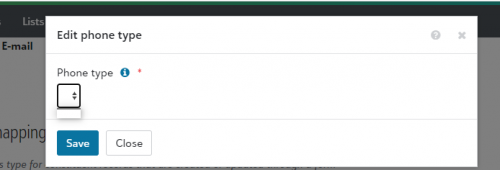
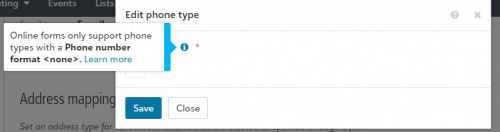
I am unable to set up a new form in NXT for online donations....I want to see what it would look like as we have never used it before. It is saying I need to go to Form Settings and set the address and phone types. I am unable to set the phone types because it is showing up with a blank drop down. I am not sure what this means that the phone number format is <none>? All of our phones in NXT are formatted the same way.....I am super confused.
0
Comments
-
I was just looking at this last week and had the same issue! Following.0
-
Hmmmmm we have Home, Mobile, and Work configured in db view as phone types and these are the values available when I go to Form Settings in web view.1
-
I just checked and have the same issue. The phone types are set up correctly in configuration in the DB view, but they are not showing as options in the form settings.0
-
I came across the same issue on yesterday while trying to get familiar with the online form in NXT, below is what I was told to do.
- Go to database view
- Click on Configuration then Tables
- Choose Phone Types and select one of your phone number options
- Change your number format to None.

- Go back to Form Settings in NXT where the drop down was blank.
- You should now see the type that you changed to None in database view is an option to select.
- Save
- Under Online registration forms it now says, Add form
5 -
Rochelle, Did it work for you to change the phone types back? I had changed the format to None previously, and our database view users didn't like that it removed the formatting, so I ended up creating a new phone type that is used only for the donation form.0
-
I just did this and then changed my telephone format in DB view back to the standard format, no issues.1
-
Hi Carrie,
Yes, it works fine after changing the phone type back to its original format. I didn't like not having a format in place. I did go back and check that there were no issues, everything is still working fine.1 -
Great - thanks for the update!0















Categories
- All Categories
- New K-12 Community Home (TEST)
- New Higher Education Home Page (Test)
- New Impact Edge Community TEST
- New YourCause Community TEST
- New SKY Community TEST
- New Grantmaking TEST Community
- New Altru Test Community
- New bbcon Community - TEST
- 12 Blackbaud Agents for Good™
- New Raiser's Edge NXT Community
- 8 Blackbaud Community Help
- 222 bbcon®
- 1.4K Blackbaud Altru®
- 410 Blackbaud Award Management™ and Blackbaud Stewardship Management™
- 1.2K Blackbaud CRM™ and Blackbaud Internet Solutions™
- 16 donorCentrics®
- 361 Blackbaud eTapestry®
- 2.7K Blackbaud Financial Edge NXT®
- 687 Blackbaud Grantmaking™
- 604 Blackbaud Education Management Solutions for Higher Education
- 3.3K Blackbaud Education Management Solutions for K-12 Schools
- 954 Blackbaud Luminate Online® and Blackbaud TeamRaiser®
- 85 JustGiving® from Blackbaud®
- 7K Blackbaud Raiser's Edge NXT®
- 4K SKY Developer
- 258 ResearchPoint™
- 123 Blackbaud Tuition Management™
- 165 Organizational Best Practices
- 248 Member Lounge (Just for Fun)
- 40 Blackbaud Community Challenges
- 37 PowerUp Challenges
- 3 (Closed) PowerUp Challenge: Grid View Batch
- 3 (Closed) PowerUp Challenge: Chat for Blackbaud AI
- 3 (Closed) PowerUp Challenge: Data Health
- 3 (Closed) Raiser's Edge NXT PowerUp Challenge: Product Update Briefing
- 3 (Closed) Raiser's Edge NXT PowerUp Challenge: Standard Reports+
- 3 (Closed) Raiser's Edge NXT PowerUp Challenge: Email Marketing
- 3 (Closed) Raiser's Edge NXT PowerUp Challenge: Gift Management
- 4 (Closed) Raiser's Edge NXT PowerUp Challenge: Event Management
- 3 (Closed) Raiser's Edge NXT PowerUp Challenge: Home Page
- 4 (Closed) Raiser's Edge NXT PowerUp Challenge: Standard Reports
- 4 (Closed) Raiser's Edge NXT PowerUp Challenge: Query
- 829 Community News
- 3.1K Jobs Board
- 57 Blackbaud SKY® Reporting Announcements
- 47 Blackbaud CRM Higher Ed Product Advisory Group (HE PAG)
- 19 Blackbaud CRM Product Advisory Group (BBCRM PAG)