@Dan PalowI realize this is a very old post, but I'm having a similar issue. When I use Attributes as a custom field in a donation form, I get a list of funds with check boxes instead of a dropdown menu. Any help on how to create dropdown menus on forms would be greatly appreciated.
@Tracey Thompson I'm not sure what you are trying to accomplish? How are these attributes supposed to be used in the form? Can you post a screenshot?
@Dan Palownot sure what donation platform you are using, but for Online Express when selecting attribute, if the attribute is table entry and that it is unique, you get dropdown (unique allow only one selected). however, if your attribute not unique (allow multiple), then you get a checkbox, allowing multiple to be selected. it is all in your attribute configuration
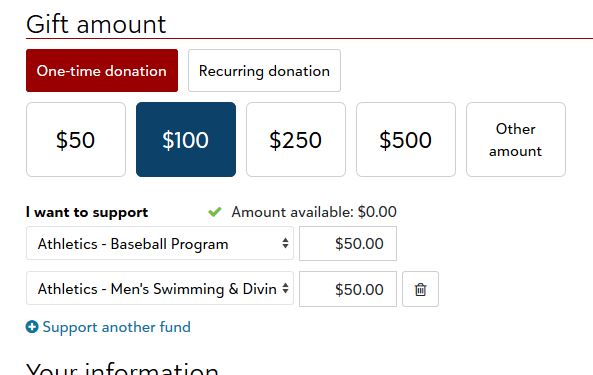
@Dariel Dixon We have list of 73 funds and wanted to be able to nest dropdown boxes. For example, If I choose Athletics (attribute) then the list of 21 funds under Athletics would appear in a drop box. Further, I need the donor to be able to split gifts between more than one team under Athletics. Aside from Athletics, we also have funds that fall under Clubs, Arts, and Classes. There doesn't appear to be a way to allow donors to designate across those categories.
@Tracey Thompson No, what you're trying to do is not possible. You can't link the available funds to an attribute. You have to just decide which funds you list. It might be better to just list a general fund like “Athletics”, and then use comments to filter down.
@Tracey ThompsonOnline Express does not allow for conditional questions by default. every question is either going to be required or optional.
You cannot do if Athletics show question 2 (drop down for fund related to athletics), or show question 3 if something else is selected.
You CAN, if you have the “real” webdev person (one that knows how to code in JavaScript and CSS, not just know how to use WordPress) in your org, use Javascript and CSS to “create” the conditional questions. However, this is only going to be gift attribute when processed, the fund is still not going to change, I think you probably already know this. Your gift processing team will need to use the gift attribute's answer to select the right fund.
@Alex Wong and @Dariel Dixon Thank you for your quick responses. Looks like what I'd like to do isn't possible….back to the drawing board…