My Community
YourCause®
Impact Edge™
All-Star Lounge
Member Lounge (Just for Fun)
Community News
Community Manager
Groups
Browse Products
Members
Community All-Stars
Monthly Challenges
Member Search
Jobs Board
Help
Using the Blackbaud Community
Blackbaud Support
Knowledgebase
Blackbaud University
Discussions
Categories
Groups
Home
Blackbaud Raiser's Edge NXT®
Raiser's Edge NXT Discussions
How to query event donors that converted to regular donors?
Brenda Schelling-Biggs
Hello Everyone! I queried our event donors in FY19 and would like to find those that have donated to a non-event appeal since then. Because there is a significant number, I'd like to refine the query to isolate those donors without having to do so in Excel. Does anyone have any suggestions? Thank you!
Find more posts tagged with
Query Import Export
Comments
Heather MacKenzie
Okay, first thoughts here... Find a report that can help you isolate those donors for gifts since the event(s) and attach the query, and have it create an output query when you run it.
So, for example, a gift detail and summary report could be one of the ones you might use to find your donors that meet your secondary criteria. Attach the query to the report in tab 1, apply your filters in that tab (like only have given to non-event appeals or funds since then) and when you run the report, the output query will contain your new set of refined records.
Another option that's coming to mind is to use merged queries. You've already got your event donors built. You'd then build a second query of all donors who meet your 2nd set of criteria. Then use the AND merge operator to find those donors in both groups.
Brenda Schelling-Biggs
Thank you Heather! I haven't done much with merged queries, however, it seems like the best approach since I'm half way there. No time like the present to learn how. Wish me luck!
Dan Snyder
I agree with the recommendations of
Heather MacKenzie
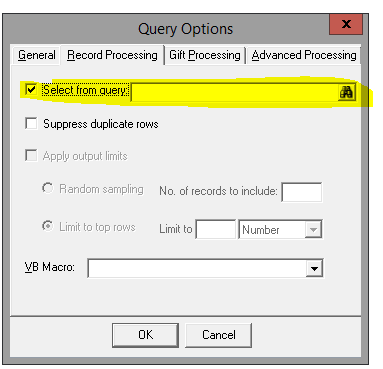
and just to add another option that is like a merge. You could attach your query of event donors in the query options (Tools-->Query Options-->Record processing tab) and then in the main query criteria area write the query for donors to non-event appeals/funds since FY19. It acts the same way as a merge using the AND operator.
Brenda Schelling-Biggs
Thanks Dan! This is helpful. This is an area I have yet to explore - setting query options. It sounds straight forward enough.
Quick Links
All Categories
Recent Posts
Activity
Unanswered
Groups
Help
Best Of