Tracking Prospect Status movement
Has anyone discovered a way to track the movement between different Prospect Statuses?
Might this be available through Insight Designer? That being said, I'm not looking for anything tied to an Opportunity, simply for a way to track who moved from say Identification to Qualification, or Qualification to Cultivation, for example.
I'm picturing some type of matrix with the Pr Status Types along the left and top, with a count of who moved, and then the ability to click on the count to open up a List. Preferrably the matrix could be downloaded.
I know that we see Time In Status in the Prospect Management panel in web view, but I'm not after the # of days it has been in the current Prospect Status, but rather the movement of where it was before and where to moved to.
Thanks.

Comments
-
I could see how that would be very helpful at my institution, too. Eager to hear if others have a solution.
1 -
That would be cool! Kudos to you for thinking strategically about what you would like to see!
Check out Report Builder and search for the Prospect Status Analysis insight. Build your insight / dashboards there, and then you can view them under Fundraising | Reporting. You can do some interesting things by overwriting page and insight filters, so I would play around with that. I don't think you can accomplish exactly what you envision, but maybe you can get really close.
I think your only other option after that might be Insight Designer or a heavyweight like PowerBI or Tableau.
Karen
3 -
Hi Chris,
I have been trying to figure a way to do this for a few years now…I have not found a way to look at that data t so far-I think it may be in the idea bank though so please vote. If you go to ideas and search the word pipeline there are a few good ideas to vote on. If you do find a a good way to report please share!
1 -
@Chris Zello As usual another SNAFU from Blackbaud. Why even have the number of days in the Prospect Status if you cannot report off of this. It is totally useless. Instead of constant bells and whistles fix issues like this.
1 -
Hi @Chris Zello, I think there are older posts on this topic, but I would recommend using an action different from the standard cultivation, solicitation, and identification actions. Ex: Action Type: MM Cultivation to Solicitation. MM stands for Moves Management. By using these specific actions for reporting, you can isolate the applicable records by particular dates. You would also be able to backdate actions for testing purposes. You can use action attributes to capture any additional information. I'm not sure if you can calculate the number of days between actions yet, but you will be able to do so in Excel to reproduce the number of days in the current status and the number of days between statuses. I haven't used the standard PowerBI connection yet either, I obtain a daily backup of the database for analysis and reporting, but in PowerBI, you will likely be able to perform automate the logic referenced to perform in Excel and reporting visualization.
0 -
This information is available through the API. If you're interested in automation or already use Power Automate, that's an avenue that could work for you.
0 -
@Chris Zello
While there is an API with prospect status history: https://developer.sky.blackbaud.com/api#api=56b76470069a0509c8f1c5b3&operation=GetConstituentProspectStatusHistories&definition=ProspectStatusHistorythis is on per constituent level, so is not ideal for what you are trying to do.
You can “potentially” do this one of 2 ways:
- create a power automate flow that utilize constituent change webhook, whenever constituent is changed, in thie flow, you will check the prospect status of the constituent and if it has a prospect status start date of today, that means it has changed, send notifcation email or whatever you want to do
- create a daily recurring flow that get a list of all changed constituent, in the flow, do the same check and then send one email of all changes.
1 -
@Joe Moretti @Alex Wong @Austen Brown @Salvador Orochena My original inquiring on this was 4 years ago, back in 2021. We have since started using Power Automate, and edited a flow that Dan Snyder created, which looks at the change in Prospect Status each day and then creates an Action we are calling Prospect Management with all the information we need for tracking.
As I've learned, the best approach to this and many other things is to start using Power Automate.
1 -
@Chris Zello My issue with this is that for all the money that we pay for Blackbaud, the system should work well without all these third party apps, etc. That is the very frustrating aspect. Produce a superior product that a gazillion apps, etc. are not needed.
3 -
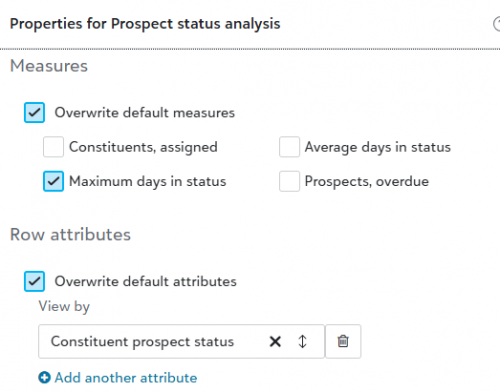
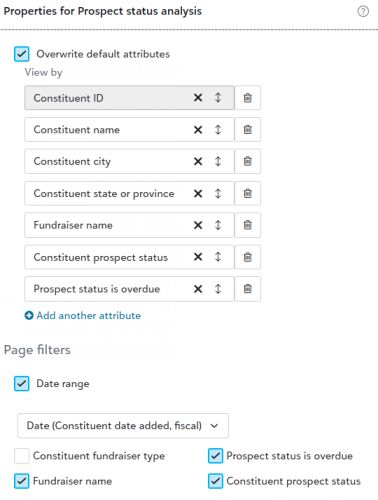
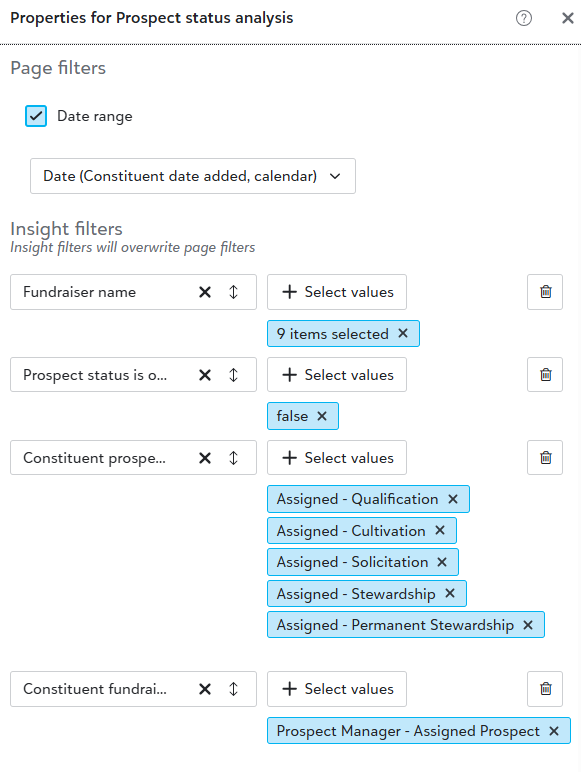
@Chris Zello I have found a very good workaround that does not include Power Automate, Power Bi or any other third party app. Just plain old RE NXT. Go to Analysis/Dashboard Builder. Create a new Dashboard the Insight called Prospect Status Analysis and drag over (You can use the free Insight, do not need the pay). You will need to tinker with this (Insight is somewhat convoluted). Click on EDIT PROPERTIES when you put your cursor in the report. Click on Set it up like the following:


I also use the following filters: Date Range (and I pick all times), Fundraiser Type (the one you want to use, I use the one I created Primary Prospect Manager), Prospect status is overdue, Fundraiser Name (and I pick the fundraisers that are needed for our report and the Prospect Status (if you have this set up correctly in RE )

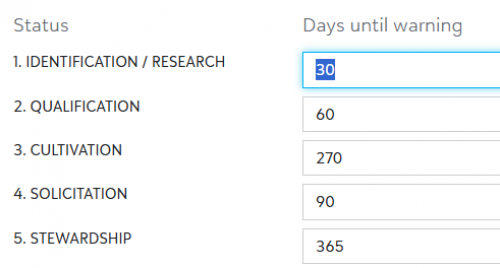
We also use the following Prospect Status Steps along with the Days Until Warning:

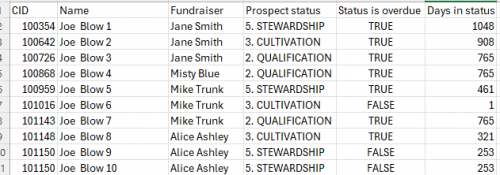
Once done and save and close. When you want the report, all you do is click on View, click the small download symbol (I use CVS) and the file opens. This is what I get and it works great for us:
1 -
@Joe Moretti thank you for showing this setup! I was able to follow along until 1) I was unable to designate a "true" attribute for the "status is overdue" column… 2) I got lost with the date range, because 3) I couldn't figure out how to get from "Prospect Status Steps" to "Days until Warning".
How do I get to Days until Warning… and how can I allow a "true" value for overdue status?
0 -
I think an issue is you have that box checked for Insight Filters. I do not have that checked. You will need to follow my document to the letter. At least I think that is the issue.
0
Categories
- All Categories
- 6 Blackbaud Community Help
- 206 bbcon®
- 1.4K Blackbaud Altru®
- 394 Blackbaud Award Management™ and Blackbaud Stewardship Management™
- 1.1K Blackbaud CRM™ and Blackbaud Internet Solutions™
- 15 donorCentrics®
- 357 Blackbaud eTapestry®
- 2.5K Blackbaud Financial Edge NXT®
- 646 Blackbaud Grantmaking™
- 561 Blackbaud Education Management Solutions for Higher Education
- 3.2K Blackbaud Education Management Solutions for K-12 Schools
- 934 Blackbaud Luminate Online® and Blackbaud TeamRaiser®
- 84 JustGiving® from Blackbaud®
- 6.4K Blackbaud Raiser's Edge NXT®
- 3.6K SKY Developer
- 242 ResearchPoint™
- 117 Blackbaud Tuition Management™
- 165 Organizational Best Practices
- 238 The Tap (Just for Fun)
- 33 Blackbaud Community Challenges
- 28 PowerUp Challenges
- 3 (Open) Raiser's Edge NXT PowerUp Challenge: Product Update Briefing
- 3 (Closed) Raiser's Edge NXT PowerUp Challenge: Standard Reports+
- 3 (Closed) Raiser's Edge NXT PowerUp Challenge: Email Marketing
- 3 (Closed) Raiser's Edge NXT PowerUp Challenge: Gift Management
- 4 (Closed) Raiser's Edge NXT PowerUp Challenge: Event Management
- 3 (Closed) Raiser's Edge NXT PowerUp Challenge: Home Page
- 4 (Closed) Raiser's Edge NXT PowerUp Challenge: Standard Reports
- 4 (Closed) Raiser's Edge NXT PowerUp Challenge: Query
- 777 Community News
- 2.9K Jobs Board
- 53 Blackbaud SKY® Reporting Announcements
- 47 Blackbaud CRM Higher Ed Product Advisory Group (HE PAG)
- 19 Blackbaud CRM Product Advisory Group (BBCRM PAG)