Basic and Advanced Lists: An Adventure





Hi Everyone!
I'm making some custom lists and I realized that having more reference material would be awesome, since trying to build something myself can be a little time-consuming if it doesn't really grow off (copied from) a list already given! It would be great to see if anyone else has made a list successfully that I would also want to make, and I'm sure I'm not alone in this. I was thinking I could start a thread and schools could share the lists they made and how they made them.
-I tried to find something like this, but have not been successful.
For Example, I needed a list that displayed New Parents and Students with additional info.
The tricky part was using their Admission year as a qualifier instead of their roles like the example list already built. (For information to pull into Finalsite, we could not leave Incoming Students as Incoming and Parent of Incoming Student as Incoming, all students and parents that are current are current.)
This list includes the names of the students, the names of the parents Homeroom section(name) and Parent contact information/address.
Here are the parameters for Select Objects:

The Display Fields:

Filters: For Course Base.Course Title, select the “Join Clause” selection for “Filter applied to” and you can select more then one item from the dropdown.
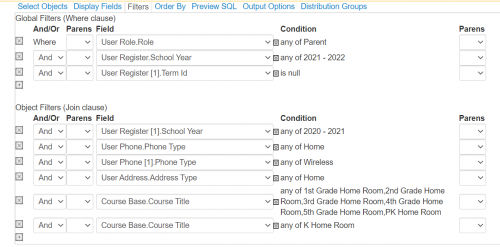
Please feel free to chime in with your thoughts, and/or lists!
-Amber
Comments
-
Thanks for sharing - that's a useful framework. Do you have suggestions for how to create a family contact list that includes guardian email addresses? Thanks.
0 -
I have found it is much easier to run a directory report and export it to excel to get a list of parents and students with parents' contract information. You can run a student directory or a parent/student directory report. Go to Core Reporting>Reports>and search for Directory. I will also send examples of advanced lists have created as well.
4 -
To filter the list down to only new students/parents, you could add the Admissions → Candidate → Entering Year object aligned with User Base [1] in your list. From there, you could filter to display only those with entering year 2021-22.
1 -
(For information to pull into Finalsite, we could not leave Incoming Students as Incoming and Parent of Incoming Student as Incoming, all students and parents that are current are current.)
In our K-12 → Finalsite integration we have Incoming Student and Incoming Parent mapped to corresponding roles within Finalsite. You should be able to mitigate much of the detail through the integration configuration with the Finalsite tech support. Our system has almost parity on the roles, which makes dealing with the parallel data sets much easier. It meant adding some roles the Finalsite integration to deal with things like Educational Consultants.
Just a consideration which might make query generation on the Blackbuaud side easier.
0 -
I created an Admin Viewable Only field “New Family.” The dropdowns are 2020-2021, 2021-2022, etc. (and I also included Other). I add the distinction for the new students who don't have a sibling already enrolled. This allows me to pull new family more easily.
1












Categories
- All Categories
- New YourCause Community TEST
- New SKY Community TEST
- New Grantmaking TEST Community
- New Altru Test Community
- New bbcon Community - TEST
- 12 Blackbaud Agents for Good™
- New Raiser's Edge NXT Community
- 7 Blackbaud Community Help
- 218 bbcon®
- 1.4K Blackbaud Altru®
- 409 Blackbaud Award Management™ and Blackbaud Stewardship Management™
- 1.2K Blackbaud CRM™ and Blackbaud Internet Solutions™
- 16 donorCentrics®
- 361 Blackbaud eTapestry®
- 2.7K Blackbaud Financial Edge NXT®
- 680 Blackbaud Grantmaking™
- 598 Blackbaud Education Management Solutions for Higher Education
- 3.3K Blackbaud Education Management Solutions for K-12 Schools
- 952 Blackbaud Luminate Online® and Blackbaud TeamRaiser®
- 85 JustGiving® from Blackbaud®
- 7K Blackbaud Raiser's Edge NXT®
- 3.9K SKY Developer
- 257 ResearchPoint™
- 123 Blackbaud Tuition Management™
- 165 Organizational Best Practices
- 247 Member Lounge (Just for Fun)
- 40 Blackbaud Community Challenges
- 37 PowerUp Challenges
- 3 (Closed) PowerUp Challenge: Grid View Batch
- 3 (Closed) PowerUp Challenge: Chat for Blackbaud AI
- 3 (Closed) PowerUp Challenge: Data Health
- 3 (Closed) Raiser's Edge NXT PowerUp Challenge: Product Update Briefing
- 3 (Closed) Raiser's Edge NXT PowerUp Challenge: Standard Reports+
- 3 (Closed) Raiser's Edge NXT PowerUp Challenge: Email Marketing
- 3 (Closed) Raiser's Edge NXT PowerUp Challenge: Gift Management
- 4 (Closed) Raiser's Edge NXT PowerUp Challenge: Event Management
- 3 (Closed) Raiser's Edge NXT PowerUp Challenge: Home Page
- 4 (Closed) Raiser's Edge NXT PowerUp Challenge: Standard Reports
- 4 (Closed) Raiser's Edge NXT PowerUp Challenge: Query
- 822 Community News
- 3.1K Jobs Board
- 57 Blackbaud SKY® Reporting Announcements
- 47 Blackbaud CRM Higher Ed Product Advisory Group (HE PAG)
- 19 Blackbaud CRM Product Advisory Group (BBCRM PAG)