I'm am trying to add an extra credit assignment that's worth 5 points if my students complete a task. I cannot set my max points to 0.
Is this something the system can't handle?
Thanks,
Matt
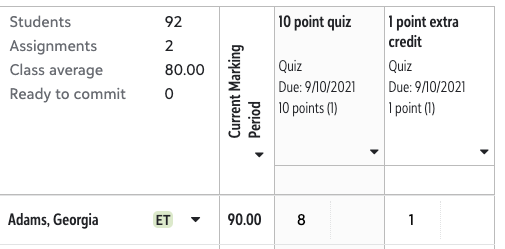
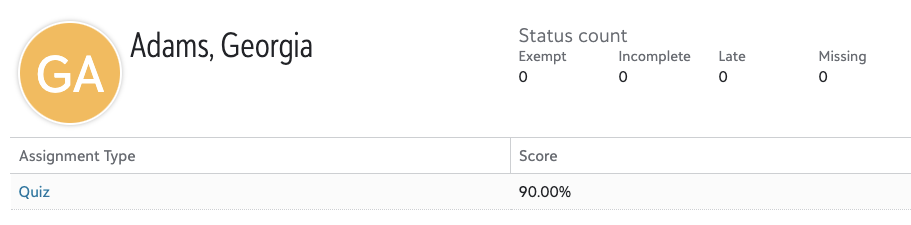
Hi Matt - it would calculate as a 9/10. Here's your scenario put to the test:
Awesome! Thank you! I definitely should have tried that on my own. I just know that once you enter grades in the gradebook, you can no longer delete assignments to my understanding.
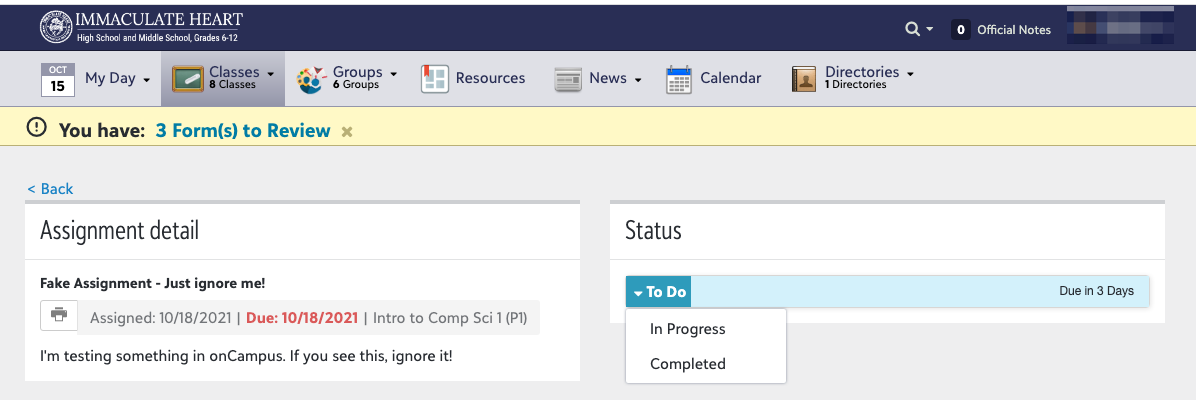
@Ben Leddy, do you know why this changed? We used to be able to set an extra credit assignment out of 0 points. From what I recall, I think this changed over this past summer. Being able to make the assignment out of 0 points was really useful for us because it was the ONLY way that students (and parents and advisors) understood the assignment was extra credit. There isn't any sort of notation for students on assignment details or in “see grade details” that shows it's an extra credit assignment.
This is what students see from the assignment detail page:
If the student didn't complete the assignment at all, and the teacher leaves their grade blank, the extra credit assignment at least doesn't show in the student's gradebook. However, if the student gets 2/10 the student (and parents and advisors) only see 2/10. This has lead to students (and parents and advisors) concerned about a low grade when really, the student DID earn 2pts extra credit. I'm regularly reminding my teachers they need to put the words “Extra Credit” in the title of the assignments.
I've had teachers ask if we could have a seperate “assignment type” for extra credit but since the gradebook doesn't calculate assignment types until there is at least one non-extra credit assignment in the assignment type, this won't work either.
If you know of other ways schools are handling this issue, I'd love to hear ideas. Thanks!
Hi @Megan Day - The change was made to address long-standing errors that could occur for assignments with zero points (e.g. issues with attempting to divide by zero). That said, this is very helpful feedback around the historical experience with extra credit, and I will bring it to my team right away.
I was just working with a teacher about this yesterday. Following!
Also following - not being able to add the zero point assignment has really thrown us for a loop!
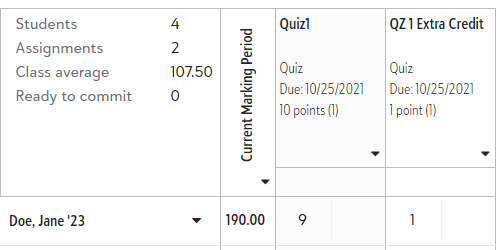
Thanks for this sample, Ben. When I gave it a try using Total Points for the quarter average calculation, it worked exactly as your sample. When I switched to Percentages for the quarter average calculation (assigning the Quiz Assignment Category 100% for the calculation) , I got the following. Should the same technique work when using the Percentages calculation type? Should I be using a different set-up when calculation with Percentages?
Hi Cecilia – it's a little hard to speak to what's occurring here without seeing the full picture. Feel free to email me at ben.leddy@blackbaud.me so we can discuss further.
Hi Cecilia,It looks like with percentages, the extra credit assignment is being added as an extra 100% but its weight is not being included.So the calculation is being made as follows:The percentage of the 9/10 assignment is 90%The percentage of the 1/1 assignment is 100%The overall grade is being calculated as an average: (90%+100%)/1 assignment = 190% (The average is calculated using only 1 assignment because the other assignment is extra credit.If you uncheck the extra credit box in the settings for QZ1 Extra Credit, we would expect it would calculate as: (90%+100%)/2 assignments = 95%.I think this is what's happening in the backend.