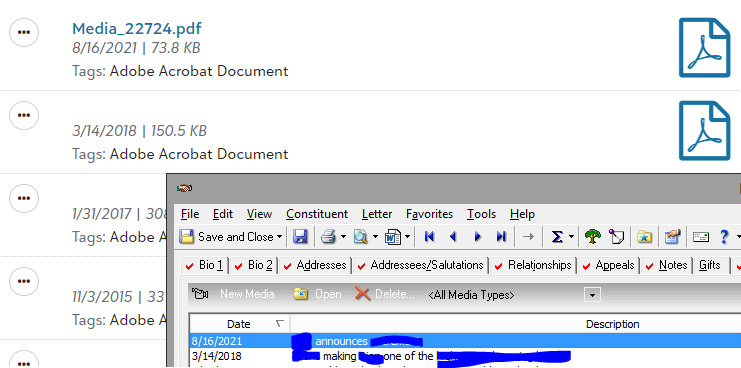
Is there any way to have the db media descriptions show in webview? I only see generic acrobat documents, so in a record with a lot of media, it would be great to scan descriptions to find what I'm looking for.
Jane, could you please describe what you are seeing with your donors? When I look at database Media in webview, the Description field (in yellow below) seems to be showing up.
To be fair, I understand there is a difference in how Media and Attachments integrate after 2019. We generally haven't used Media since 2019, as we discovered we could simply paste any images/text we needed into Notes.
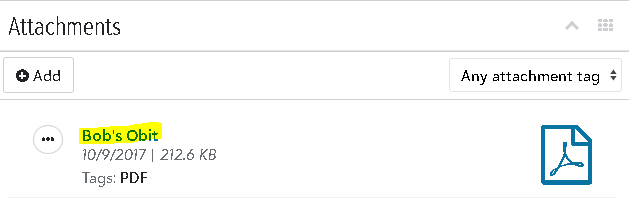
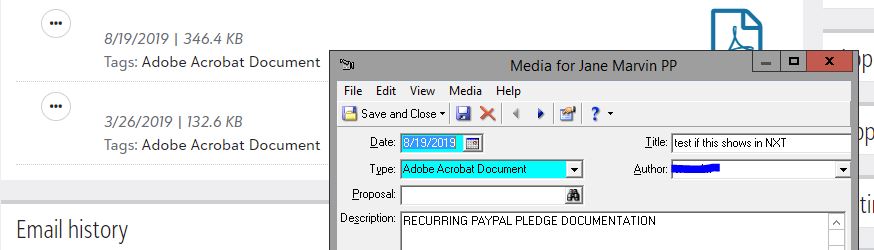
Where @Faith Murray has Bob's Obit, that information comes from the Title field of a media record in database view, one we had not used until I was faced with the same situation as @Jane Marvin ?. Needless to say it is now a required field on Media records.
Do you know if it's retroactive or only if it's in there from the get-go? I wondered about that and changed one in my own record's Title, but it didn't transfer (I made this change a few days ago, so enough time to catch up).
Jane, Dan is right about the Title being what showed. Our Title and Description fields are the same in most our media, so I didn't catch that.
I'm checking if a changed Title field pulls over. Changed one from 2019 in our db and will let you know if it updates in web!
I can tell you it is not retroactive. Media transfers from database view one time, so you would either need to reupload a new media record or adjust the information in webview.
Yes, after an entire weekend, it has not updated the Title for our 2019 media file. Would be handy, then, if there were a way to pull a list of media files in webview. Alas, attachments are not an available filter in webview.
There are three ideas in the RE NXT Idea Bank - If everyone votes for them they can be combined, and put into Action - I also would like to see the Description of the Media transfer to the NXT media field.