Letters in my config tab





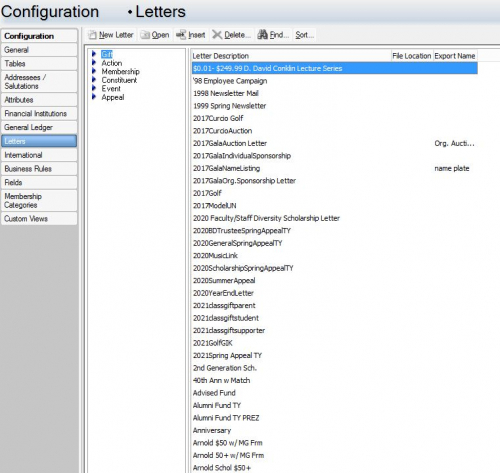
When I go to config → letters → gifts I have a list of letters I should be able to pick to acknowledge my gifts with. The question I have is where are these letters stored so I can make changes to them? If I choose a letter to use in mail merge it will not recognize the letter and I can't acknowledge the gift. Thanks in advance ?
Comments
-
I find letters confusing but I think it depends whether you're running the mailmerge from Mail for all gifts, or producing a single letter from a gift record.
From your screenshot it looks like most of your letter codes don't have an export associated with them - that's where the actual text of the letter would be if you are producing a letter from a gift record for just that gift. If you double click on the letter description, it should give you the option to either link the letter code to an existing export (if you've already got one set up for that letter somewhere) or create a brand new export. You'll need to select the fields that you want to merge into your letter, and there's a button at the top to “edit merge document” where you can write the letter itself.
If you're mailmerging from the Mail module, I think you actually have to partially run the mailmerge before you can get to the screen where you can edit the letters (terrible functionality IMO, as it means you have to have at least one unacknowledged gift in the database).
5 -
Thanks for this explanation, @Alan French! I've wondered why I have a monstrous list of letters in our own database when I thought I needed to modify them from the Mail merge. Glad to hear I wasn't mistaken. It is definitely frustrating!
1 -
Miki, it looks like many of your letters are (or should be) also Inactive? We, also, have a “monstrous” list of Letters, but only about 12 of them are Active. Anymore, I like to keep the letter names generic so you can use them year after year: so instead of “2020 Spring Appeal”, we just name it “Spring Appeal” and update the content every year. That way we don't have a growing list – because once a letter type lives on a gift record, you can never delete it unless you also delete the letter code from the gift record.
It would be nice of letter codes had a “Cleanup” function like Tables do, so that you can just combine multiple letter types into one archival code.
1












Categories
- All Categories
- New eTapestry Home Community
- New K-12 Community Home (TEST)
- New Higher Education Home Page (Test)
- New Impact Edge Community TEST
- New YourCause Community TEST
- New SKY Community TEST
- New Grantmaking TEST Community
- New Altru Test Community
- New bbcon Community - TEST
- 12 Blackbaud Agents for Good™
- New Raiser's Edge NXT Community
- 8 Blackbaud Community Help
- 223 bbcon®
- 1.4K Blackbaud Altru®
- 411 Blackbaud Award Management™ and Blackbaud Stewardship Management™
- 1.2K Blackbaud CRM™ and Blackbaud Internet Solutions™
- 16 donorCentrics®
- 361 Blackbaud eTapestry®
- 2.7K Blackbaud Financial Edge NXT®
- 688 Blackbaud Grantmaking™
- 604 Blackbaud Education Management Solutions for Higher Education
- 3.3K Blackbaud Education Management Solutions for K-12 Schools
- 954 Blackbaud Luminate Online® and Blackbaud TeamRaiser®
- 85 JustGiving® from Blackbaud®
- 7.1K Blackbaud Raiser's Edge NXT®
- 4K SKY Developer
- 258 ResearchPoint™
- 124 Blackbaud Tuition Management™
- 165 Organizational Best Practices
- 249 Member Lounge (Just for Fun)
- 40 Blackbaud Community Challenges
- 37 PowerUp Challenges
- 3 (Closed) PowerUp Challenge: Grid View Batch
- 3 (Closed) PowerUp Challenge: Chat for Blackbaud AI
- 3 (Closed) PowerUp Challenge: Data Health
- 3 (Closed) Raiser's Edge NXT PowerUp Challenge: Product Update Briefing
- 3 (Closed) Raiser's Edge NXT PowerUp Challenge: Standard Reports+
- 3 (Closed) Raiser's Edge NXT PowerUp Challenge: Email Marketing
- 3 (Closed) Raiser's Edge NXT PowerUp Challenge: Gift Management
- 4 (Closed) Raiser's Edge NXT PowerUp Challenge: Event Management
- 3 (Closed) Raiser's Edge NXT PowerUp Challenge: Home Page
- 4 (Closed) Raiser's Edge NXT PowerUp Challenge: Standard Reports
- 4 (Closed) Raiser's Edge NXT PowerUp Challenge: Query
- 829 Community News
- 3.1K Jobs Board
- 57 Blackbaud SKY® Reporting Announcements
- 47 Blackbaud CRM Higher Ed Product Advisory Group (HE PAG)
- 19 Blackbaud CRM Product Advisory Group (BBCRM PAG)