Viewing Annotation in Batch
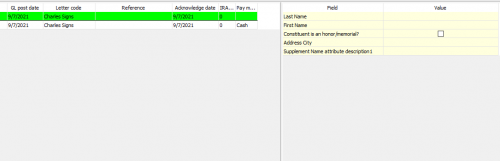
Does any one know how to make a annotation viewable in a gift batch? I use batching to record the majority of gifts, and don't always open a donor's constituent record before adding the gift. There have been times that it would have been REALLY helpful to see the special note in the annotation for that record, but I cannot figure out how to make that viewable from the gift batch. I do have the constituent “Window” open, but I don't see annotation as a field that you can view. I have include a screenshot of the “window” in case I am not using the correct word for that.
Comments
-
This sounds like it would answer your question:
KnowledgebaseArticle52830How to alert user that a constituent record has an annotation when adding gifts in a batch
0 -
Gave previous response as alternative. I'm not aware of anyway to include annotation in constituent window. Probably not considered a field. But agree it would be nice to be able to see it.
The business rule would at least alert user there is an annotation. Unfortunately, have to go to record to view it,
2 -
In a training session I learned that attributes CAN be added to the constituent window, and the fields in the constituent window can be re-ordered, so I have them show at the top. (I've currently set it up to show 3 of that attribute for constituents, and 2 for organizations.)
So I created an attribute Category: Gift Administrator, Description: Gift Batch Notes.
I put anything I need to know: no benefits, fund name (if hard to remember), receipt needed (if not usually sent for that type of gift), exact wording for a gift reference (for recurring gifts through Benevity)...
We've cleaned up our annotations to be primarily information that fundraisers need to know about the constituent, and moved almost all gift entry related annotations to the Gift Administrator Attribute.
0 -
Thank you all! We set up a business rule to have an alert to view a donors record whenever there is an annotation. Has been working pretty well so far!0
Categories
- All Categories
- 6 Blackbaud Community Help
- 213 bbcon®
- 1.4K Blackbaud Altru®
- 403 Blackbaud Award Management™ and Blackbaud Stewardship Management™
- 1.2K Blackbaud CRM™ and Blackbaud Internet Solutions™
- 15 donorCentrics®
- 360 Blackbaud eTapestry®
- 2.6K Blackbaud Financial Edge NXT®
- 656 Blackbaud Grantmaking™
- 577 Blackbaud Education Management Solutions for Higher Education
- 3.2K Blackbaud Education Management Solutions for K-12 Schools
- 940 Blackbaud Luminate Online® and Blackbaud TeamRaiser®
- 84 JustGiving® from Blackbaud®
- 6.7K Blackbaud Raiser's Edge NXT®
- 3.7K SKY Developer
- 249 ResearchPoint™
- 119 Blackbaud Tuition Management™
- 165 Organizational Best Practices
- 241 Member Lounge (Just for Fun)
- 34 Blackbaud Community Challenges
- 37 PowerUp Challenges
- 3 (Open) PowerUp Challenge: Grid View Batch
- 3 (Closed) PowerUp Challenge: Chat for Blackbaud AI
- 3 (Closed) PowerUp Challenge: Data Health
- 3 (Closed) Raiser's Edge NXT PowerUp Challenge: Product Update Briefing
- 3 (Closed) Raiser's Edge NXT PowerUp Challenge: Standard Reports+
- 3 (Closed) Raiser's Edge NXT PowerUp Challenge: Email Marketing
- 3 (Closed) Raiser's Edge NXT PowerUp Challenge: Gift Management
- 4 (Closed) Raiser's Edge NXT PowerUp Challenge: Event Management
- 3 (Closed) Raiser's Edge NXT PowerUp Challenge: Home Page
- 4 (Closed) Raiser's Edge NXT PowerUp Challenge: Standard Reports
- 4 (Closed) Raiser's Edge NXT PowerUp Challenge: Query
- 796 Community News
- 3K Jobs Board
- 54 Blackbaud SKY® Reporting Announcements
- 47 Blackbaud CRM Higher Ed Product Advisory Group (HE PAG)
- 19 Blackbaud CRM Product Advisory Group (BBCRM PAG)


