✏️ Teachers: When do you clear grades?
Hi all,
Ben from the LMS team here. We're looking to simplify some aspects of assignment management and need to hear from you on the topic of clearing grades for assignments– meaning a student or students were previously given a grade for an assignment, but the teacher wishes to remove the grade or grades.
Our questions:
- Have you cleared assignment grades in the LMS before?
- If so, what was the reason?
- How did you go about it?
Feel free to comment here, or reach out via email at ben.leddy@blackbaud.com with your responses. Thanks all!
Ben

Comments
-
Hi,
Our policy requires teachers to enter a score of “0” for missing assignments so that the cum.avg. reflects the missing work (unless exempt). If the student eventually turns it in and the teacher accepts the late assignment, it may take them a few days before they review the work and have a new grade to enter. Teachers have expressed a desire to remove the “0” (thus bringing the cum.avg. back up) and having a null/missing grade for a couple of days until they have the true score to enter. They will eventually enter the earned grade for the assignment. Previous to the new assignment / gradebook, this was easily done by simply deleting the grade. With the updated gradebook, the score cannot be changed back to a null (empty) grade if there is any box checked (incomplete, late, missing, etc.) or if there is a written comment in the comment box. Even if there is no box checked or comment, if it is an in-system submission and the student has submitted the late work, the grade cannot be changed to a null grade. My suggestion to teachers is to communicate to the student that "the correct grade will eventually replace the “0” in due time, and in the future they should not miss the due date." Of course, teachers don't like this suggestion – parents aren’t happy with it. They would like again to be able to remove the grade of “0” and have a missing grade for a few days before entering the new grade.
David
0 -
Thank you for your thoughtful reply, David. I did some testing here and was able to remove a zero this scenario. Would you mind trying this out and letting us know if it addresses the issue?
For instance, Brian has a 0, a comment, and missing flag.

Now, I open the evaluate modal, delete the zero, and save:

I can then commit the change:

And the grade is cleared, raising the cumulative grade:

Please let us know if this flow does not work on your end so we can further assist.
0 -
Hi,
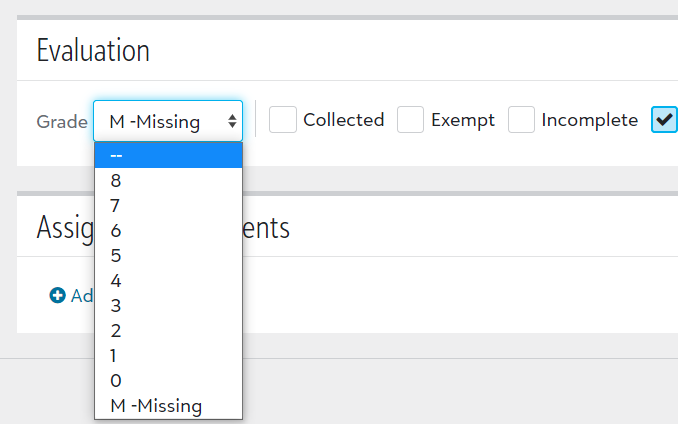
Thank you for your reply. Unfortunately (perhaps a problem on my end) I cannot see the images you posted. However, following your text I was able to clear a committed score. Your flow does work for assignments that use the standard scale points earned out of max points available. The problem is we've introduced an additional layer that complicates the issue (and I did not mention this before, sorry.) We are an IB school. For Grades 6-10 we use a translation table (Grading Setup > Gradebook Settings > Letter Grade Scale). Teachers grade certain assignment types according to IB MYP criteria and using an "8 Point MYP Scale". As a result, the grades are entered by use of the pull-down grade selector. To clear a grade, you need to go to the top of the list and select “--”. Assignment types using a standard scale (where we just type in the score) can be deleted as you described. But when using this Letter Grade Scale, a previously committed grade cannot be cleared by selecting “--” like we did last year. When committed the grade automatically changes back to the previously committed grade instead of being cleared.
If you like, please email me, dmontoya@kaa-herndon.com, and I can give you a test account to impersonate to see this behavior.
The Letter Grade Scale and also the pull-down selector are captured and shown below (I hope you can see these).

0 -
Oh dear, it's not you – my images just didn't post! Glad you were able to follow along in some way, though.
The letter grade issues is on our radar to address in the coming 1-2 weeks. We apologize for the inconvenience and look forward to getting this solved!
0 -
When I was teaching, this function was mainly used to correct a mistake on my end. Here are a few scenarios I can recall using it.
- I would have a couple assignments I was grading and began entering the grades into the wrong assignment column. It was nice to be able to clear them quickly and re-enter them in the correct column.
- I always sorted my papers alphabetically before entering grades to simplify the process. On some occasions I would fail to confirm that my class roster in the gradebook was also sorted alphabetically, so the grades I had entered were for the wrong students.
- I had an assignment that my whole class bombed, so I was going to have them redo it the next day after reviewing what I clearly didn't communicate well. I would clear the grades so I could then enter the retake grades.
I'm not sure if you are fishing to see if this feature could be removed, but I would hate for that functionality to not be available and turn a careless mistake into something more time consuming.
0 -
Thanks Rick Geyer - helpful to hear those scenarios! We are in no way considering not allowing grades to be cleared. On the contrary, we're trying to see whether are ways we can make it easier.0
Categories
- All Categories
- 6 Blackbaud Community Help
- 210 bbcon®
- 1.4K Blackbaud Altru®
- 395 Blackbaud Award Management™ and Blackbaud Stewardship Management™
- 1.1K Blackbaud CRM™ and Blackbaud Internet Solutions™
- 15 donorCentrics®
- 360 Blackbaud eTapestry®
- 2.5K Blackbaud Financial Edge NXT®
- 649 Blackbaud Grantmaking™
- 567 Blackbaud Education Management Solutions for Higher Education
- 3.2K Blackbaud Education Management Solutions for K-12 Schools
- 937 Blackbaud Luminate Online® and Blackbaud TeamRaiser®
- 84 JustGiving® from Blackbaud®
- 6.5K Blackbaud Raiser's Edge NXT®
- 3.7K SKY Developer
- 247 ResearchPoint™
- 119 Blackbaud Tuition Management™
- 165 Organizational Best Practices
- 239 The Tap (Just for Fun)
- 33 Blackbaud Community Challenges
- 31 PowerUp Challenges
- 3 (Open) PowerUp Challenge: Data Health
- 3 (Closed) Raiser's Edge NXT PowerUp Challenge: Product Update Briefing
- 3 (Closed) Raiser's Edge NXT PowerUp Challenge: Standard Reports+
- 3 (Closed) Raiser's Edge NXT PowerUp Challenge: Email Marketing
- 3 (Closed) Raiser's Edge NXT PowerUp Challenge: Gift Management
- 4 (Closed) Raiser's Edge NXT PowerUp Challenge: Event Management
- 3 (Closed) Raiser's Edge NXT PowerUp Challenge: Home Page
- 4 (Closed) Raiser's Edge NXT PowerUp Challenge: Standard Reports
- 4 (Closed) Raiser's Edge NXT PowerUp Challenge: Query
- 784 Community News
- 2.9K Jobs Board
- 53 Blackbaud SKY® Reporting Announcements
- 47 Blackbaud CRM Higher Ed Product Advisory Group (HE PAG)
- 19 Blackbaud CRM Product Advisory Group (BBCRM PAG)