In Gradebook, add option to show abbreviation





My teachers would like to see class abbreviation in the Gradebook. Currently, when they set up an assignment, they add Title, Description, Assignment Type, Abbreviation, and other items. When viewing the Gradebook, they can see Title, Assignment Type, Due date, and Total Score. Any ideas how to view Abbreviation in the Gradebook?
Comments
-
Thanks for reaching out. In terms of abbreviations, we are moving towards making them optional. We've gotten feedback that it's an additional step in the process for folks, and with the larger interface for the new gradebook, abbreviations are longer needed form a technical standpoint because longer titles can be displayed. That said, it would be great to hear more about how you are finding abbreviations useful and what it would mean to see them in gradebook.
1 -
The issue that we are having is that when we run reports it pulls the name for the assignment from the abbreviation field which is invisible to the student and the teacher in the gradebook. The only way currently for the teacher and the student to match up the information on the report with their gradebook is to look at the due date.
Our teachers would be in favor of removing the abbreviation field as you are suggesting. They would also strongly push for adding the title field to the reports. Our teachers use many of the reports for helping students stay on track of missing assignments and they also use them as talking points for parents at parent/teacher conference.
1 -
Thanks, Heather. I would really like to connect further to pinpoint which reports you're referring to -- please send me a message at ben.leddy@blackbaud.com when you have a chance. Thank you!0
-
Ben, I'm glad to hear you are considering the teacher workflow for entering assignments as the justification for making the abbreviation optional. However, before that decision is finalized, you may want to consider keeping it to solve other display issues in the grade book and parent view.
The initial ask was to be able to have the abbreviation listed in the assignment header. I think this is more of the direction our school would prefer to go. However, I certainly don't think adding more info in the header for everyone is the way to go. I think this would be a great option to add to the newly designed display preferences. :-) Allow teachers to choose between displaying assignments by abbreviation or title. You could even make it so that when a teacher mouses over the abbreviation in the header, it shows a pop-up of a the full title (like it currently does). The current grade book limitations restrict the title to two lines already, some of my teacher's titles are being clipped. Some teachers may prefer the cleaner, more uniform look of just the abbreviation, plus, that would also reduce the real estate used up for the header.
The abbreviation could also be used to clean up the parent class detail view on the progress tab. This is what those long assignment names look like on the graph at the top currently.
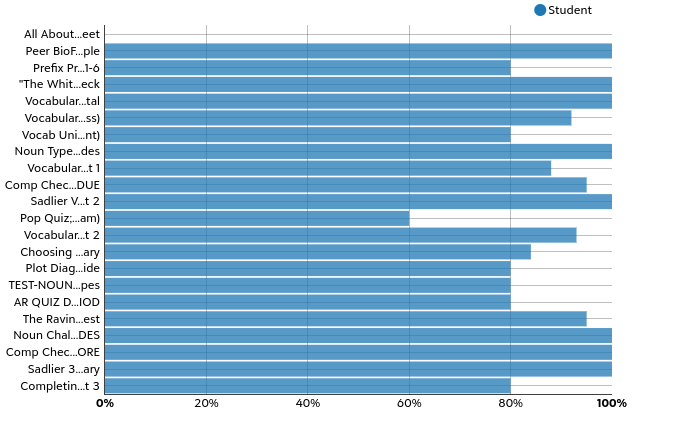
Those names are nearly indecipherable. And since this chart is organized chronologically, you have to pick through the different categories to try and figure out what's what. If you replaced those names with the abbreviation, and then add the abbreviation to the detail view list below, it would look much more clean.
You could choose to solve these issues some other way and still make the abbreviation optional, but just wanted to add a different perspective.
2 -
@Rick Geyer Thanks for these insights! We're looking into just that right now – an option to display abbreviations in the gradebook for assignments. My hope is we land in a place that simplifies the teacher workflow for those who don't want to use abbreviations, while better harnessing abbreviations for those who do.
0 -
Hi all! Just confirming that we'll be adding the ability to display abbreviation in the gradebook soon.
1 -
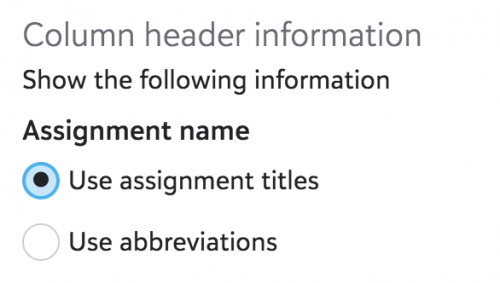
Happy to share that you can now choose to display abbreviations in the gradebook! The option is available under Settings:
 1
1






Categories
- All Categories
- New YourCause Community TEST
- New SKY Community TEST
- New Grantmaking TEST Community
- New Altru Test Community
- New bbcon Community - TEST
- 12 Blackbaud Agents for Good™
- New Raiser's Edge NXT Community
- 7 Blackbaud Community Help
- 218 bbcon®
- 1.4K Blackbaud Altru®
- 409 Blackbaud Award Management™ and Blackbaud Stewardship Management™
- 1.2K Blackbaud CRM™ and Blackbaud Internet Solutions™
- 16 donorCentrics®
- 361 Blackbaud eTapestry®
- 2.7K Blackbaud Financial Edge NXT®
- 680 Blackbaud Grantmaking™
- 598 Blackbaud Education Management Solutions for Higher Education
- 3.3K Blackbaud Education Management Solutions for K-12 Schools
- 952 Blackbaud Luminate Online® and Blackbaud TeamRaiser®
- 85 JustGiving® from Blackbaud®
- 7K Blackbaud Raiser's Edge NXT®
- 3.9K SKY Developer
- 257 ResearchPoint™
- 123 Blackbaud Tuition Management™
- 165 Organizational Best Practices
- 247 Member Lounge (Just for Fun)
- 40 Blackbaud Community Challenges
- 37 PowerUp Challenges
- 3 (Closed) PowerUp Challenge: Grid View Batch
- 3 (Closed) PowerUp Challenge: Chat for Blackbaud AI
- 3 (Closed) PowerUp Challenge: Data Health
- 3 (Closed) Raiser's Edge NXT PowerUp Challenge: Product Update Briefing
- 3 (Closed) Raiser's Edge NXT PowerUp Challenge: Standard Reports+
- 3 (Closed) Raiser's Edge NXT PowerUp Challenge: Email Marketing
- 3 (Closed) Raiser's Edge NXT PowerUp Challenge: Gift Management
- 4 (Closed) Raiser's Edge NXT PowerUp Challenge: Event Management
- 3 (Closed) Raiser's Edge NXT PowerUp Challenge: Home Page
- 4 (Closed) Raiser's Edge NXT PowerUp Challenge: Standard Reports
- 4 (Closed) Raiser's Edge NXT PowerUp Challenge: Query
- 822 Community News
- 3.1K Jobs Board
- 57 Blackbaud SKY® Reporting Announcements
- 47 Blackbaud CRM Higher Ed Product Advisory Group (HE PAG)
- 19 Blackbaud CRM Product Advisory Group (BBCRM PAG)