Deleting Lists in Webview?





A former colleague made a Constituent List in Webview. I assume that she made it “View Only”. I've got all the admin rights possible for both database view and web view, however I can't delete this list.
I am able to delete my own lists, but am not receiving the option to delete this list when clicking on the “More…” button.
How are folks managing the clutter of lists in web view if they are unable to delete view only lists made by former employees?
Is there some secret method of which I am unaware?
Comments
-
Hi Carlene - You are not missing anything, to my knowledge what you want to do is not possible. Recommend you check out the NXT Idea Bank and vote for any idea related to this topic.
1 -
That sounds like a fundamental feature that should definitely be included for improvements. Cleanup is important! Thanks for posting, Carlene, as I had not had opportunity to encounter this limitation until now.
1 -
I wholeheartedly agree and just created an idea as I did not find one when searched. Idea title is: Allow Administrators to delete other user's lists in NXT and the number is: Idea RENXT-I-4721
3 -
Voted!
0 -
@Carlene Johnson How are you able to delete your own lists?
I thought I was deleting by “x” when in the constituent list but colleague just pointed out they are still in the list when I select that I want to open a list. They open. Not gone at all, just closed.
0 -
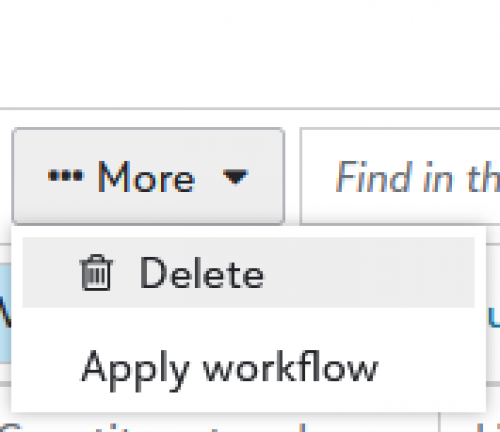
The hidden way to delete a web view list. @JoAnn Strommen - When viewing the list, you'll want to click on More > Delete.
1












Categories
- All Categories
- New K-12 Community Home (TEST)
- New Higher Education Home Page (Test)
- New Impact Edge Community TEST
- New YourCause Community TEST
- New SKY Community TEST
- New Grantmaking TEST Community
- New Altru Test Community
- New bbcon Community - TEST
- 12 Blackbaud Agents for Good™
- New Raiser's Edge NXT Community
- 8 Blackbaud Community Help
- 222 bbcon®
- 1.4K Blackbaud Altru®
- 411 Blackbaud Award Management™ and Blackbaud Stewardship Management™
- 1.2K Blackbaud CRM™ and Blackbaud Internet Solutions™
- 16 donorCentrics®
- 361 Blackbaud eTapestry®
- 2.7K Blackbaud Financial Edge NXT®
- 688 Blackbaud Grantmaking™
- 604 Blackbaud Education Management Solutions for Higher Education
- 3.3K Blackbaud Education Management Solutions for K-12 Schools
- 954 Blackbaud Luminate Online® and Blackbaud TeamRaiser®
- 85 JustGiving® from Blackbaud®
- 7.1K Blackbaud Raiser's Edge NXT®
- 4K SKY Developer
- 258 ResearchPoint™
- 123 Blackbaud Tuition Management™
- 165 Organizational Best Practices
- 249 Member Lounge (Just for Fun)
- 40 Blackbaud Community Challenges
- 37 PowerUp Challenges
- 3 (Closed) PowerUp Challenge: Grid View Batch
- 3 (Closed) PowerUp Challenge: Chat for Blackbaud AI
- 3 (Closed) PowerUp Challenge: Data Health
- 3 (Closed) Raiser's Edge NXT PowerUp Challenge: Product Update Briefing
- 3 (Closed) Raiser's Edge NXT PowerUp Challenge: Standard Reports+
- 3 (Closed) Raiser's Edge NXT PowerUp Challenge: Email Marketing
- 3 (Closed) Raiser's Edge NXT PowerUp Challenge: Gift Management
- 4 (Closed) Raiser's Edge NXT PowerUp Challenge: Event Management
- 3 (Closed) Raiser's Edge NXT PowerUp Challenge: Home Page
- 4 (Closed) Raiser's Edge NXT PowerUp Challenge: Standard Reports
- 4 (Closed) Raiser's Edge NXT PowerUp Challenge: Query
- 829 Community News
- 3.1K Jobs Board
- 57 Blackbaud SKY® Reporting Announcements
- 47 Blackbaud CRM Higher Ed Product Advisory Group (HE PAG)
- 19 Blackbaud CRM Product Advisory Group (BBCRM PAG)