Evaluation type list in Application





Hello, I am new to BB and getting our Applications set up. In the Schooling section there is an Evaluations dropdown list, and I'd like to add to the types of possible evaluations but cannot locate where to do so. Any advise?
Thank you!!
Comments
-
Hey Amanda - I think what you're looking for is in Admissions Setup>Candidate Profile Settings, scroll down to Recommendation Types and edit to add what types of evaluations you want to add. Then, once you've done that, you can switch over to the Recommendation Forms tab in Admissions Setup and add the individual forms that are tied to each type. Please reply back if that isn't what you need!
2 -
Thanks so much for your reply! Unfortunately I don't think this is the solution. I've attached screenshots showing how the field looks in the Application set up, and how the checkbox list looks in the Application Preview. I'd like to add to this list. Thank you!
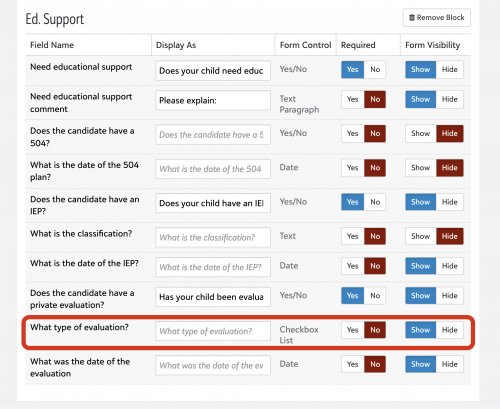
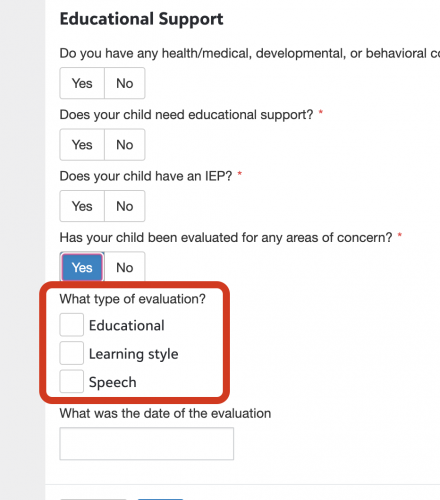 0
0 -
Hey Amanda - no, it doesn't look like there's anywhere to add to that list. What I would probably suggest is for you to not use that option, and instead create a Custom Candidate Field that asks the same question and allows you to set the answers to whatever you'd like. You can access that in Admissions Setup>Admissions Options, then scroll down to “Defined Fields”.
For each active field, you can create values that correspond to the areas you'd like to have available for parents to select, and then they can just check whatever is appropriate. Then you'd include the Custom Candidate Field block immediately below the other Educational Support section. To the user it would look like it was just part of the same section.
It's not identical, because it would display to all candidates and not only those who check “yes” to the question, but it would get you most of the way there and would probably give you the information you need. Give that a try and see if that works for you.
1 -
How did you get “checkbox” added?
0






Categories
- All Categories
- New YourCause Community TEST
- New SKY Community TEST
- New Grantmaking TEST Community
- New Altru Test Community
- New bbcon Community - TEST
- 12 Blackbaud Agents for Good™
- New Raiser's Edge NXT Community
- 7 Blackbaud Community Help
- 218 bbcon®
- 1.4K Blackbaud Altru®
- 409 Blackbaud Award Management™ and Blackbaud Stewardship Management™
- 1.2K Blackbaud CRM™ and Blackbaud Internet Solutions™
- 16 donorCentrics®
- 361 Blackbaud eTapestry®
- 2.7K Blackbaud Financial Edge NXT®
- 680 Blackbaud Grantmaking™
- 598 Blackbaud Education Management Solutions for Higher Education
- 3.3K Blackbaud Education Management Solutions for K-12 Schools
- 952 Blackbaud Luminate Online® and Blackbaud TeamRaiser®
- 85 JustGiving® from Blackbaud®
- 7K Blackbaud Raiser's Edge NXT®
- 3.9K SKY Developer
- 257 ResearchPoint™
- 123 Blackbaud Tuition Management™
- 165 Organizational Best Practices
- 247 Member Lounge (Just for Fun)
- 40 Blackbaud Community Challenges
- 37 PowerUp Challenges
- 3 (Closed) PowerUp Challenge: Grid View Batch
- 3 (Closed) PowerUp Challenge: Chat for Blackbaud AI
- 3 (Closed) PowerUp Challenge: Data Health
- 3 (Closed) Raiser's Edge NXT PowerUp Challenge: Product Update Briefing
- 3 (Closed) Raiser's Edge NXT PowerUp Challenge: Standard Reports+
- 3 (Closed) Raiser's Edge NXT PowerUp Challenge: Email Marketing
- 3 (Closed) Raiser's Edge NXT PowerUp Challenge: Gift Management
- 4 (Closed) Raiser's Edge NXT PowerUp Challenge: Event Management
- 3 (Closed) Raiser's Edge NXT PowerUp Challenge: Home Page
- 4 (Closed) Raiser's Edge NXT PowerUp Challenge: Standard Reports
- 4 (Closed) Raiser's Edge NXT PowerUp Challenge: Query
- 822 Community News
- 3.1K Jobs Board
- 57 Blackbaud SKY® Reporting Announcements
- 47 Blackbaud CRM Higher Ed Product Advisory Group (HE PAG)
- 19 Blackbaud CRM Product Advisory Group (BBCRM PAG)