Is there a way to bulk edit either opportunities in web view or proposals in the database side? I have a query of proposals that I would like to change the status on without going through each one by one. Thanks!
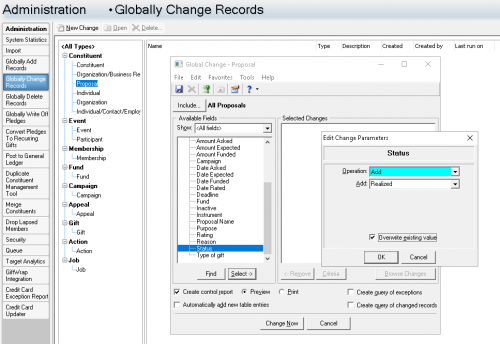
Scotland, you can accomplish this through Global Change in your Admin section of database view, per the image below. Good luck!
Thank you! This changes ALL proposals though right? What if I just have a specific list that I want to update?
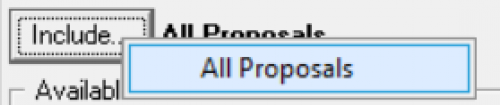
No problem, you would just need to attach your query to the Bulk Change, near the top right where it has the “Include” button.
Am I looking in the correct place? It only has the option for All Proposals where I'm looking.
So strange! You're right. That won't do at all.
The only other way I know to bulk change them is through Import.
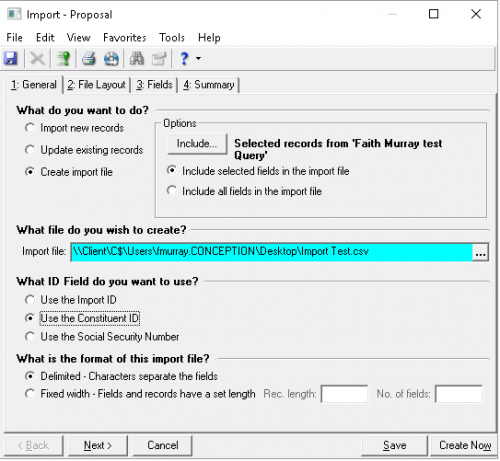
Go to Admin - Import - Constituent - Proposal, and click New import.
Attach your constituent query and select Create Import File. Select a csv file format and match by Constituent ID. On the Fields tab, be sure to add the Constituent ID and the Proposal Status columns.
Open your created csv file and change all the statuses to complete (in our table, this is “Realized”.
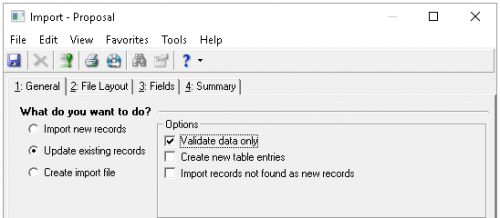
Go back to your Import box and this time select “Update Existing Records”. At first, you will want to only “Validate Data Only”, but if it processes with no exceptions, you can un-check that to process it for real.
Let me know if you need any walkthrough on it - I'd be happy to help.
That is very helpful! Thank you so much!!