What is the best method to use to automatically merge my letters by date?
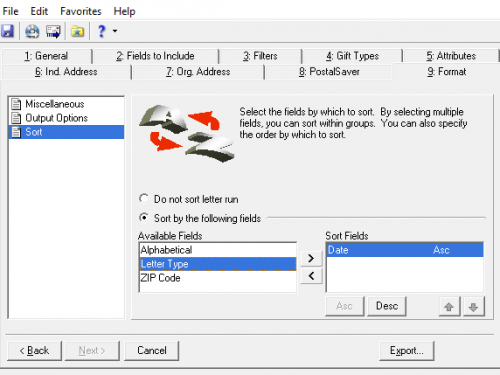
@Katy Mayo if I understand your question correctly (and please correct me if not!), you're wanting your letters sorted by date. When you open your letter under Mail in the database, go to the Format tab. On the left you will see “Sort” and then you can select to not sort the run or to sort by particular fields. From there you can choose in what order to sort things.
Hope this helps! If not, let us know and we will go from there.
I am actually looking for a solution to mail merging my acknowledgement letters since Word is no long in option in DBV
@Katy Mayo the solution that @Miki Martin provided would be for the export out of DBV so you can merge your letters outside of the hosted environment. If you are looking for complete automation you would likely need to use Queue and Power Automate.
Hi @Katy Mayo - Welcome to BB Community! I recommend you check out the webinar “What do we do now? Practical Advice for Database Administrators”. There are a few methods you can use to merge your letters, a manual export + Word merge (helpful posts listed below), automatic merge through Power Automate, or a third-party solution such as DonorTek's ReciepterPro, RedArc's Letter Box, or SmartTHING's SmartLETTERS.
Thank you!