Addressee/Salutation starting with "and"




Hi,
I've been doing some RE db maintenance and have noticed a number of records where the addressee and salutations begin with “and”, ex “and John Smith”. While this is not an option in Addressee/Sal in Config, it does appear in the addressee/salutation drop down menus, along with a number of others we don't use. I have no idea how they got on the list in the first place. I can manually correct the records, but how do I remove these items from the drop down so it doesn't recur? Has anyone else experienced something like this?
deb
greenberg@forward.com
Comments
-
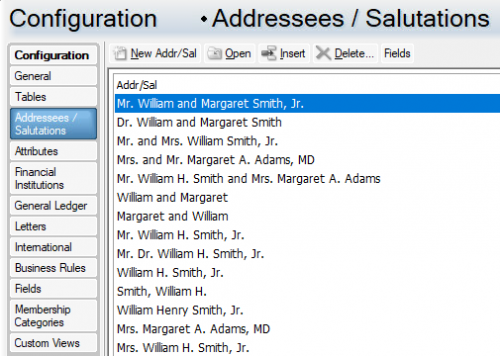
Your RE Admin can go into Configuration-Addressees/Salutations to edit/create new/delete addressee and salutations. They can also be rearranged and sorted here for how they are viewed in RE. (I have left them all there but moved what I use regularly to the top so there is less scrolling. Enabling the Smart feature is very helpful as others have said!)
 0
0 -
You may see this if you assigned and addressee sal that had Mr. and Mrs….. but the record only has primary constituent without a spouse. The wrong addressee sal is most likely assigned.
4 -
Don't delete add/sal formats until you really know what the issue is. Likely chose wrong format. There are lots of past posts about structuring/organizing your formats so selection is easier. And be sure person doing any formating knows to use ‘smart’ function.
7 -
Hi Deb, this sounds like it's where the constituent record has a salutation format selected that includes the spouse name (e.g. William and Margaret Smith) but the constituent doesn't currently have a spouse on their record, so the spouse name part of the salutation is therefore blank.
You probably don't want to remove those options from the drop-down entirely, because then you won't be able to use them for constituents who actually DO have a spouse.
If the spouse is the second name in the salutation (not the first) then you can configure the salutation so that the “and” is only present if there is something following it (i.e. there is a spouse name on the record), this is done via the “smart” tick box when configuring the salutations.
If the missing spouse name is the first name in the salutation, I would suggest setting up a query so that you can find constituent records with those joint formats selected but who do not have a spouse and regularly cleansing these.
7 -
Thanks everyone for all your advice. I think I should have illustrated the problem better. These items appear in the drop down menu on the Addressee/Salutation tab:
- and William Smith
- and William
- and Smith
- Smith
I guess I don't understand the relationship between what appears in the drop down menu on the Addressee/Salutations tab, and what is listed in Config>Addressee/Salutation. Because those are not listed in Config, only in the drop down. I'm puzzled how to remove them as options if they don't exist in Config.
deb
2 -
As @Alan French explained, the drop down is showing how it will populate for that record. In the example you showed, the record does not have a spouse entered or it would display Sue and William…
They are formats pulling the spouse name first. Last one is just one pulling last name as sometimes folks want that format for a specific purpose.
3 -
What appears in the drop-down on the constituent record will be exactly the same as what's in Config, in the same order. It's just that if a salutation has been set up in the format [Spouse first name] [and] [Constituent first name] [Surname], it'll look like “Margaret and William Smith” in Config but if an actual constituent doesn't have a spouse (i.e. there is no “Margaret” name to insert) then it'll just display “and William Smith” on their record, which sounds like the issue you have.
If you flipped the first names around in the salutation format so that the constituent was first, and marked the “and” as a smart field, it would only print the “and” if there was a spouse name following it. This page on smart fields might be helpful:
0 -
This has all been extremely helpful, since I've been having the same problem. I still can't fix salutation. If the editable? box isn't checked, the salutation that comes up is Mr & Mrs & Smith. Any suggestions on what to do about this?
Paige
0 -
@Paige Morabito Go look at the formatting for the addressee you're using. My first guess is you have an extra “&” in the format.
1














Categories
- All Categories
- New YourCause Community TEST
- New SKY Community TEST
- New Grantmaking TEST Community
- New Altru Test Community
- New bbcon Community - TEST
- 12 Blackbaud Agents for Good™
- New Raiser's Edge NXT Community
- 7 Blackbaud Community Help
- 218 bbcon®
- 1.4K Blackbaud Altru®
- 409 Blackbaud Award Management™ and Blackbaud Stewardship Management™
- 1.2K Blackbaud CRM™ and Blackbaud Internet Solutions™
- 16 donorCentrics®
- 361 Blackbaud eTapestry®
- 2.7K Blackbaud Financial Edge NXT®
- 681 Blackbaud Grantmaking™
- 599 Blackbaud Education Management Solutions for Higher Education
- 3.3K Blackbaud Education Management Solutions for K-12 Schools
- 952 Blackbaud Luminate Online® and Blackbaud TeamRaiser®
- 85 JustGiving® from Blackbaud®
- 7K Blackbaud Raiser's Edge NXT®
- 3.9K SKY Developer
- 257 ResearchPoint™
- 123 Blackbaud Tuition Management™
- 165 Organizational Best Practices
- 247 Member Lounge (Just for Fun)
- 40 Blackbaud Community Challenges
- 37 PowerUp Challenges
- 3 (Closed) PowerUp Challenge: Grid View Batch
- 3 (Closed) PowerUp Challenge: Chat for Blackbaud AI
- 3 (Closed) PowerUp Challenge: Data Health
- 3 (Closed) Raiser's Edge NXT PowerUp Challenge: Product Update Briefing
- 3 (Closed) Raiser's Edge NXT PowerUp Challenge: Standard Reports+
- 3 (Closed) Raiser's Edge NXT PowerUp Challenge: Email Marketing
- 3 (Closed) Raiser's Edge NXT PowerUp Challenge: Gift Management
- 4 (Closed) Raiser's Edge NXT PowerUp Challenge: Event Management
- 3 (Closed) Raiser's Edge NXT PowerUp Challenge: Home Page
- 4 (Closed) Raiser's Edge NXT PowerUp Challenge: Standard Reports
- 4 (Closed) Raiser's Edge NXT PowerUp Challenge: Query
- 822 Community News
- 3.1K Jobs Board
- 57 Blackbaud SKY® Reporting Announcements
- 47 Blackbaud CRM Higher Ed Product Advisory Group (HE PAG)
- 19 Blackbaud CRM Product Advisory Group (BBCRM PAG)