"Permission Denied" or "Path/File Access Error"
Curious to know if there are any clients out there that have difficulty exporting data from their hosted environment to a local drive? If I'm creating a brand new datafile (.csv or .mdb) or overwriting an existing one, I frequently get "Permission Denied" or "Path/File Access Error". If I attempt to delete the existing file, I get a "File In Use" error that reads: "The action can't be completed because the file is open in Citrix HDX Engine." Only if I completely Exit and Sign Out of Raiser's Edge and then log back in, will it work...until the next time I want to export.
I've had several cases with Blackbaud Support (that's another issue entirely): February 2020, May 2021, and December 2021. Finally, Support closed my last case with: "I am sorry that the program is unable to perform the way you would like, and I understand entirely how this can be frustrating to you. However, at this time, exporting to a local drive...is not supported at this time." They might have simply said "We can't figure it out so do something else."
Comments
-
When I click export for an Export that I built, I can choose a mapped drive that I had already created and is available from within windows explorer to output a .csv file without receiving that error. However, when I try to Export the same data to my Teams/SharePoint/OneDrive Site/folder location(s) by navigating within windows explorer to my c: drive then Users then my user folder name and then OneDrive, then pick the folder in OneDrive, I get your same error message. I completely empathize with your frustration.
1 -
Make sure that your Citrix preferences allow for writing locally
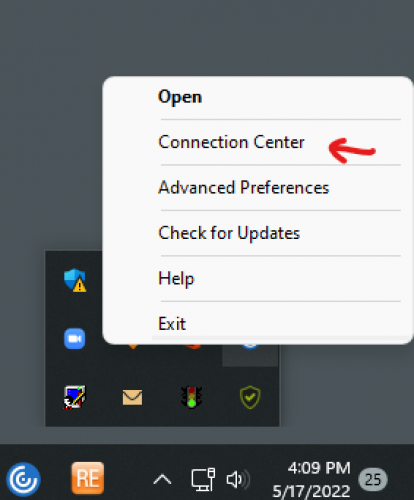
Right-click the Citrix Workspace icon in the bottom-right try and select Connection Center

In Connection Center, select the server you are connected to and then click the Preferences button

You want to make sure that “Read and write” is checked off. If it isn't, check it off, hit Apply then OK
1 -
Thank you for the detailed post, @Jamie Cross . One of our users has been having this issue and Support has similarly been unable to assist. We think his settings are the same as the other users, but I will have him follow what you outline to see if that resolves it.
0 -
Thank you for these detailed screen captures. My settings have already been set to this and still am unable to create and save an exported file to Teams/SharePoint/OneDrive folder locations. Is there anything else we can look into here or which KB articles indicate we will be unable to export to this types of locations? Thanks!
0 -
Maybe check this KB? https://kb.blackbaud.com/knowledgebase/articles/Article/67240
We are currently in Azure, but prior to that I did have to request network drive access be enabled for our organization. This allowed access to our internal network file servers. We never tested writing directly to cloud server drives because none of our users have ever asked for that.
Prior to being able to get access to our internal network file servers, we had to instruct our users to save the file locally to their desktop and then copy them as needed to department network folders.
However, the end bit to that KB article above does not sound promising for you.
“Note: If attempting to save to a virtual drive that syncs to a cloud based application, like OneDrive, DropBox, SharePoint, GoogleDrive, this may work, but Blackbaud does not test or support this configuration. Saving to a network drive will need to be a physical drive.”
0 -
I have the same problem. BB Support has told me I need access from my IT department, my IT department said it's a BB problem. So for most exports I have to save to a file I created on my desktop; for a few - haven't figured out why - I can save to a file on my drive. Annoying, but one of those things I pursued and now just live with.
1 -
@Jamie Cross and others…just wanted to report that your solution worked, and our one user was finally able to export successfully to our network folders. Thanks so much! Sorry to those users for whom this didn't do the trick.
0 -
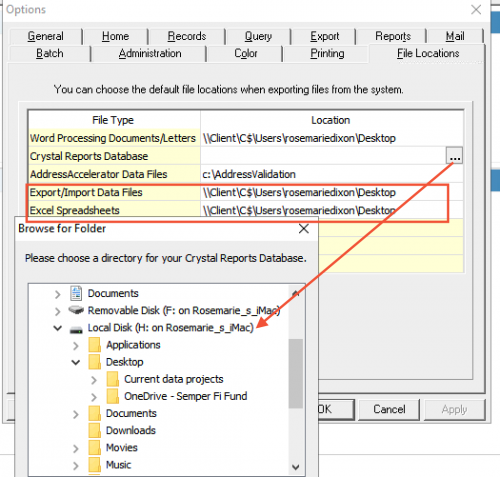
I am pretty sure you cannot download directly to SharePoint. I download all the time to my desktop. You should be able to do this in user settings so you don't have to select the path every single time. Under Tools > User Options > File Locations. I also have OneDrive on my desktop so I can save there directly if I want, but I put things on my desktop, then if I need to save to SP or OneDrive, I do it after it's on my desktop.
0 -
@Jamie Cross Hi Jamie, I just wanted to say thanks for posting this reply. This solved one of our issues and it was a quick and easy fix.
1
Categories
- All Categories
- 6 Blackbaud Community Help
- 211 bbcon®
- 1.4K Blackbaud Altru®
- 396 Blackbaud Award Management™ and Blackbaud Stewardship Management™
- 1.1K Blackbaud CRM™ and Blackbaud Internet Solutions™
- 15 donorCentrics®
- 360 Blackbaud eTapestry®
- 2.5K Blackbaud Financial Edge NXT®
- 650 Blackbaud Grantmaking™
- 568 Blackbaud Education Management Solutions for Higher Education
- 3.2K Blackbaud Education Management Solutions for K-12 Schools
- 937 Blackbaud Luminate Online® and Blackbaud TeamRaiser®
- 84 JustGiving® from Blackbaud®
- 6.5K Blackbaud Raiser's Edge NXT®
- 3.7K SKY Developer
- 248 ResearchPoint™
- 119 Blackbaud Tuition Management™
- 165 Organizational Best Practices
- 239 The Tap (Just for Fun)
- 34 Blackbaud Community Challenges
- 31 PowerUp Challenges
- 3 (Open) PowerUp Challenge: Data Health
- 3 (Closed) Raiser's Edge NXT PowerUp Challenge: Product Update Briefing
- 3 (Closed) Raiser's Edge NXT PowerUp Challenge: Standard Reports+
- 3 (Closed) Raiser's Edge NXT PowerUp Challenge: Email Marketing
- 3 (Closed) Raiser's Edge NXT PowerUp Challenge: Gift Management
- 4 (Closed) Raiser's Edge NXT PowerUp Challenge: Event Management
- 3 (Closed) Raiser's Edge NXT PowerUp Challenge: Home Page
- 4 (Closed) Raiser's Edge NXT PowerUp Challenge: Standard Reports
- 4 (Closed) Raiser's Edge NXT PowerUp Challenge: Query
- 785 Community News
- 2.9K Jobs Board
- 53 Blackbaud SKY® Reporting Announcements
- 47 Blackbaud CRM Higher Ed Product Advisory Group (HE PAG)
- 19 Blackbaud CRM Product Advisory Group (BBCRM PAG)