Deleting Unapproved Batch





According to the webfiles, I am able to select a gift in a batch and delete it. However, I am missing the delete option even though I have full access. Am I missing something or is this not an option?
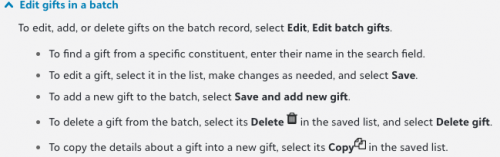
We had an alum accidentally leave the default amount selected on the donation form, which was significantly more than her intended donation. We have already refunded the incorrect amount. I was just hoping to avoid approving the batch (it's just the one donation) just to zero it out.
Comments
-
I just had a look in the one batch we have in our test database and I think this is the delete button:
 1
1 -
@Rachel Cavalier that would be. ? Unfortunately, I do not see that in my batch. I even tried clicking next to the copy button. I am at a complete loss as to why. The only thing I can figure is I have not committed the batch, which I was hoping to avoid since the gift was refunded. Thanks!
0 -
@Miki Martin - You cannot delete gifts received through Web View in the traditional sense. There is a work around, you can approve the gift move it onto a newly created record, and then delete the new record with the gift on it. However, I recommend you consider keeping the gift and adjusting it to zero to denote the refund. That way you have a record of the original attempt and the refund within your system for future reference.
1 -
@Austen Brown
Ohh. Is this a quirk that's unique to donation form webview batches and not other webview batches?0 -
@Austen Brown as much as I had wanted to avoid zeroing out the total, I think you are correct in your thinking to be able to track the refund. Noted and done. Thanks so much!
1 -
@Rachel Cavalier - I haven't tested it out, but I presume that any gift added via Web View whether through a donation form, processed through the Automatic Recurring feature, or added manually cannot be deleted. The work around I posted below is the only way I know of to delete gifts added via Web View.
0








Categories
- All Categories
- New YourCause Community TEST
- New SKY Community TEST
- New Grantmaking TEST Community
- New Altru Test Community
- New bbcon Community - TEST
- 12 Blackbaud Agents for Good™
- New Raiser's Edge NXT Community
- 7 Blackbaud Community Help
- 218 bbcon®
- 1.4K Blackbaud Altru®
- 409 Blackbaud Award Management™ and Blackbaud Stewardship Management™
- 1.2K Blackbaud CRM™ and Blackbaud Internet Solutions™
- 16 donorCentrics®
- 361 Blackbaud eTapestry®
- 2.7K Blackbaud Financial Edge NXT®
- 680 Blackbaud Grantmaking™
- 598 Blackbaud Education Management Solutions for Higher Education
- 3.3K Blackbaud Education Management Solutions for K-12 Schools
- 952 Blackbaud Luminate Online® and Blackbaud TeamRaiser®
- 85 JustGiving® from Blackbaud®
- 7K Blackbaud Raiser's Edge NXT®
- 3.9K SKY Developer
- 257 ResearchPoint™
- 123 Blackbaud Tuition Management™
- 165 Organizational Best Practices
- 247 Member Lounge (Just for Fun)
- 40 Blackbaud Community Challenges
- 37 PowerUp Challenges
- 3 (Closed) PowerUp Challenge: Grid View Batch
- 3 (Closed) PowerUp Challenge: Chat for Blackbaud AI
- 3 (Closed) PowerUp Challenge: Data Health
- 3 (Closed) Raiser's Edge NXT PowerUp Challenge: Product Update Briefing
- 3 (Closed) Raiser's Edge NXT PowerUp Challenge: Standard Reports+
- 3 (Closed) Raiser's Edge NXT PowerUp Challenge: Email Marketing
- 3 (Closed) Raiser's Edge NXT PowerUp Challenge: Gift Management
- 4 (Closed) Raiser's Edge NXT PowerUp Challenge: Event Management
- 3 (Closed) Raiser's Edge NXT PowerUp Challenge: Home Page
- 4 (Closed) Raiser's Edge NXT PowerUp Challenge: Standard Reports
- 4 (Closed) Raiser's Edge NXT PowerUp Challenge: Query
- 822 Community News
- 3.1K Jobs Board
- 57 Blackbaud SKY® Reporting Announcements
- 47 Blackbaud CRM Higher Ed Product Advisory Group (HE PAG)
- 19 Blackbaud CRM Product Advisory Group (BBCRM PAG)