Soft Credit Name in Export





Hello,
When I run an export I want to include the name of the soft credit recipients, if there are any. I tried this in both a gift export and a constituent export. Every time the “Soft Credits > Constituent Name” shows up in the export as the constituents ID number. Why is it called “Constituent Name” if gives me the ID and not the name? If I select Soft Credits > Constituent ID and >Constituent Name I get the ID number twice. If anyone knows how to get the actual name to export I would greatly appreciate it.
Thanks!
Comments
-
@Tioga Anderson I'm not seeing that happening on my exports. Can you upload a screenshot of the export parameters?
0 -
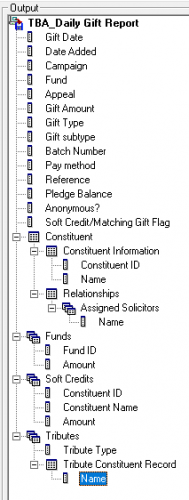
@Dariel Dixon Thanks Dariel. Screenshot attached.
0 -
@Tioga Anderson, I am having similar issues. I want to include in my acknowledgment “thank you for your gift made through XXXX Foundation…” and I can't get the name of the foundation out. This means I have to manually type it. This is just a target for errors. Hoping someone has solutions?
0 -
@Tioga Anderson, I am having similar issues. I want to include in my acknowledgment “thank you for your gift made through XXXX Foundation…” and I can't get the name of the foundation out. This means I have to manually type it. This is just a target for errors. Hoping someone has solutions?
I have tried very hard to get this to work, and never found a solution. I think you are stuck manually typing the information.
Karen
0 -
@Tioga Anderson - I have a similar weekly gift report, so I added the Soft Credits - Constituent ID, Constituent Name, and Amount to this export. I ran the export for the second quarter. My information was pulled correctly with the ID and Name in the appropriate columns, as @Dariel Dixon had mentioned. I am not sure why this isn't working correctly for you.
0 -
@Ryan Bagley - I am able to include the made through for my acknowledgments using «Soft_credit_recipient_1» , but in our organization we soft credit the “Foundation” and hard credit the donor.
0 -
@Tioga Anderson How about if you put the soft credit (the DAF name) in Gift subtype during gift processing? Or as a gift attribute? Or Reference field? You should be able to pull any of those into an export.
1 -
@Barbara Kunkel - Thanks Barbara, good to know that it is supposed to work like I thought. I think I will ask blackbaud support about it. Thanks to everyone for their responses.
1 -
@Tioga Anderson, I am having similar issues. I want to include in my acknowledgment “thank you for your gift made through XXXX Foundation…” and I can't get the name of the foundation out. This means I have to manually type it. This is just a target for errors. Hoping someone has solutions?
With regards to this @Ryan Bagley, I determined that a gift attribute was the best route. It was a bit more data entry, but I had more control on the way the acknowledgement letter printed out.
2 -
Okay so I think I know why it is happening. When I open up a gift with a soft credit, the name shows as an ID number there as well:

Is there a setting I need to change for this to show the person's actual name instead of the ID? I couldn't find one. I don't know why it would display the ID in a field called Constituent Name.
0 -
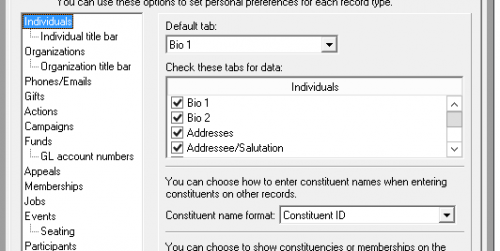
I think you can change this in Tools > User Options > Records. I had a similar issue when I ran some reports with the fund on it - my user settings determined whether it printed the fund ID or description.
2 -
@Tioga Anderson just to respond to your question about why RE would display an ID in a name field, sometimes users doing data entry will find it quicker and easier to enter a constituent ID, which is unique, than a name which might then require them to determine which ‘Jane Smith’ that comes up in the results is the correct one.
1 -
@Alan French That did it. Thanks!
1 -
@Tioga Anderson Maybe in your user options you have the Constituent Name format set to Constituent ID instead of name.
 2
2






















Categories
- All Categories
- New K-12 Community Home (TEST)
- New Higher Education Home Page (Test)
- New Impact Edge Community TEST
- New YourCause Community TEST
- New SKY Community TEST
- New Grantmaking TEST Community
- New Altru Test Community
- New bbcon Community - TEST
- 12 Blackbaud Agents for Good™
- New Raiser's Edge NXT Community
- 8 Blackbaud Community Help
- 222 bbcon®
- 1.4K Blackbaud Altru®
- 411 Blackbaud Award Management™ and Blackbaud Stewardship Management™
- 1.2K Blackbaud CRM™ and Blackbaud Internet Solutions™
- 16 donorCentrics®
- 361 Blackbaud eTapestry®
- 2.7K Blackbaud Financial Edge NXT®
- 687 Blackbaud Grantmaking™
- 604 Blackbaud Education Management Solutions for Higher Education
- 3.3K Blackbaud Education Management Solutions for K-12 Schools
- 954 Blackbaud Luminate Online® and Blackbaud TeamRaiser®
- 85 JustGiving® from Blackbaud®
- 7K Blackbaud Raiser's Edge NXT®
- 4K SKY Developer
- 258 ResearchPoint™
- 123 Blackbaud Tuition Management™
- 165 Organizational Best Practices
- 248 Member Lounge (Just for Fun)
- 40 Blackbaud Community Challenges
- 37 PowerUp Challenges
- 3 (Closed) PowerUp Challenge: Grid View Batch
- 3 (Closed) PowerUp Challenge: Chat for Blackbaud AI
- 3 (Closed) PowerUp Challenge: Data Health
- 3 (Closed) Raiser's Edge NXT PowerUp Challenge: Product Update Briefing
- 3 (Closed) Raiser's Edge NXT PowerUp Challenge: Standard Reports+
- 3 (Closed) Raiser's Edge NXT PowerUp Challenge: Email Marketing
- 3 (Closed) Raiser's Edge NXT PowerUp Challenge: Gift Management
- 4 (Closed) Raiser's Edge NXT PowerUp Challenge: Event Management
- 3 (Closed) Raiser's Edge NXT PowerUp Challenge: Home Page
- 4 (Closed) Raiser's Edge NXT PowerUp Challenge: Standard Reports
- 4 (Closed) Raiser's Edge NXT PowerUp Challenge: Query
- 829 Community News
- 3.1K Jobs Board
- 57 Blackbaud SKY® Reporting Announcements
- 47 Blackbaud CRM Higher Ed Product Advisory Group (HE PAG)
- 19 Blackbaud CRM Product Advisory Group (BBCRM PAG)