Assignment Calendar View Colors

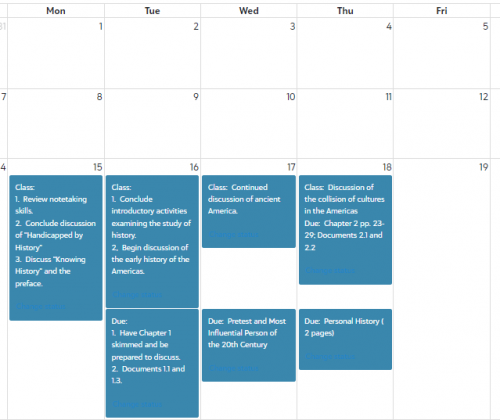
I have heard from several students that the colored boxes in Assignments (calendar view) have changed colors this year. (see image below) Has anyone else seen this? Is there a rhyme or reason to why some boxes are dark blue? Is there a way to change this or set the color by assignment status (to do, completed, in progress…). I would love to hear others experiences!

e12e37f2d1ded9fe732a0cbf4fcf3caa-huge-im

Comments

  • @Amy Welsh

    Our students are having the same experience. In addition to the weird colors (the dark blue is virtually unreadable), apparently, when a student marks ONE assignment as completed, ALL assignments are then marked as complete. Hopefully whatever glitch this is will be fixed soon. Very confusing for the students.

  • Michael Morrissette
    Michael Morrissette Blackbaud Employee
    Ninth Anniversary Kudos 5 First Reply Name Dropper

    Hey @Amy Welsh - I just wanted to let you know that our development team is aware of this issue and are in the process of changing this back to the lighter shade of blue that was present last year. We know this can be super difficult to read, and hyperlinks specifically are hard to identify with this background color.

    We should have a fix for this in the near future! If you haven't already, I would suggest reaching out to our Support team and having a case created for this issue. Once the fix is made live, you should receive a notification from that case.

    Support Information: Blackbaud Customer Support | Blackbaud

Categories