Email Pop Out with Autofill Subject




Hi
We would like to have a link to an email on one of our Resource Boards that pops out when selected. For example, if a student needed testing accommodations, they would click on the link “Request Testing Accommodations” and an email addressed to the correct person with an auto filled subject line would pop up. Then the student/parent would fill out the appropriate info and send the email. But I can't seem to find an easy way to do this. I have an idea using Google Forms as a work around.
Thanks,
Comments
-
@Megan Peter - This is possible to do, but the behavior depends in part on the settings of the user's browser. There's no guarantee that the browser will open the correct email program for the user. Your text should include the name and email address just in case the link does not work.
The HTML mailto: option for an anchor (link) tag can be used. See the page below for some examples.
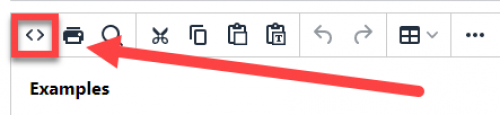
To add the raw HTML to the Resource Board page, edit the element and click the <> button (source code editing). That will open the HTML editor for the element. You can then paste the anchor tag into your page.
 2
2 -
@Megan Peter You could create a custom form from core to do this as well. You can set it to email whoever you want and set up auto-confirmations that would go to the student who created it. At my previous school, I created custom forms for teacher grade changes, student schedule change requests, among other things. They can be posted to the resource board. And once you have one built out you can use them year after year. Hope this helps!
Forms (blackbaud.com)1








Categories
- All Categories
- New K-12 Community Home (TEST)
- New Higher Education Home Page (Test)
- New Impact Edge Community TEST
- New YourCause Community TEST
- New SKY Community TEST
- New Grantmaking TEST Community
- New Altru Test Community
- New bbcon Community - TEST
- 12 Blackbaud Agents for Good™
- New Raiser's Edge NXT Community
- 8 Blackbaud Community Help
- 222 bbcon®
- 1.4K Blackbaud Altru®
- 410 Blackbaud Award Management™ and Blackbaud Stewardship Management™
- 1.2K Blackbaud CRM™ and Blackbaud Internet Solutions™
- 16 donorCentrics®
- 361 Blackbaud eTapestry®
- 2.7K Blackbaud Financial Edge NXT®
- 687 Blackbaud Grantmaking™
- 603 Blackbaud Education Management Solutions for Higher Education
- 3.3K Blackbaud Education Management Solutions for K-12 Schools
- 954 Blackbaud Luminate Online® and Blackbaud TeamRaiser®
- 85 JustGiving® from Blackbaud®
- 7K Blackbaud Raiser's Edge NXT®
- 4K SKY Developer
- 258 ResearchPoint™
- 123 Blackbaud Tuition Management™
- 165 Organizational Best Practices
- 248 Member Lounge (Just for Fun)
- 40 Blackbaud Community Challenges
- 37 PowerUp Challenges
- 3 (Closed) PowerUp Challenge: Grid View Batch
- 3 (Closed) PowerUp Challenge: Chat for Blackbaud AI
- 3 (Closed) PowerUp Challenge: Data Health
- 3 (Closed) Raiser's Edge NXT PowerUp Challenge: Product Update Briefing
- 3 (Closed) Raiser's Edge NXT PowerUp Challenge: Standard Reports+
- 3 (Closed) Raiser's Edge NXT PowerUp Challenge: Email Marketing
- 3 (Closed) Raiser's Edge NXT PowerUp Challenge: Gift Management
- 4 (Closed) Raiser's Edge NXT PowerUp Challenge: Event Management
- 3 (Closed) Raiser's Edge NXT PowerUp Challenge: Home Page
- 4 (Closed) Raiser's Edge NXT PowerUp Challenge: Standard Reports
- 4 (Closed) Raiser's Edge NXT PowerUp Challenge: Query
- 829 Community News
- 3.1K Jobs Board
- 57 Blackbaud SKY® Reporting Announcements
- 47 Blackbaud CRM Higher Ed Product Advisory Group (HE PAG)
- 19 Blackbaud CRM Product Advisory Group (BBCRM PAG)