Glitches with new event registration forms?





I'm experimenting with these new forms. Some great new features, for sure. Wonder if anyone else has experienced these glitches:
(1) If I check to limit the number of registration options and set both min and max to 1, there an error message when users select one option: Please review the fields marked in red on your form. Updates are necessary in order to submit. This does not occur if I do not set the limitation
(2) If a user is logged in and completes the form by starting from the checklist, it does update the checklist step when the form is processed. The user sees a green Registered button on the checklist. However, if I'm submitting the form with an external link, the checklist step is marked complete but does not show the green Registered button.
Comments
-
@Elizabeth Middleton I've been testing it also since it was released. I thought I would have it up and running by the next day but here I am still testing. That being said, I'm really happy with the new feature.
I haven't associated mine with the checklist (yet), I was hoping that finally I could create a new (smaller) checklist that I could add when they register for the event, but apparently not.
I didn't set limitations so I haven't experienced that issue. I have struggled to figure out where to change things (edit event? or edit registration options?) so it's been a process.
I am anxious to see everyone's ideas and feedback.
2 -
@Elizabeth Middleton I've been working with the new Event Management forms for the past few days. One issue I currently have is the Event title can be too long to properly display. In this photo, the date at the end of the title is January 11, 2023.
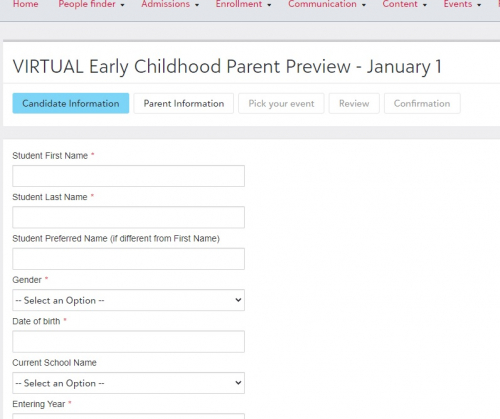
Additionally, on the Edit Registration option screen, there is a field to enter a virtual link. However, I'm not sure how to display that information to registrants.
I look forward to hearing other user's comments.
0 -
@Karla McNamee I see what you are saying. It's not completely intuitive how to get back to edit the form. I am in the testing phase too and am looking to get this set up for an event that we have coming up soon. This may be a stupid question, but what are registration options? Looks like at least one is required and if I am doing an open house I am looking just to sign people up--they don't have options. Is there a place to just select sign up only?
I tried to make the form live and test it (this also took me a bit to find all the locations to activate and publish it) and found that in testing it locked my form from editing. I never submitted and never even went to review but it locked anyway.
Still way better than the other registration forms. Next I am testing on something that will have a fee associated with it. Looking forward to hearing about others' findings!
0 -
@Rose Mary Herbert
Hello,
Registration options are the items you set up for users to sign up for on the form. The registration options are where you can define the start/end date & time, max capacity, notifications, and more!0 -
@Rose Mary Herbert another issue I just found is that I don't think the registration form is mobile-friendly when embedded on our website. ? I'm contacting support to see if they can fix this.
0 -
@Karla McNamee Yikes, I'm just now noticing this! That's a major issue - have you received any update from support?
0 -
@Sandra Bush this is their response:
“I performed further testing using the iFrame embed url with Blackbaud hosted sites and have not been able to duplicate the issue you saw on a mobile device. It may have to do with how your website provider is serving up the embedded url to display on mobile devices. If the public url is working to display properly I would continue using that method and I would also reach out to your school's website provider to further investigate why the embedded iframe url doesn't seem to display on their server supported site.”
I assumed it was just us, but since you are also experiencing the issue, I'm going to assume it's a Blackbaud thing. Since we had already went live with it and have an event in a couple weeks we couldn't afford to wait for them to figure out the issue so we replaced it with the URL for a public website, which works on mobile devices.
I had a completely new issue yesterday with Event Management; when I processed a new registration that wasn't in our database, it created the new account and the registration shows as an attachment in their record but they are not showing in y registration list. They completely disappeared. Customer Support is currently looking into this issue now too.
0 -
@Karla McNamee
Where you ever able to figure out how to make the registration form mobile friendly?0 -
@Megan Hansen
I haven't tested it again to see if it's fixed or not yet. I am pretty sure that our IT person didn't have a solution on our side of things. I'll make a note to test it again on my cell and I'll let you know if it's still an issue.0 -
@Karla McNameeThank you so much. This is at least a start for me. Really appreciate it.
0 -
@Elizabeth Middleton I realize this discussion is almost a year old but I wanted to reopen it because I've been having terrible glitches with this. Blackbaud is working on them, but for a product that's been out for a year, you'd think these major kinks would be worked out by now. I'm extremely disappointed.
0 -
@Jennifer Berger
Yes, I have an open case about it. They apparently focused on the standalone capabilities of these forms--but they do NOT perform in connection with the checklists like the old ones. MANY issues. . . . .Hope they're fixed VERY SOON.0 -
@Elizabeth Middleton @Jennifer Berger To say I am disappointed is an understatement. I was in the EAP on this and issues that we raised during the EAP just went completely unaddressed prior to release. It was a very bad look for Blackbaud and extremely unlike other EAPs that I have participated in. There are improvements being made, slowly, but those improvements are fixing things that were raised in the EAP which should have been fixed well before the full release ever saw the light of day.
We've made it work, and even in its half-baked iteration it's still a big improvement over the previous module, but to know that it could have been so much better and was rushed out the door to apparently meet some deadline with a bunch of dangling loose ends is a big, big disappointment.
0 -
@Brian LeBlanc That's terrible to hear. So far, some registrations I can't process at all and the ones I do process mark checklist items as completed for all prospects in our database. I can't imagine I'm the only one with these issues, and its beyond frustrating that they can't resolve these issues right away.
0 -
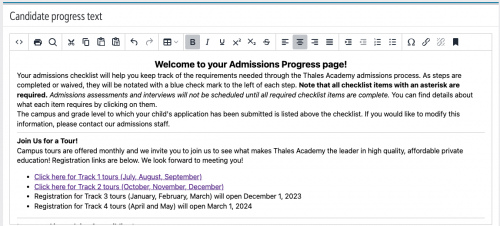
@Jennifer Berger I just gave up on having the registration directly on the checklist (partly because of the bug that it checks everyone as complete, and partly for other reasons). Instead, we've put our registration links in the Candidate Progress Text on the sidebar of the checklist. It uses the authenticated link, so the user's information is pre-filled, and it essentially provides all of the same benefits of using the checklist item other than having an actual item checked off.
At some point I'm hopeful that they will allow for reporting of candidates who attended an event on a candidates list (another thing that was requested in the EAP and not delivered, but I digress…) and at that point I'll consider putting it back on the checklist. For now, though, the workaround of having the link in the sidebar works just fine.
1 -
As much as I didn't want to think we were the only school experiencing this, I am relieved to see that this is a known issue. BB has told me two different times that all of my items being marked complete (when they shouldn't be) have to do with the way I set up my checklist. I've found it interesting that neither can tell me what is amiss in said checklist.
How are you dealing with those who register for an option and then change their mind? I would love to be able to edit the registrant's option instead of creating more workarounds!
0 -
@Brian LeBlanc That's a good idea about placing links in the progress area instead of on the checklist--at least until they get this fixed. I've seen that the old forms will be available until later than originally promised--but we've already set up for all of our events using these NEW forms, so we'll have to muddle through for now.
0 -
Hi All - I am the Product Manager for EMS and just wanted to jump in to provide some insight on what we're working on in response to some of the points you've raised here. First, we are working on updating the behavior so that a family will be marked as Scheduled instead of completed. We should have that ready to go in a couple of weeks. We're also looking into the difference in behavior when someone registers from an internal link versus external link and how that's displayed in the checklist.
In terms of managing issues where families registered by mistake or changed their mind on an option, you can now delete either just a registration option for a family using the Attendee Options list or you can delete their entire registration from the Form Submissions list.I also saw a mention of a form not showing up on a mobile device, and we're currently looking into that too!
I will look into the other points brought up in this thread and also welcome your feedback via the survey we've added to the new Events page or via the Idea Bank. I'm keeping a close eye on both and am trying to squeeze in changes where we can!
Thanks,
Kelsey Huijgen0 -
@Kelsey Huijgen Thank you for the updates. I would also like to request a few things: 1) that we be able to change the verbiage on the “register for event” button and 2) that we be able to personalize the 1st screen that registrants see. Right now that screen shows up in small bold font and I am unable to add in formatting such as paragraphs, etc.
Other than what I've mentioned above and what other people seem to be experiencing I do prefer the new reg form look to the previous version and am hopeful for more updates and using this form.
0 -
@Kelsey Huijgen Hey Kelsey, just to be clear, my frustration is very much not with you - I appreciate that you're trying to plug these holes and I know that you had nothing to do with them remaining unplugged prior to you starting in your role!!
 1
1 -
@Brian LeBlanc Hi Brian. We were about to set up a new admissions event registration form and attach it to a checklist, but based on these comments, we are rethinking that for now. How do you place the "registration links in the Candidate Progress Text on the sidebar of the checklist" as you mentioned?
0 -
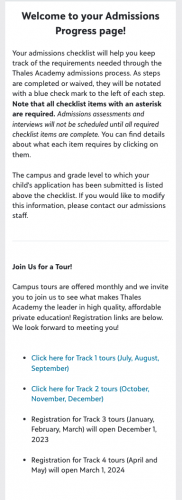
@Sondra Berry When you create the event, click the three dots and select Share, then copy the Shareable Authenticated URL. Once you've done that, go to Admissions>Admissions setup>Candidate progress text and link to the form wherever you'd like. Here's a screenshot of what ours looks like on the setup end (I use HTML code to format ours, so it looks bunched up here but it displays correctly to parents):
And here's what it looks like on the parent side:
 0
0 -
@Brian LeBlanc THANK YOU! THANK YOU! I am a visual person so all of the screenshots helped tremendously. You saved me from going down a rabbit hole that would have ended badly.
1 -
@Kelsey Huijgen - Hello. Have any of the upcoming fixes you mentioned in this post happened yet? We are recreating our checklists and I want to avoid any issues. Thank you.
0



















Categories
- All Categories
- New eTapestry Home Community
- New K-12 Community Home (TEST)
- New Higher Education Home Page (Test)
- New Impact Edge Community TEST
- New YourCause Community TEST
- New SKY Community TEST
- New Grantmaking TEST Community
- New Altru Test Community
- New bbcon Community - TEST
- 12 Blackbaud Agents for Good™
- New Raiser's Edge NXT Community
- 8 Blackbaud Community Help
- 223 bbcon®
- 1.4K Blackbaud Altru®
- 411 Blackbaud Award Management™ and Blackbaud Stewardship Management™
- 1.2K Blackbaud CRM™ and Blackbaud Internet Solutions™
- 16 donorCentrics®
- 361 Blackbaud eTapestry®
- 2.7K Blackbaud Financial Edge NXT®
- 688 Blackbaud Grantmaking™
- 604 Blackbaud Education Management Solutions for Higher Education
- 3.3K Blackbaud Education Management Solutions for K-12 Schools
- 954 Blackbaud Luminate Online® and Blackbaud TeamRaiser®
- 85 JustGiving® from Blackbaud®
- 7.1K Blackbaud Raiser's Edge NXT®
- 4K SKY Developer
- 258 ResearchPoint™
- 124 Blackbaud Tuition Management™
- 165 Organizational Best Practices
- 249 Member Lounge (Just for Fun)
- 40 Blackbaud Community Challenges
- 37 PowerUp Challenges
- 3 (Closed) PowerUp Challenge: Grid View Batch
- 3 (Closed) PowerUp Challenge: Chat for Blackbaud AI
- 3 (Closed) PowerUp Challenge: Data Health
- 3 (Closed) Raiser's Edge NXT PowerUp Challenge: Product Update Briefing
- 3 (Closed) Raiser's Edge NXT PowerUp Challenge: Standard Reports+
- 3 (Closed) Raiser's Edge NXT PowerUp Challenge: Email Marketing
- 3 (Closed) Raiser's Edge NXT PowerUp Challenge: Gift Management
- 4 (Closed) Raiser's Edge NXT PowerUp Challenge: Event Management
- 3 (Closed) Raiser's Edge NXT PowerUp Challenge: Home Page
- 4 (Closed) Raiser's Edge NXT PowerUp Challenge: Standard Reports
- 4 (Closed) Raiser's Edge NXT PowerUp Challenge: Query
- 829 Community News
- 3.1K Jobs Board
- 57 Blackbaud SKY® Reporting Announcements
- 47 Blackbaud CRM Higher Ed Product Advisory Group (HE PAG)
- 19 Blackbaud CRM Product Advisory Group (BBCRM PAG)