Difficulty getting transfer grades to populate on transcript





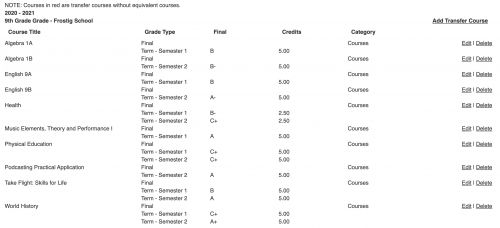
Hi, I managed to import grades successfully and even see them on a student's record in Grades Management > Enter Grades by Student > Grades & Credits - Transfer
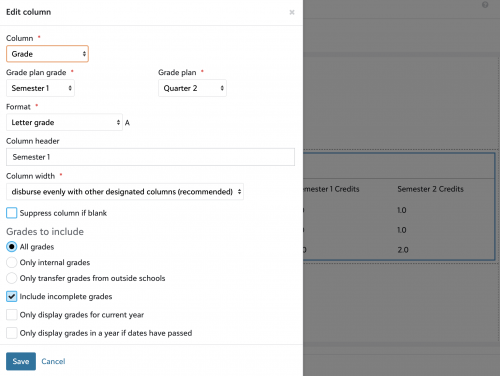
In transcript setup, I have it set up to include all grades (presuming it includes transfer grades)
Along with having all those courses set up, student enrollment in those previous years and the other pieces of grading set up (school year setup, have grade plans for each of the previous years we are trying to import)
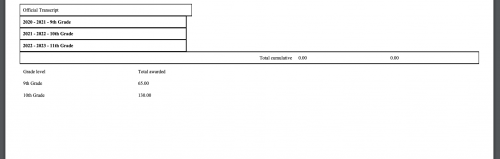
But so far the transcript still isn't showing courses, but it does show the credit count per year so it must be grabbing something from the record (they are accurate)--so not sure what else I could be missing.
Any help is appreciated, thanks!
Comments
-
@Nathan Ong - Not sure if makes a difference - but I can see that you have “Course” for Transcript Category where we have department
 0
0 -
@Sheila Gustafson Thank you for the response--setting it up our consultant said it should be fine since it would be used to group together courses for credits but at the time wasn't setting that up.
Side question and if you are fine with sharing, does this let you have a box of (English: X credits, Math: X credits etc.?) wondering if that works on transcripts but when we were setting it up it seemed it wasn't possible on the new transcripts (only something on old)
Thanks!
0 -
@Nathan Ong I don't think it is possible on the New Transcript Builder. Our school is working on Diploma / Graduation requirements. (Academics: Student: Requirements). Our Data Manager has mapped all the courses to a specific department and so on… there are still a few “glitches” in the software therefore, that option is not fully functioning just yet.
Sheila
0 -
@Nathan Ong I was able to do this after so struggle (and help from BB Support!)
Two things were hanging me up:
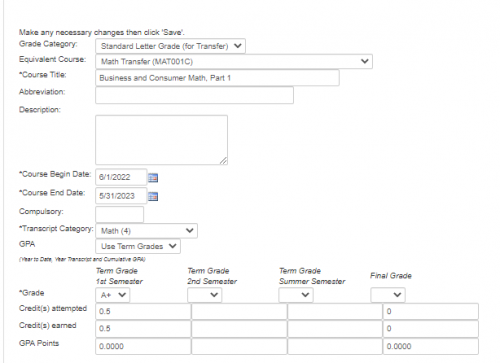
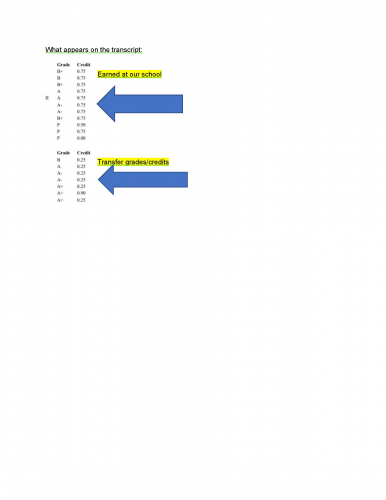
- Initially the transfer credit/class was not tied to an ACTIVE class. To make a transfer grade show on the transcript: within Academics > Hover over Grades > click on Grades management > click on the tab Enter Grades by Student > Search for the student > click view by Grades & Credits - Transfer > click Edit by class. Within this screen, the Equivalent Course must be tied to an active course.
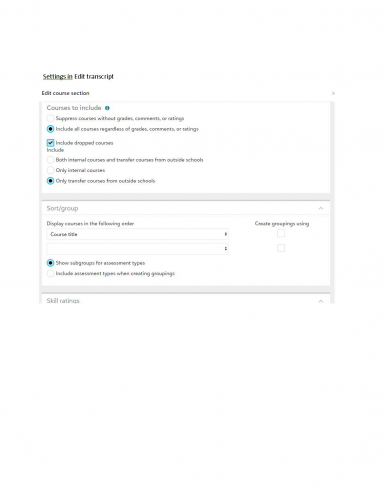
- In transcript settings, be sure to check that transfer courses should be included.
See images attached.
 1
1







Categories
- All Categories
- New K-12 Community Home (TEST)
- New Higher Education Home Page (Test)
- New Impact Edge Community TEST
- New YourCause Community TEST
- New SKY Community TEST
- New Grantmaking TEST Community
- New Altru Test Community
- New bbcon Community - TEST
- 12 Blackbaud Agents for Good™
- New Raiser's Edge NXT Community
- 8 Blackbaud Community Help
- 222 bbcon®
- 1.4K Blackbaud Altru®
- 410 Blackbaud Award Management™ and Blackbaud Stewardship Management™
- 1.2K Blackbaud CRM™ and Blackbaud Internet Solutions™
- 16 donorCentrics®
- 361 Blackbaud eTapestry®
- 2.7K Blackbaud Financial Edge NXT®
- 687 Blackbaud Grantmaking™
- 603 Blackbaud Education Management Solutions for Higher Education
- 3.3K Blackbaud Education Management Solutions for K-12 Schools
- 954 Blackbaud Luminate Online® and Blackbaud TeamRaiser®
- 85 JustGiving® from Blackbaud®
- 7K Blackbaud Raiser's Edge NXT®
- 4K SKY Developer
- 258 ResearchPoint™
- 123 Blackbaud Tuition Management™
- 165 Organizational Best Practices
- 248 Member Lounge (Just for Fun)
- 40 Blackbaud Community Challenges
- 37 PowerUp Challenges
- 3 (Closed) PowerUp Challenge: Grid View Batch
- 3 (Closed) PowerUp Challenge: Chat for Blackbaud AI
- 3 (Closed) PowerUp Challenge: Data Health
- 3 (Closed) Raiser's Edge NXT PowerUp Challenge: Product Update Briefing
- 3 (Closed) Raiser's Edge NXT PowerUp Challenge: Standard Reports+
- 3 (Closed) Raiser's Edge NXT PowerUp Challenge: Email Marketing
- 3 (Closed) Raiser's Edge NXT PowerUp Challenge: Gift Management
- 4 (Closed) Raiser's Edge NXT PowerUp Challenge: Event Management
- 3 (Closed) Raiser's Edge NXT PowerUp Challenge: Home Page
- 4 (Closed) Raiser's Edge NXT PowerUp Challenge: Standard Reports
- 4 (Closed) Raiser's Edge NXT PowerUp Challenge: Query
- 829 Community News
- 3.1K Jobs Board
- 57 Blackbaud SKY® Reporting Announcements
- 47 Blackbaud CRM Higher Ed Product Advisory Group (HE PAG)
- 19 Blackbaud CRM Product Advisory Group (BBCRM PAG)