Hello all !Our Major Donors team is having a hard time identifying the real contact from a prospected company. Do you have best pratices to share with us? (Thanks)
@Tania Pinard I think we need more info to answer your question! When you say “the real contact,” are you running into a problem where you're getting nothing? The wrong person/dated info? Something else?When I used to do research one of the challenges I had - which I'm sure many share - is that in corporations, the job titles and departments that handle philanthropy aren't even consistent. For example, one company's philanthropy might be run by HR, another's by marketing, and yet another company might have a corporate foundation with its' own staff. I know a lot of folks who use GrantAdvisor to cross-reference the info they find. (Note, this is not an official endorsement, and reflects my personal experience only.)
Hello @Vered Siegel
Thanks for replying.
Here is our current situation: The major donor staff has a portfolio of donors (individuals and companies). I am looking for a way, within RE/NXT or an Add-in, to identify easily who is the contact person from a company in the Portfolio.
Right now, they are in the proposals, but going through all the proposals to find the person is charge of the file is not ideal. So they are asking me to find the best way to identify them.
Relationships section Within the Relationships section of NXT, we identify the relationships between the company and the individual, and then, they are identified as Main Contact, Secondary contact, or Former Contact.
If a major donor staff is looking into a company’s profile, they see a list of the related staff and other relationships, but they cannot identify easily who is known by them or our colleagues.
I am looking for different ways to tag those contacts. Any ideas?
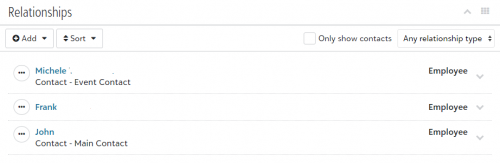
@Tania Pinard Don't forget about the checkbox on the relationships tile in NXT. If you click that box it will only show the contacts, not everyone else who has any type of relationship with that organization. That should at least help to narrow down the possibilities.
@Tania PinardWe use the Contact relationship to identify which contact to use for which team member. For example - Main Contact is used for all of our correspondence. Event Contact is used by our Event team member. Maybe you need to create a new Contact Type for your Major Donor team.
Relationships section Within the Relationships section of NXT, we identify the relationships between the company and the individual, and then, they are identified as Main Contact, Secondary contact, or Former Contact.If a major donor staff is looking into a company’s profile, they see a list of the related staff and other relationships, but they cannot identify easily who is known by them or our colleagues.I am looking for different ways to tag those contacts. Any ideas?
I'm not 100% sure what you mean by major donor staff not being able to identify easily who is known by them or our colleagues. From my experience of working with a lot of organizations who struggle with contacts, I'm going to make a guess.
The way you identify an individual relationship on an organization record is with their Position (i.e., VP of Marketing, Executive Director), use of Relationship and Reciprocal fields (the individual's relationship to the Organization record), and Contact Type (how YOU need to communicate with Individual people at Organizations, relative to YOUR organization).
There is a lot more detail that I've omitted for brevity's sake (HA!), and probably more to be accomplished, but those are the first two things that come to mind and might address the specific questions you asked.
Karen
Adding the Elon Musk / Twitter reference is because I heard about it on the news this morning and am curious how long this will last. Just adding some world history to my response.
Fantastic answer Karen!
@Tania Pinard, I would add that you should get your fundraisers to stop burying the contacts in the Opportunities altogether. If they want to have the contact there for their own convenience, fine, but they should get in the habit of putting it on the constituent record in the relationship as Karen described.
@Katherine Mannion Thanks!! Much longer than I typically like to write, but anyone who is interested will hopefully find something useful in there!
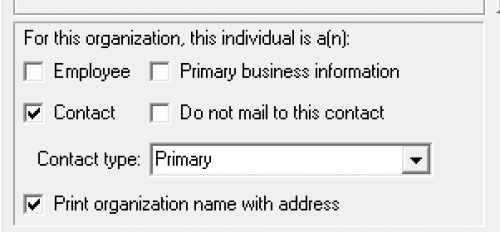
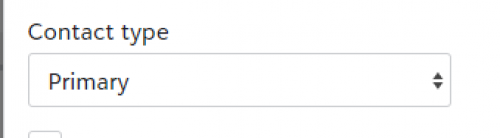
@Tania PinardWe use primary contact to identify the main contact to communicate with for an organization. In NXT this is found in the relationships, edit relationship ,“Contact Type”, “Primary” . This will display under their name in the relationships section. I have screenshots on the Database view and the NXT views. This system works well for organization.