Does a semester have to end for grades to be inputted and show up on transcripts?
We have a student who withdrew a few weeks before the semester ends (in January).
The parent is requesting for a transcript with final semester grade, so I went into Manage Grades > Enter by Student > Dropped Courses to input for Semester, for instance:
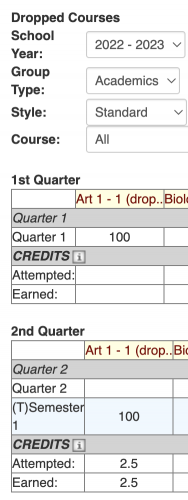
But it's not showing up on the transcript when I go to print it out.
Some reasons I'm thinking of:
- The semester hasn't ended yet
- The student's not being enrolled in the school (the parent requested documentation that the student withdrew so I unenrolled him and just used a screenshot showing the withdrawal date)
- A setting in the transcript builder involving dropped courses?
Any help is appreciated, happy new year!

Comments
-
@Nathan Ong - Grades can be reported on transcripts at any time - the term or academic year does not have to be over.
In your screenshot, there is an indication that the student dropped the course. (This happens automatically when you withdraw a student before the end of the year.) Your report card template and transcript template probably has a setting that results in those courses and grades not appearing.
Edit the report card template.
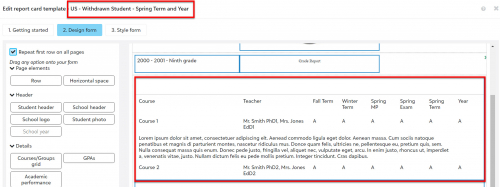
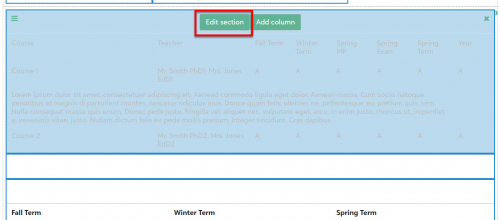
On tab 2 (Design form), point at the section for courses.


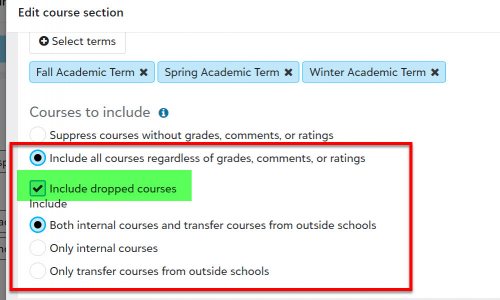
Scroll down in the edit dialog to the Courses to include section.
Check the box to Include dropped courses.
Save the changes and save the template.

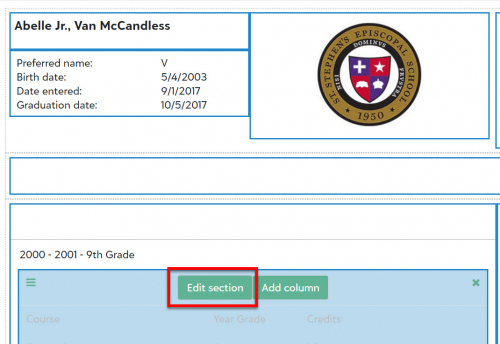
Do the same thing for the transcript template.

We keep a copy of some report card templates and transcript templates with this box checked, just to make it easy to produce these documents for withdrawn students.
---
Some unsolicited related advice that may be relevant next June: Our academic year runs from July 1 to June 30 each year, and the spring term ends on 6/30 in Core (even though exams and graduation were in late May).. When you withdraw a student, he will be dropped from all courses in the current academic term - even if the term is really over.
When you are indicating which students are not returning to your school for the next academic year, set the effective date of the withdrawal to be the first day of the next academic year. If you set the effective date to be any date in the current academic year, the student will be dropped from all courses, even though they already have final grades recorded.
5 -
@Brian Gray Thank you for the help! The tip with keeping an extra copy of the transcript for withdrawn students is great.
0
Categories
- All Categories
- 6 Blackbaud Community Help
- 209 bbcon®
- 1.4K Blackbaud Altru®
- 395 Blackbaud Award Management™ and Blackbaud Stewardship Management™
- 1.1K Blackbaud CRM™ and Blackbaud Internet Solutions™
- 15 donorCentrics®
- 359 Blackbaud eTapestry®
- 2.5K Blackbaud Financial Edge NXT®
- 646 Blackbaud Grantmaking™
- 564 Blackbaud Education Management Solutions for Higher Education
- 3.2K Blackbaud Education Management Solutions for K-12 Schools
- 934 Blackbaud Luminate Online® and Blackbaud TeamRaiser®
- 84 JustGiving® from Blackbaud®
- 6.4K Blackbaud Raiser's Edge NXT®
- 3.7K SKY Developer
- 243 ResearchPoint™
- 118 Blackbaud Tuition Management™
- 165 Organizational Best Practices
- 238 The Tap (Just for Fun)
- 33 Blackbaud Community Challenges
- 28 PowerUp Challenges
- 3 (Open) Raiser's Edge NXT PowerUp Challenge: Product Update Briefing
- 3 (Closed) Raiser's Edge NXT PowerUp Challenge: Standard Reports+
- 3 (Closed) Raiser's Edge NXT PowerUp Challenge: Email Marketing
- 3 (Closed) Raiser's Edge NXT PowerUp Challenge: Gift Management
- 4 (Closed) Raiser's Edge NXT PowerUp Challenge: Event Management
- 3 (Closed) Raiser's Edge NXT PowerUp Challenge: Home Page
- 4 (Closed) Raiser's Edge NXT PowerUp Challenge: Standard Reports
- 4 (Closed) Raiser's Edge NXT PowerUp Challenge: Query
- 779 Community News
- 2.9K Jobs Board
- 53 Blackbaud SKY® Reporting Announcements
- 47 Blackbaud CRM Higher Ed Product Advisory Group (HE PAG)
- 19 Blackbaud CRM Product Advisory Group (BBCRM PAG)