Report Card Grade Setup
Related to here:
I was surprised to find out a teacher could see other grades using the following command on their classes.
Steps to reproduce:
1. Go to a course
2. Click Grading
3. Run a grading report
When we enable Report Card setup under ACADEMICS, there is an obvious place for teachers to start seeing the report cards. However, while it's locked down to the teachers only seeing the members of their class, they can see every semester grade that a student received. So an English Teacher is able to see the semester grades from the student's history and Math teachers.
We're wanting to shut that view down so teachers can only see the grades they give out, so what are some of the other schools out there doing for this?

Comments
-
@Grant Harrison
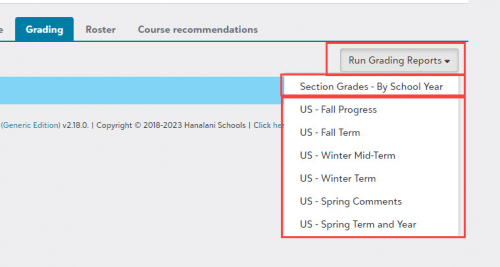
The teachers have access to see student report cards, and they went to the area where they can bring up the report cards for their class. We (our school at least) would never want to shut down that view.The report you may be expecting to see is found in the grading itself. When entering grades, in the upper right, there is “Run Grading Reports” and the dropdown has “Section Grades”. That will bring up just the grades in the particular class.
If you don't want the ability for teachers to view students' report cards (ever), then you can just leave that disabled and then direct them to the Section Grades report instead.
0 -
@David Gillespie
Thanks, that is currently what we're doing is just leaving the Section Grade Report up since that is the access we desire. I just found it surprising a default set of access was that teachers can all see each other's grades in Report Card Setup, and since we belong to a university system, that's a big no no for the departments to be able to see what other departments are giving students.We'll just have to keep the report card view turned off for Teachers on our end.
0 -
@Grant Harrison
Ah yes, the university connection creates an unusual condition there. I would think in most independent schools, teachers would expect to view the full grade report for any of their students, if not all students - at least at their own division.0 -
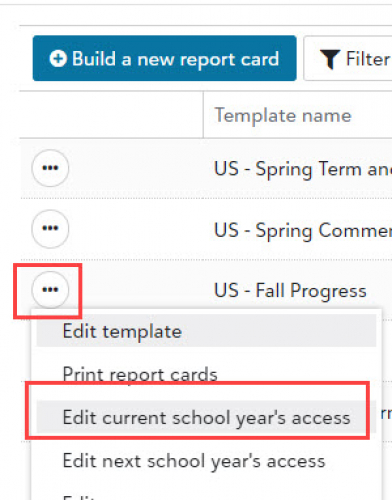
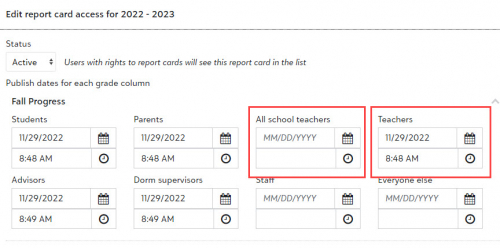
We allow teachers to see the full report card for students in their own class sections, but not for other students. We control it by settings in the report card access dates.
Academics > Grading > Report card setup, then edit current year access.
We set an access date for Teachers, but not for All school teachers.


That access controls which (if any) report cards the teacher sees in the menu on the Grading page.
0
Categories
- All Categories
- 6 Blackbaud Community Help
- 206 bbcon®
- 1.4K Blackbaud Altru®
- 393 Blackbaud Award Management™ and Blackbaud Stewardship Management™
- 1.1K Blackbaud CRM™ and Blackbaud Internet Solutions™
- 15 donorCentrics®
- 356 Blackbaud eTapestry®
- 2.5K Blackbaud Financial Edge NXT®
- 637 Blackbaud Grantmaking™
- 557 Blackbaud Education Management Solutions for Higher Education
- 3.1K Blackbaud Education Management Solutions for K-12 Schools
- 929 Blackbaud Luminate Online® and Blackbaud TeamRaiser®
- 82 JustGiving® from Blackbaud®
- 6.4K Blackbaud Raiser's Edge NXT®
- 3.6K SKY Developer
- 239 ResearchPoint™
- 117 Blackbaud Tuition Management™
- 163 Organizational Best Practices
- 237 The Tap (Just for Fun)
- 32 Blackbaud Community Challenges
- 25 PowerUp Challenges
- 3 (Open) Raiser's Edge NXT PowerUp Challenge: Standard Reports+
- 3 (Closed) Raiser's Edge NXT PowerUp Challenge: Email Marketing
- 3 (Closed) Raiser's Edge NXT PowerUp Challenge: Gift Management
- 4 (Closed) Raiser's Edge NXT PowerUp Challenge: Event Management
- 3 (Closed) Raiser's Edge NXT PowerUp Challenge: Home Page
- 4 (Closed) Raiser's Edge NXT PowerUp Challenge: Standard Reports
- 4 (Closed) Raiser's Edge NXT PowerUp Challenge: Query
- 772 Community News
- 2.9K Jobs Board
- 53 Blackbaud SKY® Reporting Announcements
- 47 Blackbaud CRM Higher Ed Product Advisory Group (HE PAG)
- 19 Blackbaud CRM Product Advisory Group (BBCRM PAG)