Name recording and pronunciation tool?
I was at a Blackbaud customer event last week and they showed a new tool where users could record themselves saying their name to help others learn pronunciation. During the meeting it was said that this feature had launched. I can't find it or any mention of it in knowledgebase. Anyone seen it yet?
Comments
-
@Brian Hoyt this was mentioned at the product update briefing in April but I didn't write down a timeframe when it would be live, so I'm not sure what the ETA is. It's going to be in Core first then hopefully ported over to EMS, and it would be a huge help in EMS for admissions events and interviews.
1 -
@Brian Hoyt from tomorrow's release notes https://community.blackbaud.com/blogs/17/9112
Name pronunciation - early adopter program (EAP)
Users at schools that are active in the early adopter program for name pronunciation, who also have access to Contact cards in Core, can play a recording of the user’s name from the user’s profile header.2 -
Hi all!
Apologies for the confusion. I am glad you are excited for the name pronunciation feature. We are in the final stages of development and anticipate having it released for the 23/24 school year. There will not be an EAP, but that only means schools will have it in their as soon as it is ready!
At release, all users can be enabled by schools to add their name pronunciation through their profile. The playback will be available on the Core, EMS, SIS, and LMS profiles to other users.Thank you!
Jacqueline
Product Manager, Student Information System3 -
@Jacqueline Koca I see the post has been updated to remove the EAP for NP. Thanks for clarifying.
0 -
@Jacqueline Koca is there an update on release for this feature?
0 -
@Jacqueline Koca Hey folks. So excited for this! I have a few questions after some initial testing that I'd love some answers on, if possible.
- When on Faculty, after I recorded my name, I notice that I don't see the top banner on my own Contact Card whereas I do when I look at any other user. Feature or bug? Makes it interesting not to see it yourself?
- Are there any plans to have it on the Directory results when searching on the Directory? If not, that's OK and we'll direct folks to the Contact Card.
- Are these recordings “publicly accessible” once recorded and able to be linked to in email signatures? #wishlist
Thanks and we're very excited about this!
0 -
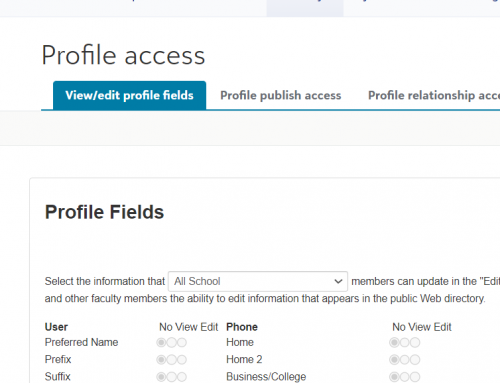
I am not able to see this in my solution - has it rolled out for all. I follow the steps from the update email Tuesday but still not seeing where we can turn it on. Core-→Security –> Profile access I can view and edit fields but nowhere is the pronunciation turn on
0 -
@Kathy Hannon
Same for us. I don't see this either in our system.0 -
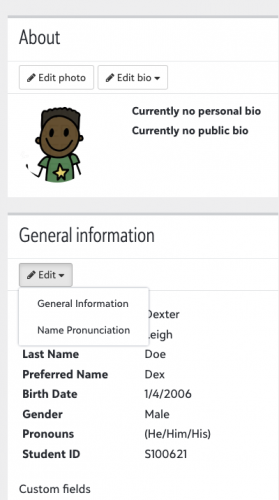
@Brian Hoyt I've only seen it on the school side. In Core, it's available in the “General Information” section of a user's contact card.
0 -
@Kathy Hannon - I don't see it either. If I don't see it next week, I'll ask support to look into it.
0 -
@Brian Gray @Kathy Hannon
This feature is being rolled out in waves to schools over the coming weeks. There's a comment at the end of the release notes this week, which I initially missed as well.0 -
Hi all!
We are very excited to have begun the release of name pronunciation. It is being released in waves, and we anticipate all schools having it no later than the end of September!
@Nick Marchese While I hate to call it a feature - it is expected that the header does not show when looking at your own profile. We hope to add it to the main directory in the future but do not have a definite timeframe for that. We don't have any current plans to make it publically accessible, but we will monitor for feedback.Thank you!
Jacqueline1 -
@Michael Panagos Thank you – I actually thought that statement was for the Scheduling Update section - lol
0 -
@Brian Hoyt I have it and it is awesome. We are rolling it out to our families this weekend. You do have to follow the steps to set it up for them to have access as well as for them to provide access. They have to allow access, once they created it, in their privacy settings for the roles they want to be able to access it.
0 -
@Brian Hoyt
We have started to use it. It's pretty cool. I did some screenshot directions, as well as a short video about how to use it. In our Middle School, we're going to have the kids record themselves during advisement. Therefore, the video is from an advisor's perspective, because the advisor has access to student profiles. I don't think it's a great idea for us, at least, to turn it on for students. But I turned it on for parents, parents FOR students, and employees. The other plan is to ask new families joining our school to do this, and providing instructions for them.0 -
@Jacqueline Koca I'm excited to start using this when it unveils for our school. From what people have said, there is no available oversight. Any thoughts on creating an approval process so students can record their voice but it pushes only upon approval? There is no way we will let students record without hearing what they say! I envision only opening for parents to record for themselves and student.
Thanks. AM
2 -
Hey @Jacqueline Koca (and maybe @Kelsey Huijgen and/or @Jessi Walters too) - am I seeing things correctly that the only place where the name recording is available at the moment is in the user's Contact Card? Is there any hope of getting this added to as a block option on an application, for example, or as a checklist item? I'm happy to add to the idea bank but don't want to waste your time on that if the wheels are already turning.
1 -
@Brian LeBlanc No promises yet, but we're looking into whether we can incorporate this into forms.
3 -
We are very excited to have begun the release of name pronunciation. It is being released in waves, and we anticipate all schools having it no later than the end of September!
Still not seeing this and I have heard from other schools the same thing? Any update on roll out timeline?
0 -
@Brian Hoyt we heard back from support early this afternoon that users on Databases 1, 2 and 3 had not yet had the feature released.
“There were a couple of changes that our development team wanted to make to the feature based on feedback from the previous release, so it will be available very soon but we do not have an exact date or timeline yet.”
0 -
@Kim Ashcraft
Good morning Kim,Would you mind sharing your video and instructions?
0 -
Seth's reply was correct. We had to delay the final wave a few days due to some concerns that came up. Once we were sure they were fully addressed, we released the final wave and it is available to all schools as of today!
0 -
@Jacqueline Koca Is there a document that explains all the places that the playback button appears? Is it only on contact card? Does it show in rosters or any other places. It doesn't appear to show on the directory itself correct?
0 -
Hi @Brian Hoyt !
Currently the playback shows on contact cards throughout the system (Core, EMS, SIS, LMS, Directory) and on Rosters. We will be looking to expand it to other areas in the upcoming months (main directory page, student list, etc). So if there is a specific area that would be valuable be sure to add them to the idea bank so I can update on when a certain area may release!0 -
@Jacqueline Koca
I've just started playing around with this but can already imagine our teachers asking for it on attendance, seating chart, and gradebook. Not sure if other schools will be in agreement so I'm curious to hear before I post an idea.1 -
@Jacqueline Koca The main directory I think would be key one. Most people don't click into the contact card.
0 -
@Jacqueline Koca - Directories, attendance and seating charts - probably in that order.
I would still like to be able to get a link to the recording like I can for photos, so that I can use them externally.
0 -
@Barbara Glass
Sure thing! I actually need to re-do the video, so let me do that and I'll send it today or tomorrow.1 -
@Kim Ashcraft
Hello Kim,How is it going? Any issues with the roll out of the name pronunciation?
0 -
@Kim Ashcraft - I tried to figure it out so that our homeroom teachers (advisors) could record the name pronunciations but they don't have acess to “academics” and I couldn't get the ability to record to show up for them from the “faculty” area. If you have screenshots or directions, would you be willing to share them with me? It may help me figure this out.
0
Categories
- All Categories
- 6 Blackbaud Community Help
- 209 bbcon®
- 1.4K Blackbaud Altru®
- 394 Blackbaud Award Management™ and Blackbaud Stewardship Management™
- 1.1K Blackbaud CRM™ and Blackbaud Internet Solutions™
- 15 donorCentrics®
- 359 Blackbaud eTapestry®
- 2.5K Blackbaud Financial Edge NXT®
- 646 Blackbaud Grantmaking™
- 563 Blackbaud Education Management Solutions for Higher Education
- 3.2K Blackbaud Education Management Solutions for K-12 Schools
- 934 Blackbaud Luminate Online® and Blackbaud TeamRaiser®
- 84 JustGiving® from Blackbaud®
- 6.4K Blackbaud Raiser's Edge NXT®
- 3.7K SKY Developer
- 243 ResearchPoint™
- 118 Blackbaud Tuition Management™
- 165 Organizational Best Practices
- 238 The Tap (Just for Fun)
- 33 Blackbaud Community Challenges
- 28 PowerUp Challenges
- 3 (Open) Raiser's Edge NXT PowerUp Challenge: Product Update Briefing
- 3 (Closed) Raiser's Edge NXT PowerUp Challenge: Standard Reports+
- 3 (Closed) Raiser's Edge NXT PowerUp Challenge: Email Marketing
- 3 (Closed) Raiser's Edge NXT PowerUp Challenge: Gift Management
- 4 (Closed) Raiser's Edge NXT PowerUp Challenge: Event Management
- 3 (Closed) Raiser's Edge NXT PowerUp Challenge: Home Page
- 4 (Closed) Raiser's Edge NXT PowerUp Challenge: Standard Reports
- 4 (Closed) Raiser's Edge NXT PowerUp Challenge: Query
- 779 Community News
- 2.9K Jobs Board
- 53 Blackbaud SKY® Reporting Announcements
- 47 Blackbaud CRM Higher Ed Product Advisory Group (HE PAG)
- 19 Blackbaud CRM Product Advisory Group (BBCRM PAG)