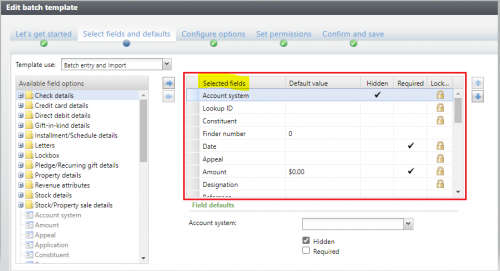
Has anyone figured out how to query the selected fields for a batch template (right side in the config UI)? The available XML includes all possible fields and I haven't found a way to identify the selected fields.
@Rob OConnellThis is what I came up with to see the selected fields…select XML.node.value('@FieldID','nvarchar(max)') from BATCHTEMPLATE BT CROSS APPLY BT.FORMDEFINITIONXML.nodes('ns:FormMetaData/ns:FormFields/ns:FormField') AS XML(node) where BT.ID = <BATCHTEMPLATEID>
@Carrie DavisThanks Carrie. I am able to query the XML, but it includes all possible fields. For example, the batch template I'm testing shows 31 “selected fields”, but this query returns 164 fields for the same batch template. The only pattern I see is that the fields not shown in the UI are hidden (makes sense), however, selected fields can also be hidden. BB Support recommended a paid engagement to identify the batch template selected fields, so I was hoping someone else in the community might have figured it out.
@Rob OConnell
That query seemed to work for my needs. I was just looking to see if one field existed, not display all selected fields - I guess that's the difference. The XML does seem to have much more than what is selected.
I had created a new Address Field for the Constituent Update Batch as an extension. During the import process, I was able to use that query to see if the new address field existed in the batch template during import - if it wasn't in the template, I could ignore import processing I was doing for the new Address Field. Here is the full version:
ALTER function [dbo].[UFN_FIELDEXISTSINIMPORTBATCHTEMPLTE](@FIELDNAME nvarchar(255),@IMPORTID uniqueidentifier)returns bitwith execute as calleras begindeclare @FIELD as varchar(255);declare @DOESFIELDEXISTS bit = 0 ;WITH xmlnamespaces ('bb_appfx_commontypes' AS [ns])select top 1 @FIELD = XML.node.value('@FieldID','nvarchar(max)')from BATCHTEMPLATE BTinner join IMPORTPROCESS IMP on IMP.BATCHTEMPLATEID = BT.IDCROSS APPLY BT.FORMDEFINITIONXML.nodes('ns:FormMetaData/ns:FormFields/ns:FormField') AS XML(node)where IMP.ID = @IMPORTIDand XML.node.value('@FieldID','nvarchar(max)') = @FIELDNAMEif COALESCE(@FIELD, '') <> ''set @DOESFIELDEXISTS = 1else set @DOESFIELDEXISTS = 0return @DOESFIELDEXISTSend
@Carrie Davis and others,
I haven't confirmed for all batch templates, but for the one I was testing with, I was able to identify the selected fields using the BATCHTEMPLATE.ADDROWDATAFORMINSTANCEID's FORMUIXML excluding hidden fields. Hopefully this is helpful to others.
with xmlnamespaces ('bb_appfx_commontypes' as common)select
bt.name, dataform.fields.value('@FieldID', 'nvarchar(max)') FieldID, dataform.fields.value('@Caption', 'nvarchar(max)') Caption from BATCHTEMPLATE BTjoin DATAFORMINSTANCECATALOG dfc on dfc.id=bt.ADDROWDATAFORMINSTANCEID cross apply dfc.FORMUIXML.nodes('common:FormMetaData/common:FormFields/common:FormField') as dataform(fields)where BT.NAME='[ENTER BATCH TEMPLATE NAME]'and dataform.fields.value('@Hidden', 'nvarchar(5)') IS NULL -- data form fields that are NOT HIDDEN