Assignment Submission / Assignment Center Redesign: Looking for EAP Participants

Hello, Hello, Hello -

As you may remember from our Product Update Briefings earlier in the year, we mentioned that the LMS team has been hard at work reconstructing the Assignment screen that student utilize and the Assignment Center that students and parents utilize. This work is nearing completion and we're looking to expand our EAP participant pool.

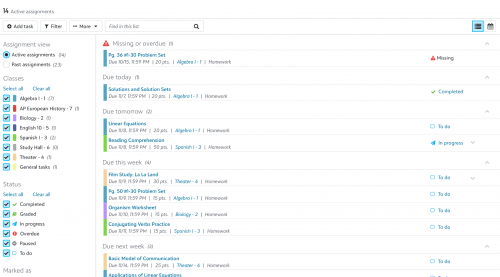
A couple of enhancements coming from these updates:

  • Students can add Tasks to Assignments
  • Students can color code their Assignment Center on a Class basis
  • Students can more easily determine how many points an Assignment is worth
  • Student can more easily determine if an Assignment is marked for Extra Credit
  • Students now see their Assignment Status change when a teachers marks an Assignment as Collected
  • Teachers can now upload documents in the Feedback section of an Assignments
  • Teachers now get a true Assignment Preview feature, allowing them to go through the same Assignment workflows that a student would otherwise get
  • And more…

Here are some screenshots of the updated experiences:

e71b6d8a14a385c5e5ad4cf8e9dea89c-huge-as

f0d0e24e06b711e563c7c03c15939aa0-huge-as

If you would like to chat about whether or not your school would be a good fit for the EAP, feel free to schedule a meeting with me using the link below. We can chat through the process in more detail and answer any questions you may have!

Schedule Meeting Link Here

-Mike

Comments

  • @Michael Morrissette

    Hi Mike! Did this go to general availability today? If so, is there documentation or a video showing students how to take advantage of the new features? It seems that our students are seeing the New Assignment Center tab, but our teachers are not.

    With gratitude for any help you can provide,

    Lori

  • @Lori MacConnell Ditto to this question on general availability. It seems our parents have the new assignment tab view as of today.

  • @Lori MacConnell
    Our Students and parents have the new view. I just impersonated a Student and took screenshots of how to find the new view (2 ways) and the new settings and sent to our teachers to spread the word for the time being.

  • @Michael Morrissette
    My son. just stumbled on it, and there's a pretty glaring omission. In calendar view, they only see when an assignment is due, not when it was assigned. This new view seems to really limit a student's view to either a list sorted by what's due next, or a calendar of due dates. I hope we don't lose the ability to see how long a teacher plans for the students to work on a project, or prepare for a test.

  • @Michael Morrissette

    I just stumbled across this as well when I was working with a student. I was unaware we even had this feature until yesterday.

  • @Michael Morrissette
    Jumping on this bandwagon - my students saw it yesterday and were THRILLED. Today, it's all gone and they are bummed. Do we have an ETA on release? They are very excited - teachers, too!

Categories