Making Parent Email lists available to Class Parents/Reps.

Has anyone figured out how to provide dynamic email lists of parents in a grade for Class Parents/Reps who need to email the grade from time to time? We don't want to have to run parent email lists in the moment and want to give our class reps the ability to do this themselves.


Comments

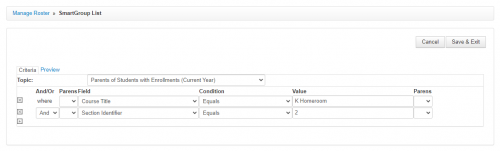
  • @Karen Tracy We set up community groups (SmartGroup) for each homeroom. We actually did this for teachers to use initially because our division directors wanted to have some admin automatically copied on emails sent to all parents of the class. I was able to give room reps access to this group by making them group leaders. It's a nuisance to set up initially, but once the group is created, you can set it to update daily so that the list is always current. Room reps see this under “my groups” and can use the "send communication to" option on the roster to send emails to all parents. The only issue we ran into is that because the room parents are “leaders” and not “members,” emails sent to Members instead of All would not include the room reps.

    These are the smart group filters that we use:

    32ab4de5f9873a20b57edb49101485e1-huge-im


  • Brian Gray
    Brian Gray Community All-Star
    Eighth Anniversary Kudos 5 First Reply bbcon 2025 Attendee Badge

    @Karen Tracy - This summer at the BB Dev Days conference, @Nick Marchese released a slick tool that will run scripts in a Google Sheets file to read Advanced Lists on a schedule and dump the results into the spreadsheet.

    You would need to to a little bit of spreadsheet work to give each person access to the correct data.

    It takes a little bit of work to set up, but once that's done, it just works.

  • @Karen Tracy Community Groups! As parents enter or leave the school (with their students) the list is dynamically updated.

  • @Brian Gray Thank you so much for your reply! Just saying: Seems like something BB should make available without a lot of slick tools and heavy lifting.

  • @Karen Tracy Actually, I misread your question originally. Grade level lists are even easier. The screenshot I included was for individual homeroom lists, but setting up a community group for each grade level is a lot quicker and easier. Then you just need to create a role for the room reps, and update the community group access to include that role so that room reps have access to the rosters.

  • @Shannon Krise THANK YOU, Sharon. Much appreciated.

Categories