Handling AM/Full day attendance for students in the same class
We have AM and Full-Day options for our Pre-Nursery kids. We need to take attendance twice for the Full-Day kids, in the AM and PM.
To keep AM kids out of the PM attendance, I created separate classes for AM and Full Day respectively, but from the teacher/admin perspective they're all one class. This works for attendance, but it means an inconvenience for having to go between classes for the full roster.
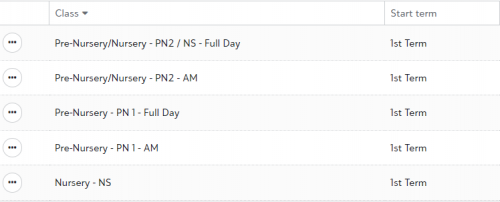
Our class setup (3 classes from admin/teacher perspective):
- Pre-Nursery 1 - split into AM and Full Day classes
- A combined Pre-Nursery and Nursery class. Split into an AM class (PN2) with no Nursery kids (they're only Full Day) for those Pre-Nursery AM kids and a Full Day class (PN2 / NS)
- A second Nursery Class.
The main problem is emailing class parents - they have to go to one class, follow the Send Communication process, then do that again for the other class.
Wondering how other schools have better ways of handling this.
Comments
-
@Daniel Wallach We also have morning and full days, and we also have 2, 3, and 5 day options in some classes, so it ends up being a lot of classes for the teachers!
What I did was create morning and afternoon classes. Everyone is there in the morning, so in your case all your students would be in your morning class. The afternoon class has just the afternoon students. That might be enough for your set up: the teacher could just use the morning class to contact all families, and the afternoon would be there for taking attendance.
Since we also have the students who are only here on certain days of the week, we didn't have that one class that contains everyone so I also created an advisory group for each teacher that includes all the students. That way for attendance we can use the classes, and the teacher can use the advisory for seeing information about all her students in one place.
0 -
@Daniel Wallach We also have a similar setup, but we are leveraging the bulletin board announcements, news, events, and other tools. When the teacher posts any of these, there is option to send to all sections simultaneously. However, they also have the flexibility to post certain things to specific sections if it doesn't apply to everyone.
1
Categories
- All Categories
- 6 Blackbaud Community Help
- 208 bbcon®
- 1.4K Blackbaud Altru®
- 394 Blackbaud Award Management™ and Blackbaud Stewardship Management™
- 1.1K Blackbaud CRM™ and Blackbaud Internet Solutions™
- 15 donorCentrics®
- 359 Blackbaud eTapestry®
- 2.5K Blackbaud Financial Edge NXT®
- 646 Blackbaud Grantmaking™
- 563 Blackbaud Education Management Solutions for Higher Education
- 3.2K Blackbaud Education Management Solutions for K-12 Schools
- 934 Blackbaud Luminate Online® and Blackbaud TeamRaiser®
- 84 JustGiving® from Blackbaud®
- 6.4K Blackbaud Raiser's Edge NXT®
- 3.7K SKY Developer
- 242 ResearchPoint™
- 118 Blackbaud Tuition Management™
- 165 Organizational Best Practices
- 238 The Tap (Just for Fun)
- 33 Blackbaud Community Challenges
- 28 PowerUp Challenges
- 3 (Open) Raiser's Edge NXT PowerUp Challenge: Product Update Briefing
- 3 (Closed) Raiser's Edge NXT PowerUp Challenge: Standard Reports+
- 3 (Closed) Raiser's Edge NXT PowerUp Challenge: Email Marketing
- 3 (Closed) Raiser's Edge NXT PowerUp Challenge: Gift Management
- 4 (Closed) Raiser's Edge NXT PowerUp Challenge: Event Management
- 3 (Closed) Raiser's Edge NXT PowerUp Challenge: Home Page
- 4 (Closed) Raiser's Edge NXT PowerUp Challenge: Standard Reports
- 4 (Closed) Raiser's Edge NXT PowerUp Challenge: Query
- 779 Community News
- 2.9K Jobs Board
- 53 Blackbaud SKY® Reporting Announcements
- 47 Blackbaud CRM Higher Ed Product Advisory Group (HE PAG)
- 19 Blackbaud CRM Product Advisory Group (BBCRM PAG)