Gradebook - workflow for tracking teacher grading (submitted/not submitted/overdue/etc)

We've just started with Gradebook as a pilot project. Teachers at this point are required to submit grades for one assignment per month by the end of each month.

The gradebook list and gradebook grades list don't seem to have filters or columns for ungraded/submitted/etc. assignments.

There also aren't filters for department. Each grade level usually has classes in 2 departments, each with their own dept heads, so being able to track/report on them separately would be very helpful.

What have people found works best for admin to be able to easily keep track of teachers' grading, so admin can follow up when teachers fall behind?

#gradebook #administration #Grading #assignments

Comments

  • @Daniel Wallach
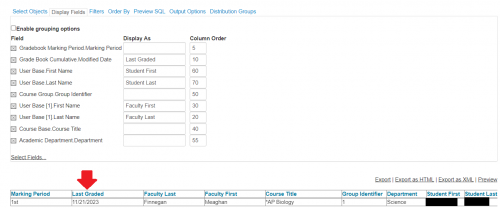
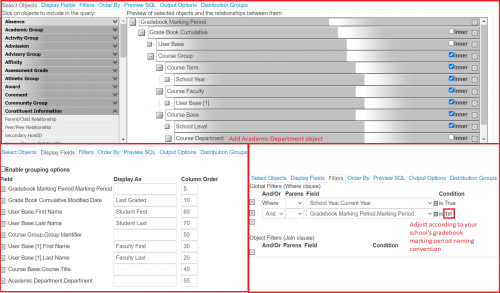
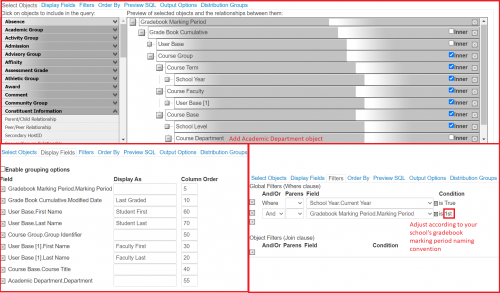
    An advanced list allows you the option to display when a section was last graded. Would that help? You could add a filter for each department and grant access to just the department head that needs to be able to run the list, depending upon the department that they're in charge of. If that would help, I can respond with the objects and filters I used to build the list.

    c8d3276d27541244a0faa43074ecaf70-huge-im
  • @Kristen Duval - I would love to know how to build this list!

  • @Kristen Duval this is fascinating! I didn't think this was possible. I will try to play with the objects, but if you have time to post them that would be very helpful. Thanks!

  • All,

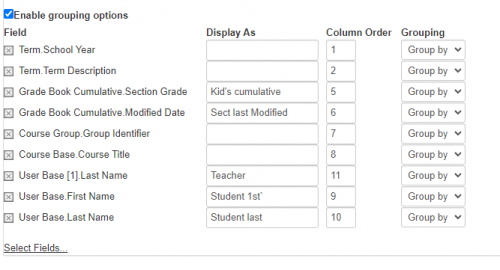
    Here's one I built that shows the teacher, the modified time of the class's gradebook cumulative, and the individual students' cumulative gradebook averages.

    You can trim away as you like to remove the student-level detail.

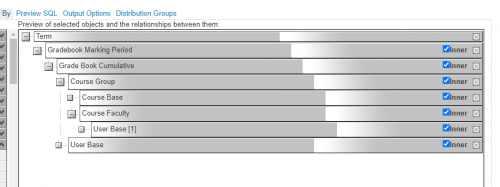
    The “Objects”:

    b7b9f943d8cdb9be3e7fbe04c28c6753-huge-im

    The displayed fields:

    fd0be4e74f471e4f3befc3aced85bcdc-huge-im

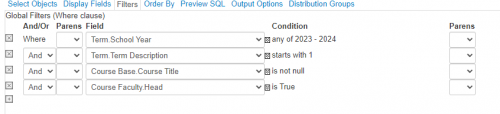
    The filters [I used].
    [note that it's often worth limiting the amount of data you're after as it's easy to run into database time/processing limits]. Hence, I only went after one term:

    0a7811191342bf22913c4ec83be59194-huge-im

    Lastly, you could, of course, do it department-wise by dropping the Academic Group\\Course Department and Academic Group\\Academic Department objects and filtering on that.

  • @Carolyn Stevens
    Sure thing! Here are the objects, display fields and filters that I used :)

    eda706d68e46fcf933cbef9aff5f8e03-huge-im
  • @Charles Shryock
    I hope you're doing well!! Here are the parameters I used. I hope this helps!

    ccadc6ae932c924b40c474ff48dec768-huge-im
  • @Kristen Duval thank you and it's great to hear from you – best wishes to you and your family!

Categories