Issuing Recurring Replacement receipts Using RE Mail Function
We (a Canadian Organization) are prepping for our annual receipting and replacement receipts, and I have an RE question related to your process on how you are issuing monthly donor replacement receipts.
Are you using RE Mail Reprint Module to issue those replacements and are you using RE MS word mail merge in RE?
I seem to be running into mail merge issues with ‘Date Issued’ and the year in the ‘Date Received’ fields.
Word receipt TEMPLATE:
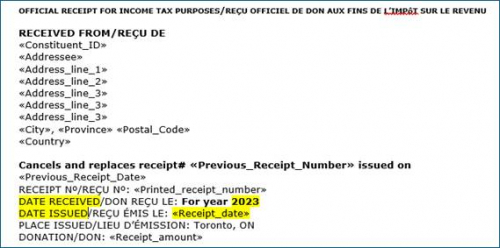
Our current process is we assign new receipt numbers for monthly donor replacement receipts under RE Mail Reprint Module, then use RE Export to export the recurring gift pay-cash replacement receipt data and use mail merge in our word receipt template.
We want to reduce the step of exporting the data from RE export, so I am testing using RE Mail Reprint Module to assign replacement receipt number and to also export the data from this module, then pull the information in our receipt template file with mail merge.
- Under the ‘Date Received’ field in recipe template I am trying to find out how to just populate the year i.e. 2023 after ‘For Year so we don’t have to create multiple receipt templates. Does anyone know how this can be done as I don’t see option in the ‘Mailings > rules’ menu, or how to set up using ‘If, then statement’?. Any suggestions would be greatly appreciated.
- Other issue is for the Date Issued’ field in our receipt template, the only field available using RE Mail Reprint Module is <<Receipt_date>> but when I merge it populates ‘<Consolidated>’. I believe this is because we need the summary information date like RE export has. Any ideas how to populate the year without manual entry?
Let me know if you need clarification on this.
Thanks!
Comments
-
@Lesa Charran I'm not Canadian and may not understand all of the implications, but I wondered if you wanted a Reprint or a Reissue.
I'm not sure that you can adjust any of the dates down to just the year in RE, but if you are exporting to Excel, could you add a column for the year there and use that as a merge field? You could copy the gift date and change the format there to only show the year, the copy and paste values.0
Categories
- All Categories
- 6 Blackbaud Community Help
- 211 bbcon®
- 1.4K Blackbaud Altru®
- 396 Blackbaud Award Management™ and Blackbaud Stewardship Management™
- 1.1K Blackbaud CRM™ and Blackbaud Internet Solutions™
- 15 donorCentrics®
- 360 Blackbaud eTapestry®
- 2.5K Blackbaud Financial Edge NXT®
- 649 Blackbaud Grantmaking™
- 568 Blackbaud Education Management Solutions for Higher Education
- 3.2K Blackbaud Education Management Solutions for K-12 Schools
- 937 Blackbaud Luminate Online® and Blackbaud TeamRaiser®
- 84 JustGiving® from Blackbaud®
- 6.5K Blackbaud Raiser's Edge NXT®
- 3.7K SKY Developer
- 247 ResearchPoint™
- 119 Blackbaud Tuition Management™
- 165 Organizational Best Practices
- 239 The Tap (Just for Fun)
- 34 Blackbaud Community Challenges
- 31 PowerUp Challenges
- 3 (Open) PowerUp Challenge: Data Health
- 3 (Closed) Raiser's Edge NXT PowerUp Challenge: Product Update Briefing
- 3 (Closed) Raiser's Edge NXT PowerUp Challenge: Standard Reports+
- 3 (Closed) Raiser's Edge NXT PowerUp Challenge: Email Marketing
- 3 (Closed) Raiser's Edge NXT PowerUp Challenge: Gift Management
- 4 (Closed) Raiser's Edge NXT PowerUp Challenge: Event Management
- 3 (Closed) Raiser's Edge NXT PowerUp Challenge: Home Page
- 4 (Closed) Raiser's Edge NXT PowerUp Challenge: Standard Reports
- 4 (Closed) Raiser's Edge NXT PowerUp Challenge: Query
- 785 Community News
- 2.9K Jobs Board
- 53 Blackbaud SKY® Reporting Announcements
- 47 Blackbaud CRM Higher Ed Product Advisory Group (HE PAG)
- 19 Blackbaud CRM Product Advisory Group (BBCRM PAG)
