Overview report in NXT Fundraising reporting includes full pledge amt despite being written off





Hi, I share the numbers showing in the overview under fundraising reporting with the board or managers and realized that for committed report it includes the full pledge amt despite the pledge being written off partially or completely. I have exported the data and confirm it. Is there a way that this number shows the actual amount after deducting the written off pledge amount?
Thanks,
naila
Comments
-
@Naila Asif Unfortunatley there is no way to see the Pledge Amount minus the write off. You will always see the full pledge amount.
0 -
@Naila Asif
if you use Constituent Query > Summary of Giving, the total amount will minus the writeoffI don't know if the same is true for Export > Summary of Giving
0 -
@Alex Wong, I want to do it from NXT dashboard instead of database constituent query. I noted that in NXT individual records show correct summary of committed but not paid amount as it deducts the write off amount but overview reporting dashboard shows original pledge amount.
see the example below:
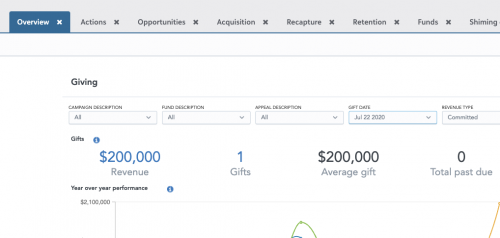
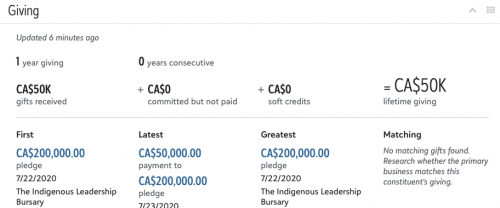
The overview report shows the revenue as $200k, where as the individual record shows gift received as $50k which the donor paid out of $200k and 0 as committed not paid, which is correct as $150k has been written off.
My point is to get the correct total in overview fundraising report as fundraisers can see the dashboard by themselves without asking me to get the received or committed revenue for a given period from database view.
0 -
@Joe Moretti, Blackbaud should do something to fix this in NXT dashboard as it is so much easier for fundraisers to see the revenue numbers by themselves. Individual records show correct amounts for lifetime giving and committed but not paid amounts but overview reports are not correct.
0 -
@Naila Asif There are limits to what you can do with pledges in both the webview and the database view. In my client roster, many organizations with significant numbers of pledges have opted to reply on database view reporting until there are more options (such as what you're looking for) available in the webview. This type of need absolutely should be logged in the Idea bank and voted for by anyone who uses pledges so that the developers can see what the need is. Raiser's Edge NXT® Ideas - Blackbaud Community
2 -
@Naila Asif
the Constituent tile for giving summary is non-configurable, it will show what Blackbaud think should be shown, and nothing you can do about it.what you want is achievable only by custom work. A separate custom build tile for Giving summary can be build to show whatever you want it to show, however, this will require you or your IT team has the capability to do SKY API and SKY Add-in. That, or hired a blackbaud partner that knows how to do it.
1 -
@Alex Wong It is not true in Export, but as you said Alex, in Query you see the amount minus the write-off. But the problem is you do not want to have to do all the fields in the output of a query like you would in an Export.
0 -
@Joe Moretti
Query or Export will depends on the need.I understand Blackbaud generally like to tell people Query is for grouping and Export is truly where you want to do output export. I do not agree with that actually.
Query can be a better place to do exporting of data as long as you are aware what is 1-many relationship that will cause dup records row and handle appropreiately. Back when I do RE reporting via database view, I do 90% of my reporting data output from Query.
Constituent Export will allow you to have separate parameter specification for each summary giving column (i.e. one with soft credit to reciepeint, one with soft credit to both full amount, one with direct credit), so if your report need requires this, then using Export makes perfect sense. However, given the OP does not have different specification for each giving summary column, using query is good, esp when write off should be excluded.
0 -
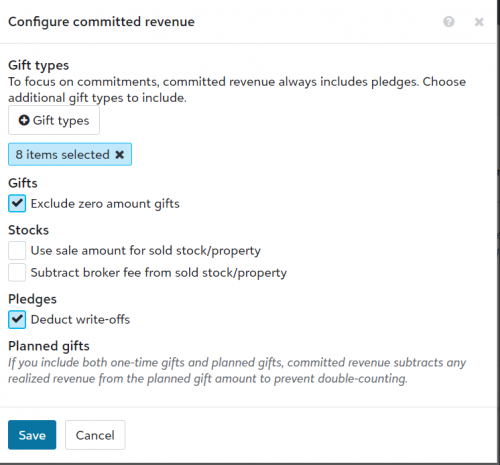
@Naila Asif I could be wrong, but I think you can define what gets counted as “Committed” in RE NXT by going to Control Panel>Settings>Giving Analysis>Committed revenue>Configure, then select the checkbox that says “Deduct write-offs”. Have you tried that and it didn't affect the Overview report?
 2
2 -
@Stephanie Crawley, I tried it before but did not show any change. I am trying it again and maybe give few hours before it will update the dashboard. I will let you know in the morning if this click will do the magic.
0 -
@Stephanie Crawley, I tried it before but did not show any change. I am trying it again and maybe give few hours before it will update the dashboard. I will let you know in the morning if this click will do the magic.
If you want to do this with the core functionality in webview, Stephanie's suggestion is the only choice. Those settings definitely do take a little bit of time to update, so waiting a few hours or overnight is the best way to test.
But I do have a feeling that it does not impact the tile on a constituent record. I remember going through a lot of testing on this for a client a few years ago, and confirming with Blackbaud. The help section shows this: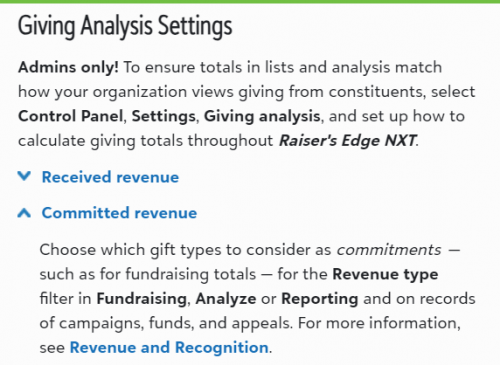
The implication is that it only updates the filters in Fundraising, Analyze or Reporting. So I the reporting you're showing in your first image would be corrected, but it might not reflect on the individual constituent tile.
I'm eager to hear how it looks this morning!
Karen
0 -
It did work! so it did take few hours to update this but now my overview reporting dashboard is showing the amount minus the written off pledge amount.
Thank you everyone for your input.
Naila
3 -
I noticed that dashboard is showing the correct total but when I clicked on the revenue to get the list as an export, it is showing the original pledge amount and not deducting the written off amount. I want to show you an exampled from my webview:

on individual record I am getting the correct lifetime giving, received and committed but not paid amounts but the list still shows $250k. Here is the image of the pledge details:
 0
0 -
@Naila Asif When you click on the revenue amount to get the list as an export, it will automatically show the original pledge amount under the field Amount, but there is the field Balance to show the current balance on the pledge in the list to export. If you aren't seeing that field in your list, you need to hit the Choose Columns icon (looks like an open book) and checkmark Balance in the Gift basics section. So it will show you original pledge amount and pledge balance, but it won't show you if it were payments or write-offs that reduced the balance. If it's important to you to pull the data from this location AND know if the pledge balance is due to a write-off, you could create a gift custom field called Write-off Amount and add it to gifts that you write off with the amount written off as the value, then checkmark that field to show in the list to export. That would mean an extra step when doing write-offs, but that may be worth it to you for this reporting/exporting capability.
1 -
@Stephanie Crawley, Do you mean to create a gift attribute Sp Gft Fld as write-off and add the write-off amount in the comment section?
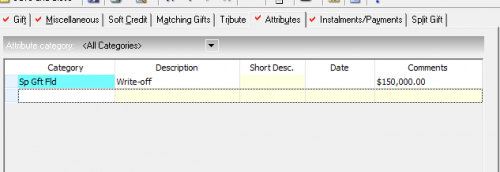
Will I see this amount in NXT if I choose the custom gift field?
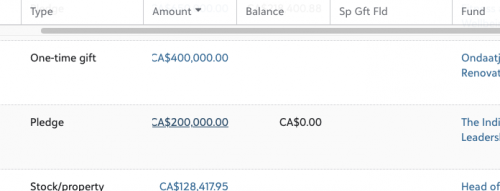
Maybe it will take few hours to update. you think the write-off gift attribute desc will appeal here? where can I see the amount if I have added it in the comment section? or should I add the amount in desc in front of write-off?
0 -
@Stephanie Crawley, ignore my prior reply, I got it
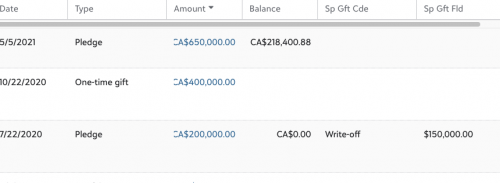
Thank you so much, really appreciate that suggestion.1 -
@Naila Asif Glad I could be of help!
1

















Categories
- All Categories
- New YourCause Community TEST
- New SKY Community TEST
- New Grantmaking TEST Community
- New Altru Test Community
- New bbcon Community - TEST
- 12 Blackbaud Agents for Good™
- New Raiser's Edge NXT Community
- 7 Blackbaud Community Help
- 218 bbcon®
- 1.4K Blackbaud Altru®
- 409 Blackbaud Award Management™ and Blackbaud Stewardship Management™
- 1.2K Blackbaud CRM™ and Blackbaud Internet Solutions™
- 16 donorCentrics®
- 361 Blackbaud eTapestry®
- 2.7K Blackbaud Financial Edge NXT®
- 680 Blackbaud Grantmaking™
- 598 Blackbaud Education Management Solutions for Higher Education
- 3.3K Blackbaud Education Management Solutions for K-12 Schools
- 952 Blackbaud Luminate Online® and Blackbaud TeamRaiser®
- 85 JustGiving® from Blackbaud®
- 7K Blackbaud Raiser's Edge NXT®
- 3.9K SKY Developer
- 257 ResearchPoint™
- 123 Blackbaud Tuition Management™
- 165 Organizational Best Practices
- 247 Member Lounge (Just for Fun)
- 40 Blackbaud Community Challenges
- 37 PowerUp Challenges
- 3 (Closed) PowerUp Challenge: Grid View Batch
- 3 (Closed) PowerUp Challenge: Chat for Blackbaud AI
- 3 (Closed) PowerUp Challenge: Data Health
- 3 (Closed) Raiser's Edge NXT PowerUp Challenge: Product Update Briefing
- 3 (Closed) Raiser's Edge NXT PowerUp Challenge: Standard Reports+
- 3 (Closed) Raiser's Edge NXT PowerUp Challenge: Email Marketing
- 3 (Closed) Raiser's Edge NXT PowerUp Challenge: Gift Management
- 4 (Closed) Raiser's Edge NXT PowerUp Challenge: Event Management
- 3 (Closed) Raiser's Edge NXT PowerUp Challenge: Home Page
- 4 (Closed) Raiser's Edge NXT PowerUp Challenge: Standard Reports
- 4 (Closed) Raiser's Edge NXT PowerUp Challenge: Query
- 822 Community News
- 3.1K Jobs Board
- 57 Blackbaud SKY® Reporting Announcements
- 47 Blackbaud CRM Higher Ed Product Advisory Group (HE PAG)
- 19 Blackbaud CRM Product Advisory Group (BBCRM PAG)