NXT Gift batches and auto recurring gifts - updates? We are still using OLX happily but know it will expire





We are still considering using some of the NXT forms and also converting to automatic recurring gifts but are wondering if NXT has added the improvements we need. All discussions I can find are from a year ago. We definitely need control on matching constituents before committing a gift. We are on the smaller side and do not want a lot of different batches as we prefer 1-3 batches a week. We also need to be able to change the appeal and/or campaign before the batch is committed. Many thanks for anyone with input!
Comments
-
@Beverly Porzelt You can edit the recurring payments from within the batch, but if that is something you are doing on the payment on a regular basis, I would definitely recommend adding an amendment to the recurring gift to save yourself the time.
While I have seen these batches and worked with them for some of my clients, I'm not sure how much control you would have regarding the number of batches. There are fewer steps to working with automatically processing recurring payments, but the batches do not look the same as they do in database view and the reporting is different.
4 -
I agree with @Christine Robertson. I wouldn't worry about the number of batches as NXT batches tend to be on the smaller side, and there's no way to control the number of batches created. I think if you need to manually edit each gift, NXT might be an easier way to go as you can edit the gifts very easily before batching @Beverly Porzelt.
2 -
@Dariel Dixon@Christine Robertson Thank you both for the replies. @Dariel Dixon I am confused how you can change the appeal/campaign before batching? It is super simple in the database view… Changing appeal/campaign was partially a question on any gift coming in, but also for recurring because we link the campaign to the calendar year it is processed.
I did see in one of the discussions that you can combine batches, can one combine them and then rename the batch? We have a number of steps that we do after batches and want to limit repeating those steps. The whole point of working in batches is to save repetition in general.
We use a custom report for batches and imagine that would still work?
Thank you!
0 -
@Beverly Porzelt You can “merge” batches though I think you would need to move the individual gifts from one batch to another.
As @Dariel Dixon and @Christine Robertson mentioned, you can adjust the gifts in the batch (including campaign and appeal) before committing.
Depending on the number of recurring gifts you have, you might want to consider the amendments to the processing date before you promote them to automated recurring, that could reduce the number of batches as well.
Now, my soap box caveat. If you have any processes that run based on date entered, the date entered for all NXT gifts processed through batch does NOT match the date committed as it does in database view. For example, I have a daily gift report that pulls in all gifts entered yesterday. If I have an NXT gift that was charged on the 15th, but I did not get the chance to commit that NXT batch until the 17th, my daily report would not pull that gift because NXT will use the 15th as the date added, not the 17th when the gift was actually committed. If you want to join my crusade to get BB to change this please vote for this idea!
Down from my soap box now.
4 -
@Dan Snyder Thank you Dan. I'll have to experiment on merging batches, I definitely wouldn't want to have to move them gift by gift. I'm afraid I'm not much help with your voting though, because we use the date entered for our reporting. At least as much as I understand your idea. Although what we would do for reporting in NXT I can't say yet. I really like the database view and don't want to convert.
I'll look into amending the dates before converting. More than half have the date we want already as that is the way we've been setting them up when we can. So, if you have 100 recurring on the 15th, will they all fall into 1 batch? I'm assuming that, but don't want to find out the hard way…
Thanks again!
0 -
@Beverly Porzelt: I think that the way you look at gift batches changes between DBV and NXT. NXT by default batches gifts by date and type and payment method. They come in that way, but they don't have to stay that way. Like you mentioned, the batches can be combined if you have a different batch system. I would look at NXT batches like the OLX bucket…the gifts come into a holding place and can be batched together or separately. In the NXT batch, editing the gift brings up a gift entry page with the gift details as they are entered by default. To me, it's much easier to edit these gifts because you can see all the details on one page, and don't need to worry about tabs and things. Even entering constituent information is easy, because NXT does have a duplicate problem.
Here is an image of what you'll see when you edit the batch gifts. The data will be pre-filled with the gift information.
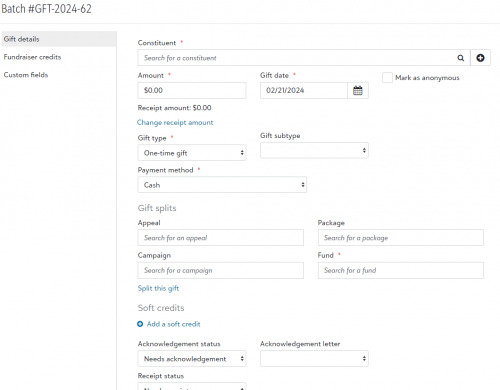
Edit Batch Gifts Screenshot My organization uses NXT to ONLY batch recurring gifts, and uses OLX for one-time gifts. Once the information is set for the donor, you don't run into duplicates anymore. And, not having to worry about manually processing EFT files makes it much easier.
That said, you may have to change your process a bit. Hopefully it will be for the better.
@Dariel Dixon@Christine Robertson Thank you both for the replies. @Dariel Dixon I am confused how you can change the appeal/campaign before batching? It is super simple in the database view… Changing appeal/campaign was partially a question on any gift coming in, but also for recurring because we link the campaign to the calendar year it is processed.
I did see in one of the discussions that you can combine batches, can one combine them and then rename the batch? We have a number of steps that we do after batches and want to limit repeating those steps. The whole point of working in batches is to save repetition in general.
We use a custom report for batches and imagine that would still work?
Thank you!
3 -
@Beverly Porzelt: In regards to your example, you have 100 recurring donors on the 15th, NXT will batch them together based not only by date, but also payment type and gift type. Recurring credit cards would be in one batch, recurring direct debits may be in another, and recurring PayPal/Venmo (I'm not sure if these are recurring options, but they are for one-time gifts) would be in another. You have the option to combine these batches, or you can batch them separately. So, in your example, you could have 70 credit cards in one batch, and 30 direct debits in another. If you need to combine the batches and have all 100 transactions in the same batch you can.
I'll look into amending the dates before converting. More than half have the date we want already as that is the way we've been setting them up when we can. So, if you have 100 recurring on the 15th, will they all fall into 1 batch? I'm assuming that, but don't want to find out the hard way…
Thanks again!
3










Categories
- All Categories
- New YourCause Community TEST
- New SKY Community TEST
- New Grantmaking TEST Community
- New Altru Test Community
- New bbcon Community - TEST
- 12 Blackbaud Agents for Good™
- New Raiser's Edge NXT Community
- 7 Blackbaud Community Help
- 218 bbcon®
- 1.4K Blackbaud Altru®
- 409 Blackbaud Award Management™ and Blackbaud Stewardship Management™
- 1.2K Blackbaud CRM™ and Blackbaud Internet Solutions™
- 16 donorCentrics®
- 361 Blackbaud eTapestry®
- 2.7K Blackbaud Financial Edge NXT®
- 681 Blackbaud Grantmaking™
- 598 Blackbaud Education Management Solutions for Higher Education
- 3.3K Blackbaud Education Management Solutions for K-12 Schools
- 952 Blackbaud Luminate Online® and Blackbaud TeamRaiser®
- 85 JustGiving® from Blackbaud®
- 7K Blackbaud Raiser's Edge NXT®
- 3.9K SKY Developer
- 257 ResearchPoint™
- 123 Blackbaud Tuition Management™
- 165 Organizational Best Practices
- 247 Member Lounge (Just for Fun)
- 40 Blackbaud Community Challenges
- 37 PowerUp Challenges
- 3 (Closed) PowerUp Challenge: Grid View Batch
- 3 (Closed) PowerUp Challenge: Chat for Blackbaud AI
- 3 (Closed) PowerUp Challenge: Data Health
- 3 (Closed) Raiser's Edge NXT PowerUp Challenge: Product Update Briefing
- 3 (Closed) Raiser's Edge NXT PowerUp Challenge: Standard Reports+
- 3 (Closed) Raiser's Edge NXT PowerUp Challenge: Email Marketing
- 3 (Closed) Raiser's Edge NXT PowerUp Challenge: Gift Management
- 4 (Closed) Raiser's Edge NXT PowerUp Challenge: Event Management
- 3 (Closed) Raiser's Edge NXT PowerUp Challenge: Home Page
- 4 (Closed) Raiser's Edge NXT PowerUp Challenge: Standard Reports
- 4 (Closed) Raiser's Edge NXT PowerUp Challenge: Query
- 822 Community News
- 3.1K Jobs Board
- 57 Blackbaud SKY® Reporting Announcements
- 47 Blackbaud CRM Higher Ed Product Advisory Group (HE PAG)
- 19 Blackbaud CRM Product Advisory Group (BBCRM PAG)