Importacular with DonorDrive





Is anyone using Importacular to import data from DonorDrive? It's a great tool but I need help getting ONLY the data we need.
We use DonorDrive for our walks. We have Importacular to migrate the data from DonorDrive to Raiser's Edge. We ONLY want registrants and the gifts they contribute imported and NOT the data of donors who donate to their page. We're having trouble excluding the donor data. When donor data imports it looks like the registrant donated the money when it was a gift someone made to their page.
I would love to collaborate with anyone using Importacular with DonordRIVE
Comments
-
@Heidi Meireles Is there a field in your API or your file that you can use to suppress the records that you don't want to bring in? I know Importacular can suppress records pretty easily - I just don't remember DonorDrive well enough to identify a field that would indicate the registrant versus the donor.
0 -
@Kimberly Lankshear - Tagging in case you have something you can add regarding Importacular and DonorDrive.
0 -
@Christine Robertson
Thank you for getting back to me. We manually import and review the gifts; it's not done through API. The Importacular team suggested creating a template that imports only the registrant's contact information, then create another template to import registrant gifts and have it pick up ONLY the gifts of those already imported. I can't wrap my brain around this.It's a project that has been on my “to-do” list for more than six months. I was hoping someone had run into a similar problem.
0 -
@Heidi Meireles If you're importing via a spreadsheet, can you just remove the rows in the spreadsheet that aren't registrants? That would avoid the need to build two templates.
0 -
@Christine Robertson We're not using a spreadsheet, the information is importing from DonorDrive into Importacular where we review the data before importing into RE.
0 -
@Heidi Meireles
@Christine Robertson We have SmartSYNC which connects DonorDrive and RE and has filters which you could use to limit the data processed. It is a real-time sync and supports NXT batches if you wish to use those. Anyway, let the team know if you are interested support at smartthing.org.0 -
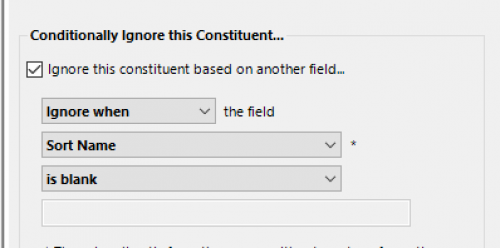
@Heidi Meireles If you are not using a spreadsheet, you are using the API integration (just to clarify terms). You need to look at the data fields available to you to see if any of them indicate the records that you don't want to add to RE. If there is a field that all of the records that you do not want in RE have in common, then you can use a conditional ignore at the constituent level to make that work. By ignoring the constituents at this level, you will not create or update any RE records (whether for Gifts or Constituents).
If you can identify such a field and need help setting this up, search the User Guide for Constituent Area Settings (or if you have paid support, you can reach out there as well).
I attached an example where I am ignoring all Constituents who have a blank value in the field “Sort Name”. You could also set this up to ignore all Constituents who have a specific value.0 -
@Christine Robertson
Thank you!0 -
@Heidi Meireles You're welcome! I hope you can find a field to make it work for you.
 0
0







Categories
- All Categories
- New eTapestry Home Community
- New K-12 Community Home (TEST)
- New Higher Education Home Page (Test)
- New Impact Edge Community TEST
- New YourCause Community TEST
- New SKY Community TEST
- New Grantmaking TEST Community
- New Altru Test Community
- New bbcon Community - TEST
- 12 Blackbaud Agents for Good™
- New Raiser's Edge NXT Community
- 8 Blackbaud Community Help
- 223 bbcon®
- 1.4K Blackbaud Altru®
- 411 Blackbaud Award Management™ and Blackbaud Stewardship Management™
- 1.2K Blackbaud CRM™ and Blackbaud Internet Solutions™
- 16 donorCentrics®
- 361 Blackbaud eTapestry®
- 2.7K Blackbaud Financial Edge NXT®
- 688 Blackbaud Grantmaking™
- 604 Blackbaud Education Management Solutions for Higher Education
- 3.3K Blackbaud Education Management Solutions for K-12 Schools
- 954 Blackbaud Luminate Online® and Blackbaud TeamRaiser®
- 85 JustGiving® from Blackbaud®
- 7.1K Blackbaud Raiser's Edge NXT®
- 4K SKY Developer
- 258 ResearchPoint™
- 124 Blackbaud Tuition Management™
- 165 Organizational Best Practices
- 249 Member Lounge (Just for Fun)
- 40 Blackbaud Community Challenges
- 37 PowerUp Challenges
- 3 (Closed) PowerUp Challenge: Grid View Batch
- 3 (Closed) PowerUp Challenge: Chat for Blackbaud AI
- 3 (Closed) PowerUp Challenge: Data Health
- 3 (Closed) Raiser's Edge NXT PowerUp Challenge: Product Update Briefing
- 3 (Closed) Raiser's Edge NXT PowerUp Challenge: Standard Reports+
- 3 (Closed) Raiser's Edge NXT PowerUp Challenge: Email Marketing
- 3 (Closed) Raiser's Edge NXT PowerUp Challenge: Gift Management
- 4 (Closed) Raiser's Edge NXT PowerUp Challenge: Event Management
- 3 (Closed) Raiser's Edge NXT PowerUp Challenge: Home Page
- 4 (Closed) Raiser's Edge NXT PowerUp Challenge: Standard Reports
- 4 (Closed) Raiser's Edge NXT PowerUp Challenge: Query
- 829 Community News
- 3.1K Jobs Board
- 57 Blackbaud SKY® Reporting Announcements
- 47 Blackbaud CRM Higher Ed Product Advisory Group (HE PAG)
- 19 Blackbaud CRM Product Advisory Group (BBCRM PAG)