New Grading Issues
Has anyone started using the “new grading” function yet? I have started to play around with it for our school and I cannot figure out why “previous grades” are not showing up. Also, when I got to calculate our yearlong grade, I am only given the option for spring semester, but I need fall semester as well.
Comments
-
@Megan Peter - We were part of the early adopter program for this. We've been through a couple of report card cycles with it.
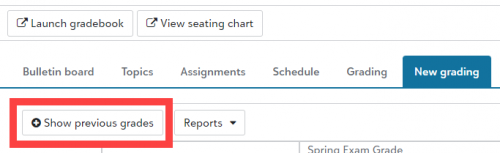
To make the grades from previous report cards appear, click the Show previous grades button.

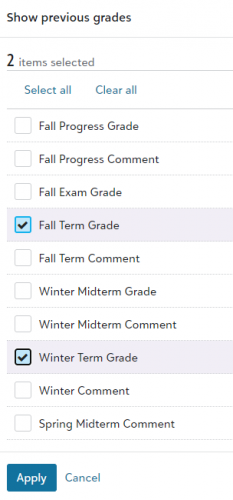
In the dialog that opens, select the grading columns that you want to see, and click Apply.

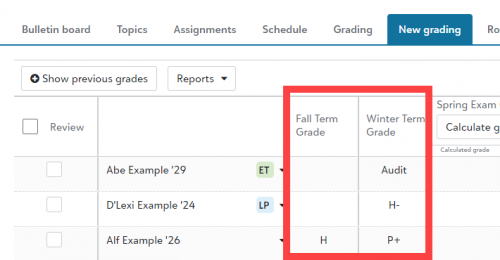
The previous term grades you selected will appear.

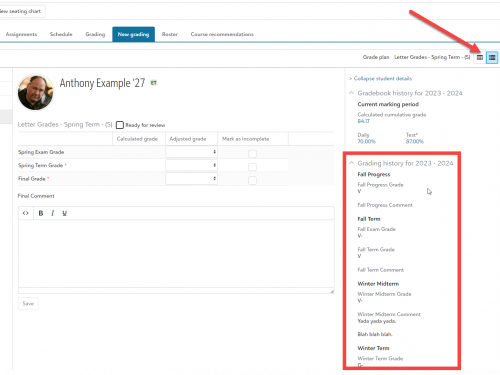
If you are in Narrative view, you don't need to do anything extra to see the previous grades. All of the previous grades are shown on the right side of the screen.

I'm not sure I understand your other question about final grades. Can you add some details about what step is going wrong for you.
1 -
Hi @Megan Peter -
With the new experience turned on, you can still access the old experience directly from the class page. I'm curious if you're able to see the Fall term in the old experience.
From the sounds of it, you may be working within single term courses. If that's the case, then the calculation and Show previous grades button won't be able to connect to the Fall version of the course because they technically exist as different entities in the database. In order to calculate cross terms, the course would need to be configured as multi-term.
-Mike
0 -
@Michael Morrissette
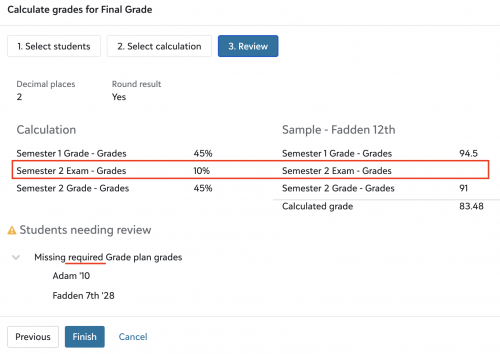
Previously, a grade could be included in a grade formula but if it wasn't marked as a “required” grade and a teacher left it blank, the system would calculate without it. This doesn't appear to be the case any longer. I have the Semester 2 Exam set to not required, but am now receiving an error:
This is what teachers used to see:
Is that going to be addressed later or do schools need to make multiple variations of the formula?
Thank you in advance!
0 -
@Michael Morrissette
If I am understanding your answer correctly, since we have all our courses set as “1 term” even if they are technically a yearlong course, we won't be able to access previous terms grades.Is there anything in the works to allow for getting this updated since the information is all there for the students, it would just be a matter of making the connections?
0 -
Hi @Kristen Duval -
Originally that was our guidance, to create a different formula to use for situations where a non-required grade could potentially be left null for a given student. However, after a little more internal research, we think we can have the new experience mimic the old calculation where it would exclude the null, non-required grade value.
I'll make a quick update on this post once the first enhancement has been made live.
-Mike
0 -
Hi @Megan Peter -
That is correct. Even though the rosters, teacher, and the name of the section are the same, it's technically a different class section record because of the 1 term setting. So, while it looks to be identical, on the backend they are treated as completely separate entities.
If you don't mind, I would love to learn more about your school's setup. I'll reach out directly and maybe we can set up a time to discuss in more detail.
-Mike
0 -
Hey @Michael Morrissette,
That's great! Thank you for responding - I truly appreciate it. I'm really loving the new grading updates. Thanks again
0 -
Quick update, @Kristen Duval – The change will be going live with next Tuesday's release! If you try it then and it's still not behaving as you would expect, feel free to reach out to me directly.
0 -
So awesome!! Thanks for the good news. I will pass it along
0 -
@Michael Morrissette @Jacqueline Koca
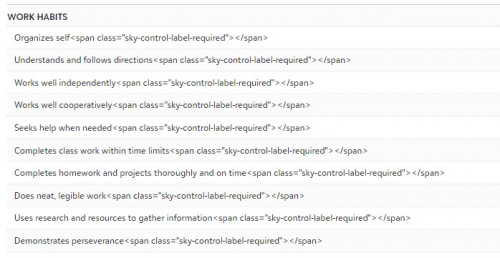
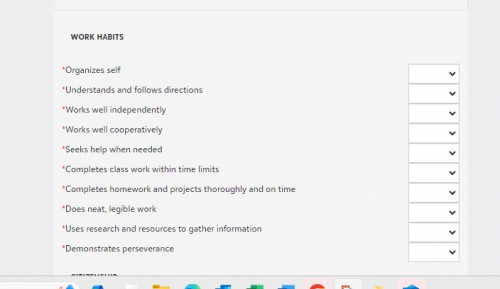
Hi all! I was taking a sneak peek at the new grading tab for Assessment report cards in Lower School. The Assessment Skills are all showing up with messy HTML code. Is this on your team's radar? Below is a screenshot of the “new” and the “old" grading tabs. Thanks!
0 -
Hi @Nancy Kierstead -
Thanks for posting this for us! We have an engineer looking into this now for us.
If you haven't, I would suggest reaching out to our Support team so they can link your case to the existing defect. That way, when the fix is deployed, you'll get an email letting you know.
-Mike
1 -
@Michael Morrissette
I tried chatting with Support to get this answer but was unsuccessful so am trying here:- Can I activate the ‘new end of term grade entry’ features so that I can test and get screen shots for our teachers and then turn it back off until the teachers have been trained? (I don't want them to find the new screens by accident and get anxious about the changes.)
- When will the ‘old’ screens be permanently disabled? The only documentation I found said ‘fall 2024’. I don't want teachers to start entering grades with the old version and then have those disabled and be forced to use the new screens (even if they do seem better) during our 1st trimester grade entry.
Thanks!
0 -
- Yes, you can turn on the feature and then turn it off, that shouldn't be an issue. When the feature is turned on, it will be on for all faculty. So, if you don't want them finding it by accident, I would do your screengrabs during an off-peak hour, or only enable a Grade Plan that you have access to for testing purposes. I will note that during this opt-in period, teachers will have access to both the old and the new experience at the same time. Hopefully that gives your faculty a little time to ease into the new experience before the old one is phased out completely.
- We don't have a concrete date just yet, but will likely be making the move while most schools are on Winter break. We'll communicate via a blog post and our What's New communication once that timeline has been solidified. I would expect an official announcement closer to the end of September.
-Mike
0 - Yes, you can turn on the feature and then turn it off, that shouldn't be an issue. When the feature is turned on, it will be on for all faculty. So, if you don't want them finding it by accident, I would do your screengrabs during an off-peak hour, or only enable a Grade Plan that you have access to for testing purposes. I will note that during this opt-in period, teachers will have access to both the old and the new experience at the same time. Hopefully that gives your faculty a little time to ease into the new experience before the old one is phased out completely.
-
@Michael Morrissette Thanks for the quick reply! My plan was to test / grab screenshots with a ‘test’ class that I only have access to so we are on the same page there.
As long as the ‘old’ screens don't go away before mid November we should be fine so winter break sounds like a good plan for us anyway.
Thanks again!
0
Categories
- All Categories
- 6 Blackbaud Community Help
- 209 bbcon®
- 1.4K Blackbaud Altru®
- 394 Blackbaud Award Management™ and Blackbaud Stewardship Management™
- 1.1K Blackbaud CRM™ and Blackbaud Internet Solutions™
- 15 donorCentrics®
- 359 Blackbaud eTapestry®
- 2.5K Blackbaud Financial Edge NXT®
- 646 Blackbaud Grantmaking™
- 563 Blackbaud Education Management Solutions for Higher Education
- 3.2K Blackbaud Education Management Solutions for K-12 Schools
- 934 Blackbaud Luminate Online® and Blackbaud TeamRaiser®
- 84 JustGiving® from Blackbaud®
- 6.4K Blackbaud Raiser's Edge NXT®
- 3.7K SKY Developer
- 243 ResearchPoint™
- 118 Blackbaud Tuition Management™
- 165 Organizational Best Practices
- 238 The Tap (Just for Fun)
- 33 Blackbaud Community Challenges
- 28 PowerUp Challenges
- 3 (Open) Raiser's Edge NXT PowerUp Challenge: Product Update Briefing
- 3 (Closed) Raiser's Edge NXT PowerUp Challenge: Standard Reports+
- 3 (Closed) Raiser's Edge NXT PowerUp Challenge: Email Marketing
- 3 (Closed) Raiser's Edge NXT PowerUp Challenge: Gift Management
- 4 (Closed) Raiser's Edge NXT PowerUp Challenge: Event Management
- 3 (Closed) Raiser's Edge NXT PowerUp Challenge: Home Page
- 4 (Closed) Raiser's Edge NXT PowerUp Challenge: Standard Reports
- 4 (Closed) Raiser's Edge NXT PowerUp Challenge: Query
- 779 Community News
- 2.9K Jobs Board
- 53 Blackbaud SKY® Reporting Announcements
- 47 Blackbaud CRM Higher Ed Product Advisory Group (HE PAG)
- 19 Blackbaud CRM Product Advisory Group (BBCRM PAG)