Help Needed with Alumni Parent Report

Hi! I'm new here, and I need help with an alumni parent report.

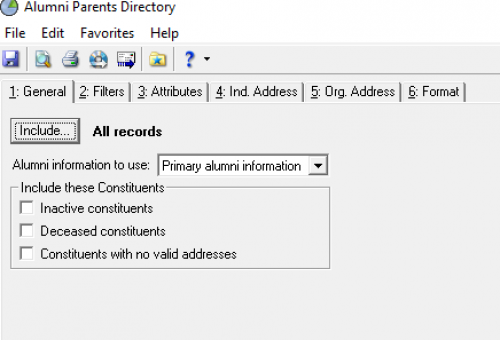
I'm starting in Reports > Profiles, Lists, & Directories > Parent Directory

My first issue, I need to filter out deceased constituents. I've unchecked ‘include these constituents’ and then I attached a query (not shown) for ‘Deceased = No’. The report is still pulling in deceased alumni parents. How can I fix this?

Secondly, under the Filters tab, I'm pulling ‘Alumni Parent’ under ‘Parent Codes’. This works for all records EXCEPT it brings in more info than I want for a specific constituent group: those who are alumni and ALSO alumni parents.

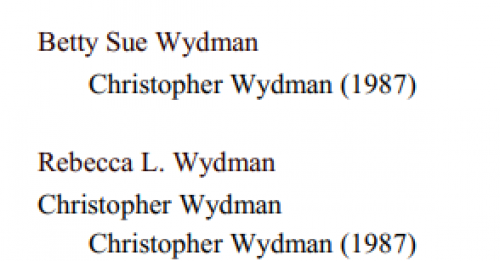
Here is an example of the problem, below: Betty Sue is the Alumni Parent, and Christopher is her son. That info is correct. Christopher is ALSO an alumni parent of a student in the 2000's, the second entry is incorrect; it appears that he is also the son of Rebecca (who is his wife) and himself.
d97aaf7ac5064e8eb6afa9ac7c919bd6-huge-im

I JUST want the original alumni parent(s) and child listed under the appropriate year. Right now it is also pulling aunts, uncles, siblings, etc. only for those who are both alumni and alumni parents, making it appear that these superfluous constituents are the parents of the alumnus/alumna.

I'm guessing a query would help here but I have tried several different things and nothing works-can anyone help?

Thank you!!

Liz
ab8a258f7faec6f97f07bcbc7c48b388-huge-im

Comments

  • Christine Robertson
    Christine Robertson Community All-Star
    Kudos 5 Name Dropper Participant First Anniversary

    @Liz Wright This is absolutely dependent on the codes in your system as well as the criteria that you have selected, but happy to try to help.

    Can you show what you selected on the second tab?

    63dab4bfa06744ddb14089ad1d32b335-huge-im


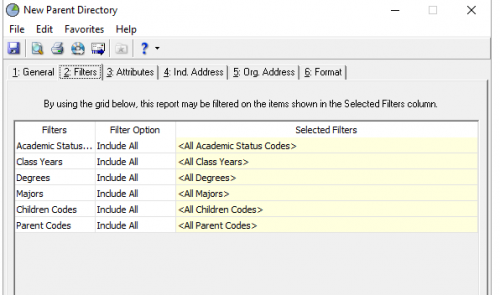
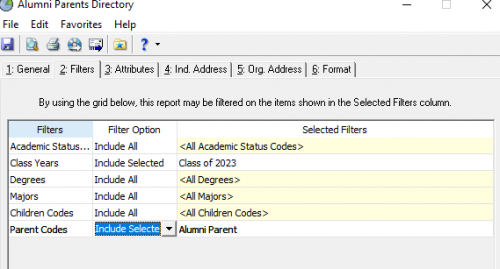
  • @Christine Robertson thank you so much! Here are my selections. I'm wondering if it has something to do with the ‘children’ option…

    a38065fc7ee70b66f57b7d1fcae8f925-huge-im


  • Christine Robertson
    Christine Robertson Community All-Star
    Kudos 5 Name Dropper Participant First Anniversary

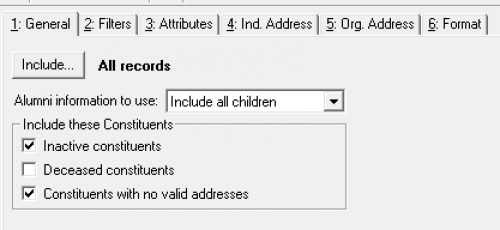
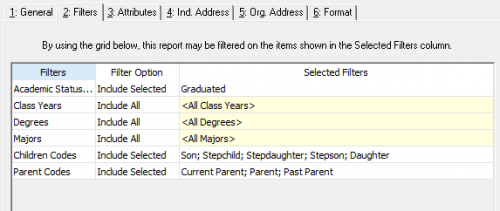
    @Liz Wright If I am understanding correctly, you want to see all living alumni parents (if someone is both an alum and an alumni parent they should then be listed twice). I was able to do that in my sample with these settings:

    f2b6a751cf38244a640e255a556def47-huge-im
    bd7574902a644be9113fdb987dfac154-huge-im

    Your code tables will be different, but try something along these lines to see if that generates the correct results.

    If your records aren't consistently coded, this may be very difficult to do.

  • @Christine Robertson thank you so much- taking a crack at it right now!

  • @Christine Robertson thank you again for your help! I wasn't choosing the Children Code, and then when I did, the code of ‘daughter’ wasn't an option (although it is in the web view table under relationships, which is odd).

    I fixed the problem by universally changing anyone with a ‘daughter’ relationship code to ‘child’ (we are switching to gender-neutral terminology so this needed to be done anyway) and it worked! :) Thank you again!

  • Christine Robertson
    Christine Robertson Community All-Star
    Kudos 5 Name Dropper Participant First Anniversary

    @Liz Wright You're welcome - I'm so glad that worked for you. Have a great rest of your day. =)

Categories