Comparing funds from different years by month




I am looking for a way to compare funds from different years and track how they did month to month to see we are on track this year comparingly. Does anyone know where I could possible build that out?
Comments
-
@Israel Pena
export all the gifts in the number of years you want to track, then in excel you can manipulate with pivot table and formulaOr you can use Power BI or other report visualization tool and import the data you export from RE and create dashboard
1 -
@Israel Pena:
I am looking for a way to compare funds from different years and track how they did month to month to see we are on track this year comparingly. Does anyone know where I could possible build that out?
You may be able to view some charts in webview, under Fundraising → Reporting. It depends on your end goal to an extent - if you can set up a chart to show what you want, you will need to grab a screen shot of it to share with users who either don't want to log in to webview or don't have permission.
Go to Fundraising and then down to Reporting. On the Overview tab, you can select filters at the top and specify the Funds you would like to see. Although you can only pick one date range, the first graph will show that date range compared to the previous two date ranges.Take a look and see if that is helpful. That is the only one I can think of that shows a comparison.
1 -
@Israel Pena Feel free to contact me offline for information about Data Moose (steve@datamoose.org) where we provide turnkey data warehousing for NXT. A data warehouse would make this reporting more straightforward by exposing the data to analytics tools like PowerBI and even Excel.
0 -
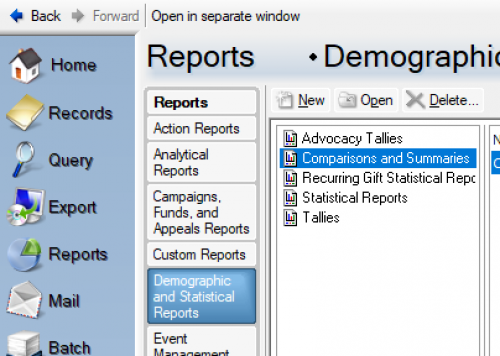
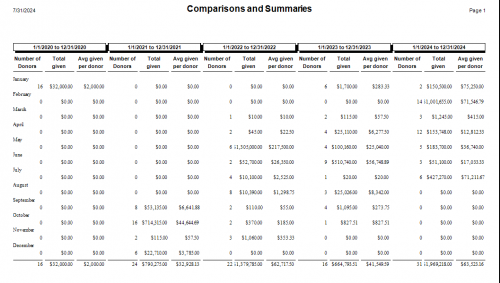
@Israel Pena Have you looked at the Comparison and Summary Report in DB view? It might get you what you want to see. (This is fake data.)
0










Categories
- All Categories
- New YourCause Community TEST
- New SKY Community TEST
- New Grantmaking TEST Community
- New Altru Test Community
- New bbcon Community - TEST
- 12 Blackbaud Agents for Good™
- New Raiser's Edge NXT Community
- 7 Blackbaud Community Help
- 218 bbcon®
- 1.4K Blackbaud Altru®
- 409 Blackbaud Award Management™ and Blackbaud Stewardship Management™
- 1.2K Blackbaud CRM™ and Blackbaud Internet Solutions™
- 16 donorCentrics®
- 361 Blackbaud eTapestry®
- 2.7K Blackbaud Financial Edge NXT®
- 680 Blackbaud Grantmaking™
- 598 Blackbaud Education Management Solutions for Higher Education
- 3.3K Blackbaud Education Management Solutions for K-12 Schools
- 952 Blackbaud Luminate Online® and Blackbaud TeamRaiser®
- 85 JustGiving® from Blackbaud®
- 7K Blackbaud Raiser's Edge NXT®
- 3.9K SKY Developer
- 257 ResearchPoint™
- 123 Blackbaud Tuition Management™
- 165 Organizational Best Practices
- 247 Member Lounge (Just for Fun)
- 40 Blackbaud Community Challenges
- 37 PowerUp Challenges
- 3 (Closed) PowerUp Challenge: Grid View Batch
- 3 (Closed) PowerUp Challenge: Chat for Blackbaud AI
- 3 (Closed) PowerUp Challenge: Data Health
- 3 (Closed) Raiser's Edge NXT PowerUp Challenge: Product Update Briefing
- 3 (Closed) Raiser's Edge NXT PowerUp Challenge: Standard Reports+
- 3 (Closed) Raiser's Edge NXT PowerUp Challenge: Email Marketing
- 3 (Closed) Raiser's Edge NXT PowerUp Challenge: Gift Management
- 4 (Closed) Raiser's Edge NXT PowerUp Challenge: Event Management
- 3 (Closed) Raiser's Edge NXT PowerUp Challenge: Home Page
- 4 (Closed) Raiser's Edge NXT PowerUp Challenge: Standard Reports
- 4 (Closed) Raiser's Edge NXT PowerUp Challenge: Query
- 822 Community News
- 3.1K Jobs Board
- 57 Blackbaud SKY® Reporting Announcements
- 47 Blackbaud CRM Higher Ed Product Advisory Group (HE PAG)
- 19 Blackbaud CRM Product Advisory Group (BBCRM PAG)