What does the community do with monthly backup files and SQL queries?




Hello everyone, we request a monthly data backup file from Blackbaud. We need to run some SQL checks on our data for reporting because some of the things that we need to look at in more detail cannot be done within RE Query. Our current solution is to export into Excel and use array formulas, but we would like to improve that process.
However, in interrogating our monthly backup file, we are now encountering some difficulties with many fields having a numeric code instead of something in plain English, where we've since learned that many tables have foreign keys as well as primary keys. We have acquired a schema, but that seems to hinder more than help, in terms of converting those numeric codes to either short descriptions or long descriptions.
I'm hoping that we cannot surely be the only client encountering these challenges, hence what does the Blackbaud community do instead? Is there a shared resource of standardised T-SQL queries for use with Microsoft SQL Server Management Studio, or do you just contact Blackbaud Project Support for a quote and delivery date?
Comments
-
@Mal Colley
Blackbaud support for SQL is very minimal, KB has some article if you search “SQL”.But will not be enough depending on your need. RE Schema help file is all you have to reference.
The tableentriesid you are seeing a lot is referencing TABLEENTRIES table, tableentriesid field.
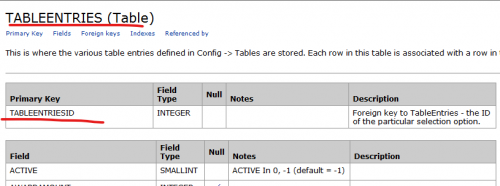
For example:
Code from CONSTITUENT_CODES table reference TABLEENTRIES.tableentriesid
SELECT r.constituent_id AS ‘Constituent ID’,cc_te.longdescription AS ‘Constituent Code’
FROM records AS r
LEFT JOIN constituent_codes AS cc ON cc.constit_id=r.id
LEFT JOIN tableentries AS cc_te ON cc_te.tableentriesid=cc.code
You need to do your own due diligent to understand all the tables in the schema and how each relates. All the One-to-Many relationship. There is really no other “resource”
0 -
@Mal Colley
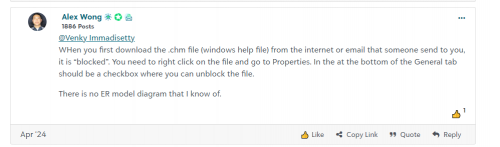
You can download the schema from hereAnd follow the below instructions to view the complete tables information in Schema
 0
0







Categories
- All Categories
- New K-12 Community Home (TEST)
- New Higher Education Home Page (Test)
- New Impact Edge Community TEST
- New YourCause Community TEST
- New SKY Community TEST
- New Grantmaking TEST Community
- New Altru Test Community
- New bbcon Community - TEST
- 12 Blackbaud Agents for Good™
- New Raiser's Edge NXT Community
- 8 Blackbaud Community Help
- 222 bbcon®
- 1.4K Blackbaud Altru®
- 410 Blackbaud Award Management™ and Blackbaud Stewardship Management™
- 1.2K Blackbaud CRM™ and Blackbaud Internet Solutions™
- 16 donorCentrics®
- 361 Blackbaud eTapestry®
- 2.7K Blackbaud Financial Edge NXT®
- 687 Blackbaud Grantmaking™
- 604 Blackbaud Education Management Solutions for Higher Education
- 3.3K Blackbaud Education Management Solutions for K-12 Schools
- 954 Blackbaud Luminate Online® and Blackbaud TeamRaiser®
- 85 JustGiving® from Blackbaud®
- 7K Blackbaud Raiser's Edge NXT®
- 4K SKY Developer
- 258 ResearchPoint™
- 123 Blackbaud Tuition Management™
- 165 Organizational Best Practices
- 248 Member Lounge (Just for Fun)
- 40 Blackbaud Community Challenges
- 37 PowerUp Challenges
- 3 (Closed) PowerUp Challenge: Grid View Batch
- 3 (Closed) PowerUp Challenge: Chat for Blackbaud AI
- 3 (Closed) PowerUp Challenge: Data Health
- 3 (Closed) Raiser's Edge NXT PowerUp Challenge: Product Update Briefing
- 3 (Closed) Raiser's Edge NXT PowerUp Challenge: Standard Reports+
- 3 (Closed) Raiser's Edge NXT PowerUp Challenge: Email Marketing
- 3 (Closed) Raiser's Edge NXT PowerUp Challenge: Gift Management
- 4 (Closed) Raiser's Edge NXT PowerUp Challenge: Event Management
- 3 (Closed) Raiser's Edge NXT PowerUp Challenge: Home Page
- 4 (Closed) Raiser's Edge NXT PowerUp Challenge: Standard Reports
- 4 (Closed) Raiser's Edge NXT PowerUp Challenge: Query
- 829 Community News
- 3.1K Jobs Board
- 57 Blackbaud SKY® Reporting Announcements
- 47 Blackbaud CRM Higher Ed Product Advisory Group (HE PAG)
- 19 Blackbaud CRM Product Advisory Group (BBCRM PAG)