Questions about Forms





I'm trying to add parents as recipients in a form and the system seems to only list the students. Am I to understand that if I select parents that the message will be sent to the listed student's parents in the selection box.
Also how do I send forms to a whole division (upper, middle and lower schools) if it is not listed as a group??
Comments
-
@Richard Pan When setting up forms, you want to send them to “Parent of User”.
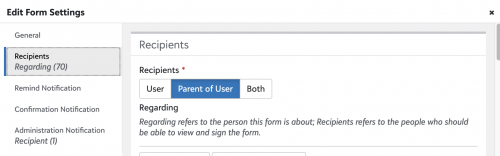
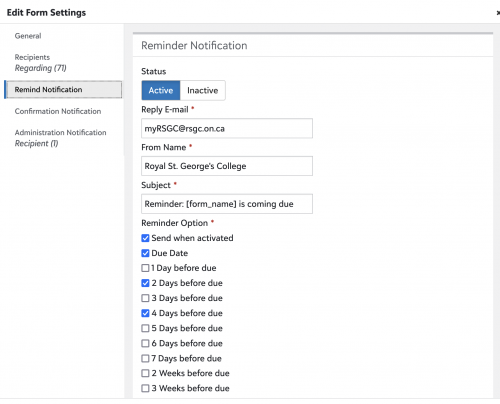
Once you've clicked that tab, select +Add Recipients and choose your students. Be sure to set all filters to narrow the lists. For example, if you are attempting to send a permission form to all students within a particular class, set your Role (Student), Year (2024-2025), and Group (this can be class, activity, team, etc.). After you've set your filters, hit the search icon and the list of students who meet the criteria will be displayed. Select all or choose those for whom a form should be sent. Click the “Add Currently Selected” button and the students will be added to the Regarding column and you will see the parents listed under “Recipients (Form Will Be Sent To)”.Make sure to set up your Reminder Notifications because this is what triggers the email notification to parents letting them know that they have a form pending. If you don't use the reminder notifications, parents won't know that they have a form to review unless they are actively checking the portal daily.
 1
1 -
@Richard Pan One more thing, we have two schools: Junior School and Senior School. I cannot send the form to the “whole division” but I can add students by grade. So, if sending a form to all parents of students in the Senior School, I add recipients to the form, one grade at a time.
If that's not ideal, the other thing you can do is create Community Groups for each division and enroll the students into the appropriate groups. Once that's done, you can create a form, add recipients by filtering on Role (Student), Year (2024-2025) and Group (Senior School) and when you hit the search icon, this will pull in all students who are members of this group. Again, make sure you're sending the forms to Parent of User.
I hope that helps!
1




Categories
- All Categories
- New YourCause Community TEST
- New SKY Community TEST
- New Grantmaking TEST Community
- New Altru Test Community
- New bbcon Community - TEST
- 12 Blackbaud Agents for Good™
- New Raiser's Edge NXT Community
- 7 Blackbaud Community Help
- 218 bbcon®
- 1.4K Blackbaud Altru®
- 409 Blackbaud Award Management™ and Blackbaud Stewardship Management™
- 1.2K Blackbaud CRM™ and Blackbaud Internet Solutions™
- 16 donorCentrics®
- 361 Blackbaud eTapestry®
- 2.7K Blackbaud Financial Edge NXT®
- 681 Blackbaud Grantmaking™
- 599 Blackbaud Education Management Solutions for Higher Education
- 3.3K Blackbaud Education Management Solutions for K-12 Schools
- 952 Blackbaud Luminate Online® and Blackbaud TeamRaiser®
- 85 JustGiving® from Blackbaud®
- 7K Blackbaud Raiser's Edge NXT®
- 3.9K SKY Developer
- 257 ResearchPoint™
- 123 Blackbaud Tuition Management™
- 165 Organizational Best Practices
- 247 Member Lounge (Just for Fun)
- 40 Blackbaud Community Challenges
- 37 PowerUp Challenges
- 3 (Closed) PowerUp Challenge: Grid View Batch
- 3 (Closed) PowerUp Challenge: Chat for Blackbaud AI
- 3 (Closed) PowerUp Challenge: Data Health
- 3 (Closed) Raiser's Edge NXT PowerUp Challenge: Product Update Briefing
- 3 (Closed) Raiser's Edge NXT PowerUp Challenge: Standard Reports+
- 3 (Closed) Raiser's Edge NXT PowerUp Challenge: Email Marketing
- 3 (Closed) Raiser's Edge NXT PowerUp Challenge: Gift Management
- 4 (Closed) Raiser's Edge NXT PowerUp Challenge: Event Management
- 3 (Closed) Raiser's Edge NXT PowerUp Challenge: Home Page
- 4 (Closed) Raiser's Edge NXT PowerUp Challenge: Standard Reports
- 4 (Closed) Raiser's Edge NXT PowerUp Challenge: Query
- 822 Community News
- 3.1K Jobs Board
- 57 Blackbaud SKY® Reporting Announcements
- 47 Blackbaud CRM Higher Ed Product Advisory Group (HE PAG)
- 19 Blackbaud CRM Product Advisory Group (BBCRM PAG)