Has anyone used templates for Official Notes successfully?

Under Enrollment Management > Communication > Official Notes > Templates:

We would like to create some templates to communicate to parents.

When we copy and paste an email signature into the template, it comes out on the preview, but in the actual email (I compose and send an Official Note to a test email), the image does not display and only has the letter name.

I believe the Official Notes feature was only recently added too, is this just an early stage kink to work out or is there something we can do on our end to make it look a bit more “professional”?

Thanks!

Comments

  • Bryan Lorenzo
    Bryan Lorenzo Blackbaud Employee
    Tenth Anniversary Kudos 5 Name Dropper Participant

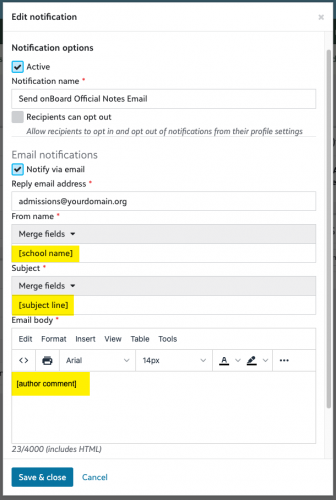
    Hi @Nathan Ong you will want to edit the E-mail notifications of the Note Type that your Official Note Template is linked to.

    Navigate to Enrollment management > Communication > Official Notes > select E-mail Notifications next tot he Note Type that is linked to your Official Note Template.

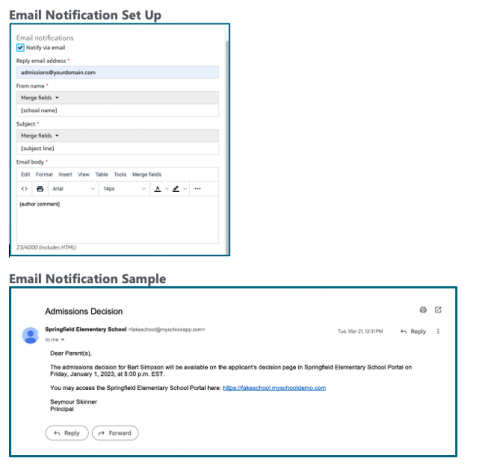
    Under Email body if you remove everything and just leave the [author comment] placeholder that will have the exact contents of your Official Note Template.

    I would also recommend changing From name to have the [school name] placeholder and Subject to have the [subject line] placeholder. This would put the subject of your Official Note Template as the subject of the email.

    b209f4da48b34907fd51712170f26923-huge-im

    a8a87428a6dab0c58d1f738f9c997fb4-huge-im
  • @Bryan Lorenzo Thank you, this is exactly what I was looking for!