Report card grade plans are pulling grades from progress report plans - URGENT! Grades already published

Our grades went public on Friday. We started receiving reports that the grades and comments on the report card were the same as the progress reports sent in September.

I have modified the Grade Plans Details in all possible ways but haven't figured out what the problem is. Any suggestions?


Comments

  • @Gian Toyos - Gian, It sounds as if you need to change the setup on your report card. If you are using the new report card builder, edit the template and go to the Design form tab. In the column that contains your grades and comments, click Edit column and be sure the proper Grade plan grade and comment grade plan name are selected.

    Hope that helps.

    Scott

  • @Scott Chrysler Thank you for the quick response. Yes, I have tried that, switching the Grade Plan Grades we have available.

    This year we started using trimesters after having semesters. The way we set up our progress reports in September worked fine. But then we have this issue now. I am basically using the categories of Grade Plan Grades we previously used, I am surprised that this is happening.

    Why is the system not showing the correct grades when I am saying to use the specified Grade Plan?

  • @Gian Toyos - Gian, the only other thing I can think of without seeing your actual setup is do you have the correct term selected in the General box of the Edit course section?

    Scott

  • @Scott Chrysler Checked all that and the correct term is selected.

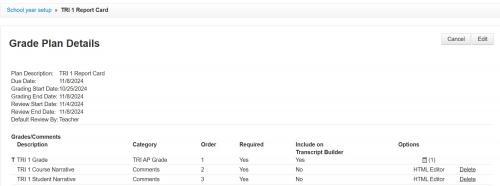
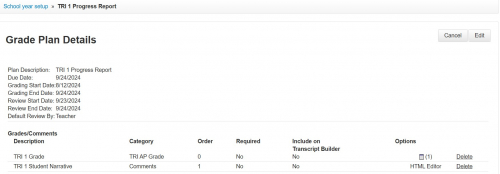
  • @Scott Chrysler Here's how the Grade Plans Details look right now. Very similar to last year, but this time with trimesters.

    Do you know if BBaud has an “emergency” phone number? Being a holiday, all support is closed.

    Report Card (November)

    43e56fe0b65f005be94aa952b15bfd83-huge-re


    Progress Report (September)

    9c0e64075dd2e37a7ed5e6a8572a5d62-huge-pr
  • @Gian Toyos - Gian, I do not know of a magic number. When they are closed, I believe they are closed. Looking at your grade plans, it looks as if the issue is that the grades and comments are named the same for both the progress report and report card. We do a progress report as well, but we call that grade Interim Q1 and Interim Q1 comment. I would suggest renaming the report card grade TRI 1 Final Grade and the comment TRI 1 Final Student Comment. With both the progress report and report card having the same name for the grade and the comment, the system is getting confused.

    Hope that helps.

    Scott

  • @Scott Chrysler Thanks, that makes sense. That's something that crossed my mind (I started in this position this year) when I looked at the names. The thing is that that's how it was done in previous years, and it worked. I'll look into that.

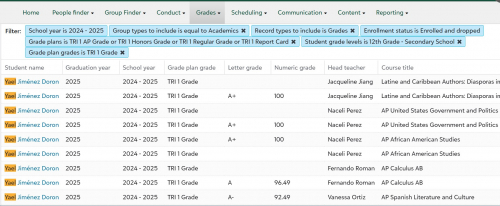
    Looking for explanations I found this. Do you think it might have to do with the grades not being recorded? When I generated a Report card grades list, I could see that the same course appeared with and without a grade.

    8ff05da5cd984afb9a94071f0ac8020d-huge-re

    Thank you for your time!!!!

  • @Gian Toyos - Gian, a blank grade should appear as a blank on the report card if you have "Include all courses regardless of grades, comments, or ratings" checked the General Edit course section box on the report card builder. I think the main issue you have is the grades and comments have the same name for both the progress report and report card.

    All the best,

    Scott

  • @Scott Chrysler Today we were able to contact BBaud. As it turns out, the issue of why the grades didn't match what the teachers had in their gradebooks was an option in Grade Categories - Translate score on input. This was selected and it was rounding the final average to a range established in the Grade Translation.

    Anyhow, we figured that out and now all is working. Again, thank you for taking the time to answer my questions.

    Regards,

Categories