Grading Students - Grades are not fully visible on the





Dear Blackbaud Community,
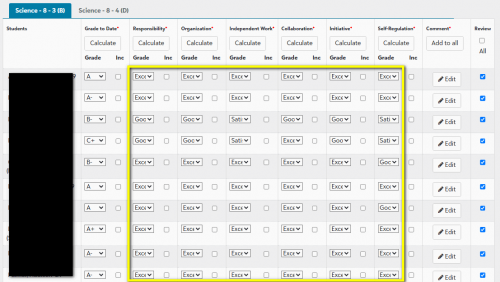
When teachers enter grades for students, we notice that the grade labels are not fully visible. Only the first three / four letters are displayed in each “Grading box”.
For example: We have 3 grade labels to grade students' progress. [Progressing Well], [Progressing], and [Progressing with Difficulty]. After selecting the grade labels for a student, the “Grading box” will only display “Prog” in it.
To review what they have entered, teachers must click on each box in the drop-down menu to verify the grade. We wonder if any other Blackbaud users have found a way to expand the length of these “Grading boxes” so that more, if not all, of the text of these grades can be displayed.
Please find below screenshots to illustrate the problem we are encountering. While they do not precisely represent the grading for "student progress" mentioned above, they should still convey the general idea.

Comments
-
@Raphael Chui Same issue here. Not sure how to resolve it but if you create an Idea please link it here so we can vote for it.
1 -
@Raphael Chui Given that the grade translation table has an “abbreviation” column in the setup, it just seems like this screen isn't pulling that when perhaps it should be.
1 -
@Erin Caprielian
Thank you for replying. Please find below the link to the idea I created:0 -
@Raphael Chui We assign a number or letter grade to each of these types of grades and print the grading scale at the top of the report card. “Exceeds Expectations” is a 1. “Meets Expectations is a 2. “Needs Improvement” is a 3. ”Unsatisfactory" is a 4.
Another example: Very Good = V Satisfactory = S Needs Improvement = I1 -
@Jo Giesecke We do the same thing. Then you can have the abbreviations key on your report card.
0








Categories
- All Categories
- New YourCause Community TEST
- New SKY Community TEST
- New Grantmaking TEST Community
- New Altru Test Community
- New bbcon Community - TEST
- 12 Blackbaud Agents for Good™
- New Raiser's Edge NXT Community
- 7 Blackbaud Community Help
- 218 bbcon®
- 1.4K Blackbaud Altru®
- 409 Blackbaud Award Management™ and Blackbaud Stewardship Management™
- 1.2K Blackbaud CRM™ and Blackbaud Internet Solutions™
- 16 donorCentrics®
- 361 Blackbaud eTapestry®
- 2.7K Blackbaud Financial Edge NXT®
- 680 Blackbaud Grantmaking™
- 598 Blackbaud Education Management Solutions for Higher Education
- 3.3K Blackbaud Education Management Solutions for K-12 Schools
- 952 Blackbaud Luminate Online® and Blackbaud TeamRaiser®
- 85 JustGiving® from Blackbaud®
- 7K Blackbaud Raiser's Edge NXT®
- 3.9K SKY Developer
- 257 ResearchPoint™
- 123 Blackbaud Tuition Management™
- 165 Organizational Best Practices
- 247 Member Lounge (Just for Fun)
- 40 Blackbaud Community Challenges
- 37 PowerUp Challenges
- 3 (Closed) PowerUp Challenge: Grid View Batch
- 3 (Closed) PowerUp Challenge: Chat for Blackbaud AI
- 3 (Closed) PowerUp Challenge: Data Health
- 3 (Closed) Raiser's Edge NXT PowerUp Challenge: Product Update Briefing
- 3 (Closed) Raiser's Edge NXT PowerUp Challenge: Standard Reports+
- 3 (Closed) Raiser's Edge NXT PowerUp Challenge: Email Marketing
- 3 (Closed) Raiser's Edge NXT PowerUp Challenge: Gift Management
- 4 (Closed) Raiser's Edge NXT PowerUp Challenge: Event Management
- 3 (Closed) Raiser's Edge NXT PowerUp Challenge: Home Page
- 4 (Closed) Raiser's Edge NXT PowerUp Challenge: Standard Reports
- 4 (Closed) Raiser's Edge NXT PowerUp Challenge: Query
- 822 Community News
- 3.1K Jobs Board
- 57 Blackbaud SKY® Reporting Announcements
- 47 Blackbaud CRM Higher Ed Product Advisory Group (HE PAG)
- 19 Blackbaud CRM Product Advisory Group (BBCRM PAG)