How can I print a team roster with the student's cumulative or term gpa?
@Christine Lamar - I don't see a way to get team rosters and GPAs in the same report. I would generate two separate lists: Team Rosters (from an Advanced List), and GPAs (from a SKY list), then put it all together in a spreadsheet.
Include the student User ID in both reports. Export the results to CSVs, and put the data into Excel or Google Sheets - each of the CSVs on a separate sheet. Use XLOOKUP to pull the GPA for each player onto the roster page.
@Brian Gray - That is what I thought. Thank you!
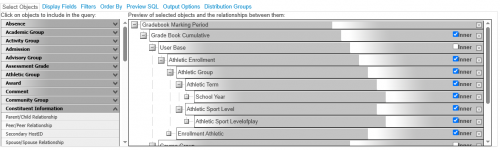
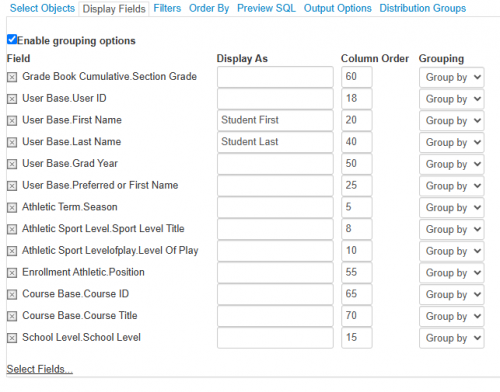
@Christine Lamar We were able to do this through an Advanced list; it requires having the sports, teams, and rosters set up under Extracurricular > Athletics > Athletics Setup first. I've added some screenshots below (had to split the Select Objects into two screenshots); make sure to update the Filters as applicable for your school and setup.
I export the results then use Excel for sorting, filtering, pivot tables, etc. Hope this helps!
@Erin Caprielian this is awesome! Thank you